
Breaking News

ASRock Introduces Its First Taichi Flagship Monitor Lineup RICOH announces GR IV 30th Anniversary Edition Kit Samsung Begins Official Rollout of One UI 9 Canon announces EOS R8 Mark II Razer Unleashes the Kraken V4 X Sensa HD Haptics

logo

  • Share Us
    • Facebook
    • Twitter
  • Home
  • Home
  • News
  • Reviews
  • Essays
  • About
    • Submit News

    • Contact Us
    • Privacy

    • Promotion
    • Advertise

    • RSS Feed

Search form

Behringer BCD3000

Sep 3,2007 0

3. Installation


Review Pages

1. Introduction
2. Unpacking
3. Installation
4. Working with BCD3000
5. Conclusion


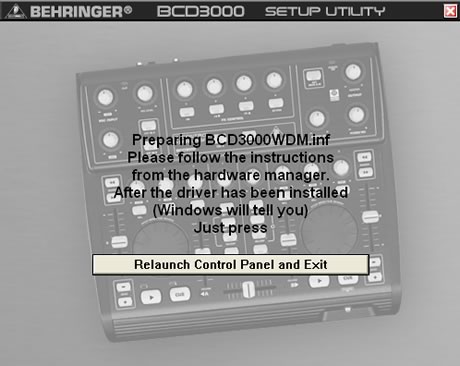
The BCD3000 console needs drivers in order to work, at least, under the Windows operating system. We used the drivers from the included CD, since there wasn't an update online...
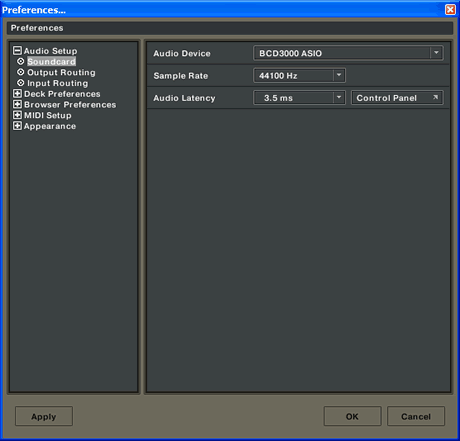
After installation and rebooting, we could access the main control panel of the BCD3000. There are three tabs indicating the operating modes of the console (ASIO/WDM/MIDI). The default setting is ASIO with 12ms latency,
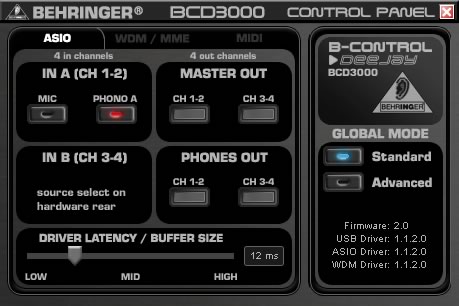
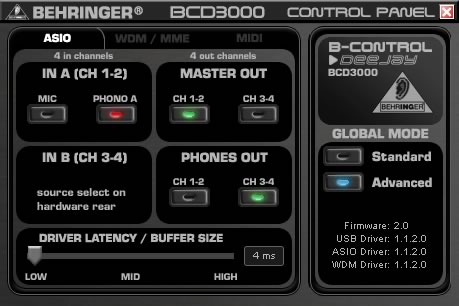
which can be lowered down to 4ms. Note that latencies lower than 10ms are quite satisfactory, since they are not noticeable.

Pressing on Advanced mode, you can set the master out and phones out.
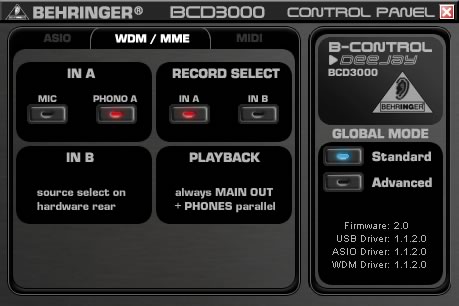
Under the WDM/MME tab, more options are available.
While the third tab, MIDI, you can set the way the MIDI works, mostly for the console buttons.
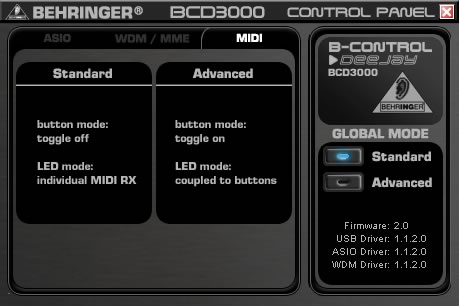
In standard mode, the buttons will NOT power up and it needs only one click to work. In advanced mode, button LEDs do light up, but you need to DOUBLE click for each operation. I think this is probably one of the biggest negatives of the BCD3000. Why shouldn't buttons light up and work with a single click?

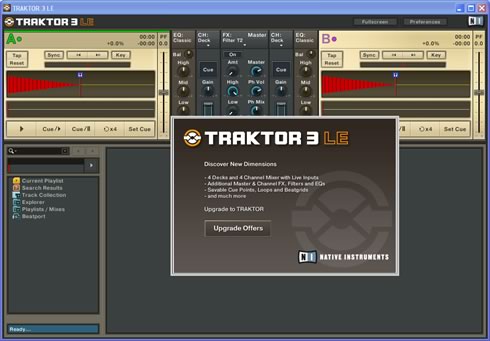
Let's now install the software that is bulked with the BCD3000 console, Traktor 3.2 LE edition.

Any user that has spent even a little time with PC DJ mixing knows Traktor 3. Unfortunately, you don't get the full edition, but a limited version (LE) for "bedroom" DJs. I imagine there should be some kind of discount for users who wish to upgrade to the full version of Traktor.
Another screen from the Soundcard properties.
When using the BCD3000 with a Mac, there are several differences in comparison to using it with Windows.

  • Hardware driver is not required.
  • Input A is only switchable between the Microphone and Phono input by using MIDI commands
  • The outputs are dedicated: channels 1-2 are always routed to MASTER OUT and channels 3-4 are routed to PHONES.
  • The properties of the MIDI interface and LED cannot be reconfigured.
  • Control Panel software to control the latency is not required.


Review Pages

1. Introduction
2. Unpacking
3. Installation
4. Working with BCD3000
5. Conclusion


Pages

  • « first
  • ‹ previous
  • 1
  • 2
  • 3
  • 4
  • 5
  • next ›
  • last »

DJ

Behringer

MIDI

ASIO

USB

Tags: DJ Behringer MIDI ASIO USB
Previous Post
LG Muziq phone
Next Post
Intel P35 Motherboard Roundup

Related Posts

  • Numark Adds Capacitive Touch Platters to Pocket-sized DJ2GO2 Controller

  • Akai Proffessional Introduces the Force Standalone Production / DJ Performance Device

  • Denon Takes on Pioneer With New Four-channel Standalone Prime 4 DJ System

  • USB-IF Completes Media Agnostic Wireless USB Specification

  • Next Generation USB Connector Underway

  • SuperSpeed USB 10 Gbps Ready for Development

  • USB-IF Certified Intel 7 Series Chipset and Intel C216 Chipset Family

  • Pioneer DJS Software

Latest Reviews

Fanxiang MP83 M.2 NVMe SSD Enclosure
Enterprise & IT

Fanxiang MP83 M.2 NVMe SSD Enclosure

Ugreen CM642 USB4.0 Enclosure
PC components

Ugreen CM642 USB4.0 Enclosure

be quiet! Dark Power 14 IO
PC components

be quiet! Dark Power 14 IO

SanDisk High Endurance 512GB microSDXC
Cameras

SanDisk High Endurance 512GB microSDXC

Samsung PRO Ultimate 512GB microSDXC
Cameras

Samsung PRO Ultimate 512GB microSDXC

Popular News

CORSAIR announces Vanguard Pro 96 and Vanguard 96 Gaming Keyboards

CORSAIR announces Vanguard Pro 96 and Vanguard 96 Gaming Keyboards

MSI Launches FORGE GK600 TKL WIRELESS Special Edition Compact Mechanical Keyboard

MSI Launches FORGE GK600 TKL WIRELESS Special Edition Compact Mechanical Keyboard

MSI’s Latest AMD X870E MAX & EVO Series Motherboards

MSI’s Latest AMD X870E MAX & EVO Series Motherboards

Panasonic Introduces the First Ultra-Telephoto Zoom Lens in the LUMIX S Series

Panasonic Introduces the First Ultra-Telephoto Zoom Lens in the LUMIX S Series

COLORFUL Launches iGame B850M ULTRA Series Micro-ATX Motherboards

COLORFUL Launches iGame B850M ULTRA Series Micro-ATX Motherboards

COLORFUL Presents Limited Edition Chitu MAG-60 Magnetic Keyboard Inspired by the Year of the Horse

COLORFUL Presents Limited Edition Chitu MAG-60 Magnetic Keyboard Inspired by the Year of the Horse

COLORFUL Presents iGame Z890 ULTRA-S W and iGame Z890M ULTRA Z Motherboards

COLORFUL Presents iGame Z890 ULTRA-S W and iGame Z890M ULTRA Z Motherboards

LIAN LI Launches 8.8” Universal Screen with Flexible Mounting Solution

LIAN LI Launches 8.8” Universal Screen with Flexible Mounting Solution

Main menu

  • Home
  • News
  • Reviews
  • Essays
  • About
    • Submit News

    • Contact Us
    • Privacy

    • Promotion
    • Advertise

    • RSS Feed
  • About
  • Privacy
  • Contact Us
  • Promotional Opportunities @ CdrInfo.com
  • Advertise on out site
  • Submit your News to our site
  • RSS Feed


