
Breaking News

ASUS ProArt RTX Spark Windows PCs Available for Immediate Pre-Order Kioxia Introduces E1.L QLC-based SSDs for Hyperscale Data Centers CORSAIR Launches the HS80 v2 MAX WIRELESS Gaming Headset Sony Announces the World's First Eclipsa Audio Certified Microphone1 for Smartphones Razer Unveils the Basilisk V4 Line

logo

  • Share Us
    • Facebook
    • Twitter
  • Home
  • Home
  • News
  • Reviews
  • Essays
  • About
    • Submit News

    • Contact Us
    • Privacy

    • Promotion
    • Advertise

    • RSS Feed

Search form

Asus Maximus Extreme

Mar 28,2008 0

13. Overclocking


Review Pages

1. Features, specifications
2. The package
3. BIOS settings
4. Testing configuration
5. Benchmarks - EVEREST Ultimate Edition
6. Benchmarks - SiSoftware Sandra
7. Benchmarks - PCMark05, 3DMark 06
8. Benchmarks - Science Mark 2.0, Pov-Ray
9. Benchmarks - MAXON CINEBENCH
10. Benchmarks - SuperPI
11. Benchmarks - SYSmark 2007 Preview, WorldBench
12. Lost Planet: Extreme Condition
13. Overclocking
14. Asus AI Gear 3
15. Summary


1st Test

In our first test, all motherboards must achieve the highest overclocking speed with all the BIOS settings left to Auto. This means that each motherboard must calculate how much voltage the CPU needs in order to be absolutely stable while operating in higher clock speed. The memory dividers and the memory/FSB/MCH voltages are also left to Auto. In other words this is the easiest overclocking you can do. For this test we use a retail Intel E6600 with it's CPU multiplier locked at x9 and we raise the FSB until we get a stable system (Orthos2004+PovRay running).
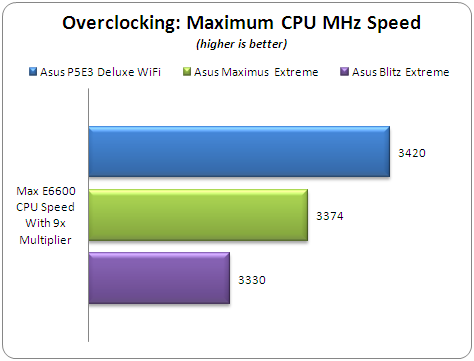
Keeping the CPU multiplier at 9x, the Maximus Extreme reached 3374MHz stable with Orthos/PovRay stretching the system. We noticed that with an earlier BIOS (0802) installed, the overclocking performance was somewhat higher...

2nd Test

Apart from the maximum overclocking speed, we have to examine the maximum possible FSB frequency with the specific CPU installed. Again all BIOS settings are left to Auto and the CPU multiplier is dropped to 6x. The memory timings and the dividers are also left to auto. An additional 8cm fan was used to further cool the whole system.

The Asus Maximus Extreme and P5E3 Deluxe gave similar performance with 490MHz FSB.

3rd Test

Our final overclocking test focuses on how good a motherboard is when the memory is overclocked. In this test we used one pair of SuperTalent's DDR3-1600CL7 with the following settings:

  • Timings: 8-8-8-24-2T
  • Voltage: 2.25V
  • FSB:DRAM divider: 1:2
  • Additional 8cm rotating fan
  • All other BIOS settings left to Auto

We had a hard time to make the system boot under Windows when the memory was overclocked. As a result, we had to skip this test and run it again with a newer BIOS installed.

- Overclocking stability

During our overclocking attempts, we noticed that after some overclocking failures, the system didn't POST back and we had power off/or use the clr CMOS button to get everything back in order. While this is the way things are supposed to work, we didn't have so many problems with Asus P5E3 Deluxe WiFi Edition.


Review Pages

1. Features, specifications
2. The package
3. BIOS settings
4. Testing configuration
5. Benchmarks - EVEREST Ultimate Edition
6. Benchmarks - SiSoftware Sandra
7. Benchmarks - PCMark05, 3DMark 06
8. Benchmarks - Science Mark 2.0, Pov-Ray
9. Benchmarks - MAXON CINEBENCH
10. Benchmarks - SuperPI
11. Benchmarks - SYSmark 2007 Preview, WorldBench
12. Lost Planet: Extreme Condition
13. Overclocking
14. Asus AI Gear 3
15. Summary


Pages

  • « first
  • ‹ previous
  • …
  • 7
  • 8
  • 9
  • 10
  • 11
  • 12
  • 13
  • 14
  • 15
  • next ›
  • last »

ASUS

Tags: ASUS
Previous Post
Krusell Mobile Cases
Next Post
LITEON DH-20A4P EZ-DUB

Related Posts

  • ASUS ProArt RTX Spark Windows PCs Available for Immediate Pre-Order

  • ASUS Announces New 64GB Configuration of ASUS Ascent GX10

  • Announcing the New ASUS Googlebook 14

  • ASUS Announces Ascent QN10 Mini PC

  • ASUS Announces WiFi 8 Router

  • Asus announces ExpertBook B3 G2 and ExpertBook P3 G2

  • ASUS Announces Prime AP304 PC Case

  • ASUS Announces ProArt Display OLED PA279CDV and PA329CDV

Latest Reviews

Fanxiang MP83 M.2 NVMe SSD Enclosure
Enterprise & IT

Fanxiang MP83 M.2 NVMe SSD Enclosure

Ugreen CM642 USB4.0 Enclosure
PC components

Ugreen CM642 USB4.0 Enclosure

be quiet! Dark Power 14 IO
PC components

be quiet! Dark Power 14 IO

SanDisk High Endurance 512GB microSDXC
Cameras

SanDisk High Endurance 512GB microSDXC

Samsung PRO Ultimate 512GB microSDXC
Cameras

Samsung PRO Ultimate 512GB microSDXC

Popular News

MSI’s Latest AMD X870E MAX & EVO Series Motherboards

MSI’s Latest AMD X870E MAX & EVO Series Motherboards

COLORFUL Launches iGame B850M ULTRA Series Micro-ATX Motherboards

COLORFUL Launches iGame B850M ULTRA Series Micro-ATX Motherboards

COLORFUL Presents Limited Edition Chitu MAG-60 Magnetic Keyboard Inspired by the Year of the Horse

COLORFUL Presents Limited Edition Chitu MAG-60 Magnetic Keyboard Inspired by the Year of the Horse

COLORFUL Launches iGame B850I MINI OC V14 Motherboard

COLORFUL Launches iGame B850I MINI OC V14 Motherboard

COLORFUL Presents iGame Z890 ULTRA-S W and iGame Z890M ULTRA Z Motherboards

COLORFUL Presents iGame Z890 ULTRA-S W and iGame Z890M ULTRA Z Motherboards

COLORFUL Launches the iGame X870E VULCAN W OC Motherboard

COLORFUL Launches the iGame X870E VULCAN W OC Motherboard

COLORFUL Expands B850 Motherboard Lineup with New CVN, Battle-Ax, and MEOW Models

COLORFUL Expands B850 Motherboard Lineup with New CVN, Battle-Ax, and MEOW Models

ASRock Adds Support for One Sub-Channel DRAM Module on Intel DDR5 Motherboards

ASRock Adds Support for One Sub-Channel DRAM Module on Intel DDR5 Motherboards

Main menu

  • Home
  • News
  • Reviews
  • Essays
  • About
    • Submit News

    • Contact Us
    • Privacy

    • Promotion
    • Advertise

    • RSS Feed
  • About
  • Privacy
  • Contact Us
  • Promotional Opportunities @ CdrInfo.com
  • Advertise on out site
  • Submit your News to our site
  • RSS Feed