Breaking News

Samsung Introduces Galaxy Tab S12 Series PlayStation Plus Monthly Games for October 2026 Logitech announces Zone Vibe Pro Headset Razer Expands Sanrio Collection With Pompompurin Eared Headset And Kuromi Earbuds TerraMaster Launches Storage Upgrade Season with Up to 30% Off During Prime Big Deal Days

logo

  • Share Us
    • Facebook
    • Twitter
  • Home
  • Home
  • News
  • Reviews
  • Essays
  • About
    • Submit News

    • Contact Us
    • Privacy

    • Promotion
    • Advertise

    • RSS Feed

Search form

ABIT AN-8 Fatal1ty

Jun 14,2005 0

4. Bios


Review Pages

1. Introduction
2. The Package
3. Detailed Look
4. Bios
5. Software Bundled
6. The Tests - Page 1
7. The Tests - Page 2
8. Overclocking
9. Memory Overclocking
10. Conclusion


BIOS

Abit BIOS was always one of my favourites. It was always complete and user friendly, and I was pleased to see that this hadn’t changed. The only negative thing is the VDIMM menu that doesn’t allow more than 2.8v. And even though this over voltage is more than enough for the majority of users, the more demanding and overclockers will certainly ask for more.

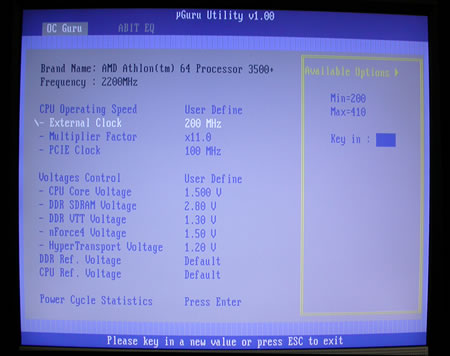
The available tweakings inside the OC Guru menu are:

  • VCore:  1.4v-1.75v
  • VDIMM:  2.5v-2.8v
  • DDR VTT:  1.25v-1.4v
  • DDR Ref Voltage:  -60 to 0 to +60
  • CPU Ref Voltage:  -60 to 0 to +60
  • Chipset Voltage:  1.5v-1.8v
  • HyperTransport Voltage:  1.2v-1.35v
  • LDT Multipliers:  1x-5x, AUTO
  • Memory Dividers:  DDR400, DDR333, DDR266, DDR200
  • PCI-E Frequency:  100MHZ-145MHZ
  • HyperTransport Frequency (HTT):  200MHZ-410MHZ
  • CPU Multiplier:  4x-highest your CPU allows
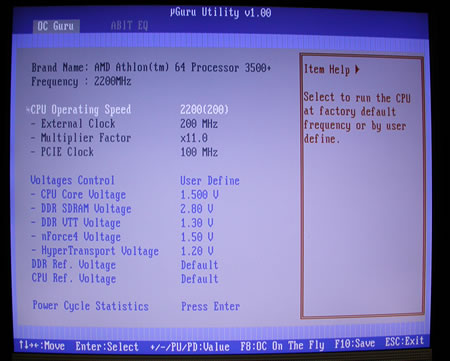
 

When we set the CPU operating speed to User Defined, various frequency related settings became accessible. The CPU maximum FSB can be only 410 MHz, but note that this setting also affects the memory and Hyper Transport bus speeds as well. The minimum option for the CPU multiplier is 4x, and the PCI Express bus speed is asynchronously set through the PCI E clock option. This option allows a maximum bus speed of 145MHz.

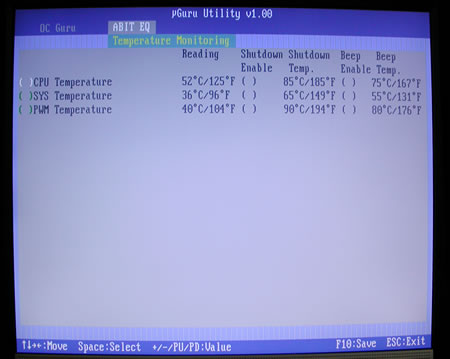
The nGuru utility menu is split in two individual sections, OC Guru and Abit EQ. OC Guru allows the manipulation of all board bus speeds and all board voltages, while the Abit EQ monitors all the voltages and the temperatures on the board.
The advanced Chipset Features menu contains various chipset related settings, such as the Hyper Transport and the memory settings.
From the HT Frequency Settings, we can actually control the speed of the Hyper Transport, with a maximum multiplier of 5x. We also have the option to disable the SSE and SSE2 CPU registers, from the SSE / SSE2 menu option.

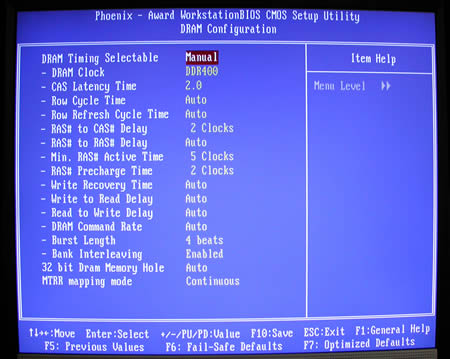
At the advanced Chipset Features, we find the memory controller settings that offer a wide variety of settings, where you can manually configure the RAS to CAS delay, row to row delay which is shown as RAS to RAS Delay, active to precharge delay shown as Min RAS Active Time, RAS precharge delay; write recovery time, write to read delay, read to write delay, command rate, burst length, and memory register access and cacheability shown as MTRR Mapping Mode. Also available is the ability to adjust a lot of secondary parameters for the memory subsystem.

 

Review Pages

1. Introduction
2. The Package
3. Detailed Look
4. Bios
5. Software Bundled
6. The Tests - Page 1
7. The Tests - Page 2
8. Overclocking
9. Memory Overclocking
10. Conclusion


Pages

  • « first
  • ‹ previous
  • 1
  • 2
  • 3
  • 4
  • 5
  • 6
  • 7
  • 8
  • 9
  • next ›
  • last »

Abit

Tags: Abit
Previous Post
OCZ PC2-5400 DDR2 667Mhz
Next Post
Arctic Cooling - Freezer 64

Related Posts

  • abit Announces I-G31, IP35P Motherboards

  • abit Introduces First AMD Phenom Ready Motherboard, the AX78

  • Intel Core 2 Extreme Overclocked at 5 GHz

  • Fatal1ty FP-IN9 SLI Motherboard Launched

  • abit Launches IN9 32X-MAX

  • ABIT - The Reclaim Computex 2006

  • ABIT's New NForce 570 SLI Motherboard for Socket AM2

  • ABIT AN8 32X

Latest Reviews

Fanxiang MP83 M.2 NVMe SSD Enclosure
Enterprise & IT

Fanxiang MP83 M.2 NVMe SSD Enclosure

Ugreen CM642 USB4.0 Enclosure
PC components

Ugreen CM642 USB4.0 Enclosure

be quiet! Dark Power 14 IO
PC components

be quiet! Dark Power 14 IO

SanDisk High Endurance 512GB microSDXC
Cameras

SanDisk High Endurance 512GB microSDXC

Samsung PRO Ultimate 512GB microSDXC
Cameras

Samsung PRO Ultimate 512GB microSDXC

Popular News

MSI’s Latest AMD X870E MAX & EVO Series Motherboards

MSI’s Latest AMD X870E MAX & EVO Series Motherboards

COLORFUL Launches iGame B850M ULTRA Series Micro-ATX Motherboards

COLORFUL Launches iGame B850M ULTRA Series Micro-ATX Motherboards

COLORFUL Presents Limited Edition Chitu MAG-60 Magnetic Keyboard Inspired by the Year of the Horse

COLORFUL Presents Limited Edition Chitu MAG-60 Magnetic Keyboard Inspired by the Year of the Horse

COLORFUL Presents iGame Z890 ULTRA-S W and iGame Z890M ULTRA Z Motherboards

COLORFUL Presents iGame Z890 ULTRA-S W and iGame Z890M ULTRA Z Motherboards

COLORFUL Launches iGame B850I MINI OC V14 Motherboard

COLORFUL Launches iGame B850I MINI OC V14 Motherboard

COLORFUL Expands B850 Motherboard Lineup with New CVN, Battle-Ax, and MEOW Models

COLORFUL Expands B850 Motherboard Lineup with New CVN, Battle-Ax, and MEOW Models

ASRock Adds Support for One Sub-Channel DRAM Module on Intel DDR5 Motherboards

ASRock Adds Support for One Sub-Channel DRAM Module on Intel DDR5 Motherboards

Exceed the Infinite with New ASRock X870E Taichi White Motherboard

Exceed the Infinite with New ASRock X870E Taichi White Motherboard

Main menu

  • Home
  • News
  • Reviews
  • Essays
  • About
    • Submit News

    • Contact Us
    • Privacy

    • Promotion
    • Advertise

    • RSS Feed
  • About
  • Privacy
  • Contact Us
  • Promotional Opportunities @ CdrInfo.com
  • Advertise on out site
  • Submit your News to our site
  • RSS Feed