Breaking News

Fanatec and Trak Racer showcase the future of simulation at SimRacing Expo Frankfurt 2026 Razer Unveils the Barracuda V2 Pro ASUS Republic of Gamers Announces Bulwark Dock DG310 Akasa Announces Fermi CM5 Fanless Case for Raspberry Pi Compute Module 5 LG Electronics Advances the LG Sound Suite Experience With New DTS

logo

  • Share Us
    • Facebook
    • Twitter
  • Home
  • Home
  • News
  • Reviews
  • Essays
  • About
    • Submit News

    • Contact Us
    • Privacy

    • Promotion
    • Advertise

    • RSS Feed

Search form

DVD Technical Guide

Aug 30,2005 0

7. Read-Only Disc File Format


Review Pages

1. DVD History
2. Concepts and Structure of the DVD Format
3. The Future of DVD
4. Design Concept of the Physical Specification
5. Features of the DVD Physical Specification
6. The DVD Data Format
7. Read-Only Disc File Format
8. Video Format
9. Video Format - Page 2
10. Video Format - Page 3
11. Audio Format
12. Audio Format - Page 2
13. Audio Format - Page 3
14. Audio Format - Page 4
15. Audio Format - Page 5
16. DVD-R and DVD-RW
17. DVD-R and DVD-RW - Page 2
18. DVD-R and DVD-RW - Page 3
19. DVD-R and DVD-RW - Page 4
20. DVD-RAM
21. DVD-RAM - Page 2
22. DVD-RAM - Page 3
23. DVD-RAM - Page 4


Chapter 3 Read-Only Disc File Format

3.1 Structure of the DVD-ROM Logical Format
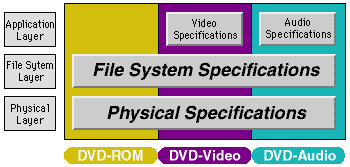
The file format of the DVD-ROM family is common to DVD-ROM (computer applications), DVD-Video, and DVD-Audio discs. This makes it possible to handle the same content in the same way on both consumer-oriented stand-alone devices and computer systems. However, there are a few minor restrictions on the file system for DVD-Video and DVD-Audio. This is to make it possible to play these discs on stand-alone devices which use simple software.

3.2 Overview of the DVD-ROM File Format

DVD-ROM uses the UDF (Universal Disk Format), but can also be accessed using ISO-9660, to provide compatibility with previous systems. This hybrid file system is called "UDF Bridge." As both file systems are able to access any file on the disc, all content on the disc can be accessed by using either file system.

3.3 Relationship with the Application Format
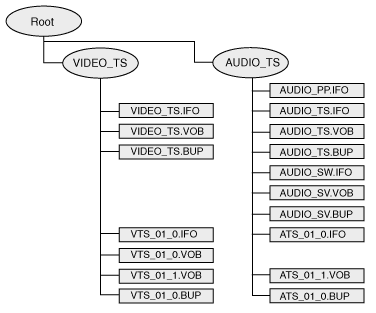
The files used for DVD-Video and DVD-Audio are arranged in directories called VIDEO_TS and AUDIO_TS, respectively. The files in these directories have predetermined names and extensions. Files with the extension ".IFO" contain application information needed to reproduce the content. For each ".IFO" file there is always a back-up file with the same name but the ".BUP" extension. Files with the ".VOB" extension contain the actual video or audio content.


Source: http://www.pioneer.co.jp/crdl/tech/index-e.html


Review Pages

1. DVD History
2. Concepts and Structure of the DVD Format
3. The Future of DVD
4. Design Concept of the Physical Specification
5. Features of the DVD Physical Specification
6. The DVD Data Format
7. Read-Only Disc File Format
8. Video Format
9. Video Format - Page 2
10. Video Format - Page 3
11. Audio Format
12. Audio Format - Page 2
13. Audio Format - Page 3
14. Audio Format - Page 4
15. Audio Format - Page 5
16. DVD-R and DVD-RW
17. DVD-R and DVD-RW - Page 2
18. DVD-R and DVD-RW - Page 3
19. DVD-R and DVD-RW - Page 4
20. DVD-RAM
21. DVD-RAM - Page 2
22. DVD-RAM - Page 3
23. DVD-RAM - Page 4


Pages

  • « first
  • ‹ previous
  • …
  • 3
  • 4
  • 5
  • 6
  • 7
  • 8
  • 9
  • 10
  • 11
  • …
  • next ›
  • last »

DVD

Pioneer

Tags: DVD Pioneer
Previous Post
A Revolutionary by Accident
Next Post
Windows Vista Public Beta 1 - Part 2

Related Posts

  • Pioneer announces microSD for dashcam

  • Pioneer Japan announces BDR-WX01DM for US market

  • Pioneer Japan announces new optical storage drives for JIS X6257 archive format

  • Pioneer Japan updates its CD-DVD Software utility

  • Pioneer Japan announces new BDR-X13J-X external BD Writer and BDR-WX01DM for archiving

  • Pioneer Japan releases new firmware updates for external Blu-Ray Recorders

  • Pioneer BDR-XD08UMB-S External Blu-Ray Recorder

  • Pioneer Japan updates firmware for their X13 lineup (30-01-2023)

Latest Reviews

Fanxiang MP83 M.2 NVMe SSD Enclosure
Enterprise & IT

Fanxiang MP83 M.2 NVMe SSD Enclosure

Ugreen CM642 USB4.0 Enclosure
PC components

Ugreen CM642 USB4.0 Enclosure

be quiet! Dark Power 14 IO
PC components

be quiet! Dark Power 14 IO

SanDisk High Endurance 512GB microSDXC
Cameras

SanDisk High Endurance 512GB microSDXC

Samsung PRO Ultimate 512GB microSDXC
Cameras

Samsung PRO Ultimate 512GB microSDXC

Popular News

MSI’s Latest AMD X870E MAX & EVO Series Motherboards

MSI’s Latest AMD X870E MAX & EVO Series Motherboards

COLORFUL Launches iGame B850M ULTRA Series Micro-ATX Motherboards

COLORFUL Launches iGame B850M ULTRA Series Micro-ATX Motherboards

COLORFUL Presents Limited Edition Chitu MAG-60 Magnetic Keyboard Inspired by the Year of the Horse

COLORFUL Presents Limited Edition Chitu MAG-60 Magnetic Keyboard Inspired by the Year of the Horse

COLORFUL Launches iGame B850I MINI OC V14 Motherboard

COLORFUL Launches iGame B850I MINI OC V14 Motherboard

COLORFUL Launches the iGame X870E VULCAN W OC Motherboard

COLORFUL Launches the iGame X870E VULCAN W OC Motherboard

COLORFUL Presents iGame Z890 ULTRA-S W and iGame Z890M ULTRA Z Motherboards

COLORFUL Presents iGame Z890 ULTRA-S W and iGame Z890M ULTRA Z Motherboards

COLORFUL Expands B850 Motherboard Lineup with New CVN, Battle-Ax, and MEOW Models

COLORFUL Expands B850 Motherboard Lineup with New CVN, Battle-Ax, and MEOW Models

ASRock Adds Support for One Sub-Channel DRAM Module on Intel DDR5 Motherboards

ASRock Adds Support for One Sub-Channel DRAM Module on Intel DDR5 Motherboards

Main menu

  • Home
  • News
  • Reviews
  • Essays
  • About
    • Submit News

    • Contact Us
    • Privacy

    • Promotion
    • Advertise

    • RSS Feed
  • About
  • Privacy
  • Contact Us
  • Promotional Opportunities @ CdrInfo.com
  • Advertise on out site
  • Submit your News to our site
  • RSS Feed