DVD Technical Guide
13. Audio Format - Page 3
Review Pages
2. Concepts and Structure of the DVD Format
3. The Future of DVD
4. Design Concept of the Physical Specification
5. Features of the DVD Physical Specification
6. The DVD Data Format
7. Read-Only Disc File Format
8. Video Format
9. Video Format - Page 2
10. Video Format - Page 3
11. Audio Format
12. Audio Format - Page 2
13. Audio Format - Page 3
14. Audio Format - Page 4
15. Audio Format - Page 5
16. DVD-R and DVD-RW
17. DVD-R and DVD-RW - Page 2
18. DVD-R and DVD-RW - Page 3
19. DVD-R and DVD-RW - Page 4
20. DVD-RAM
21. DVD-RAM - Page 2
22. DVD-RAM - Page 3
23. DVD-RAM - Page 4
5.4 Additional Information
The DVD-Audio specification allows reproduction of a wide variety of audio content, from Super Hi-Fi stereo to multi-channel audio (5.1ch), which provides a powerful concert hall experience. But that's not all. DVD-Audio also defines various types of additional information which expands the world of audio entertainment, making it a specification truly worthy of the "next-generation audio disc" appellation. In consultation with content creators, the details of this additional information were refined again and again throughout the process of defining the format, as the specification evolved to its current form.
DVD-Audio defines three main types of additional information: 1) still image information; 2) video information; and 3) text information.

5.4.1 Still image information
Still images, as the term is used in the purview of DVD-Audio, is the feature which allows still images to be recorded to a DVD-Audio disc, and then displayed as images on a display of some kind while the audio is being played back, according to control provided by navigation data. When playing audio content which has associated still images, a data structure called an ASVU (Audio Still Video Unit), which contains the data for multiple still images, is first read from the disc and stored in buffer memory. After this is done, the audio data begins to play. As long as playback remains within the ASVU range (the range of content covered by the one ASVU in the buffer), the system can guarantee continuity of audio reproduction with no skips in the audio stream. That is, there is no need to stop the audio in order to read images from the disc. The specification defines several different playback modes which expand the possibilities for using still images.
Various playback modes are defined for still image reproduction, including display timing, display order, and a variety of visual effects. The content creator can select these modes to provide the user with the most effective possible presentation of the content.
The following playback modes are defined by the specification.(1) Display timing
- Slide show mode (still images are displayed one after the other, with timing defined by the content creator, as the audio is played)
- Browsable mode (still image display is independent from the audio playback, and the user can control the timing of still image display)
- Sequential mode (still images are displayed in an order determined by the content creator)
- Random / shuffle mode (still images are displayed in an arbitrary order)
- Cut in / out
- Fade in / out
- Dissolve
- Wipe
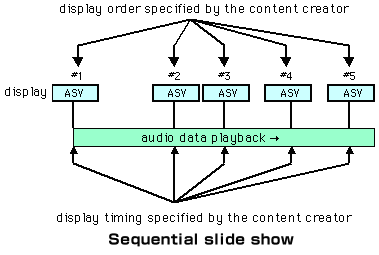
5.4.1.1 Sequential slide show
This example illustrates a sequential slide show, which is a combination of sequential mode and slide show mode. In this mode, the still images are displayed in an order and timing to fit perfectly with the audio content, as determined by the content creator. While listening to the audio, the user can also view the images, which are matched to the audio, on a monitor.
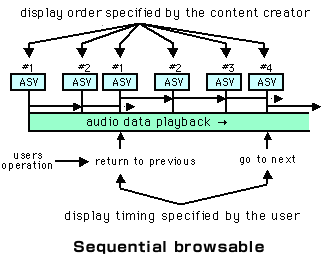
5.4.1.2 Sequential browsable
This example illustrates sequential browsable mode, which is a combination of sequential mode and browsable mode. In this mode, the display order of the still images is determined by the content creator. The time at which the images are displayed is completely up to the user, who can move through the images like turning the pages of a book, moving at his own pace. In this example the basic order and timing are determined by the content creator, and if the user does nothing the images will be displayed in the predetermined order, and the display will move to the next image after a set amount of time passes. However, the user can specify "return to previous" or "go to next" at any time, and the previous or next image will be displayed in response.
Review Pages
2. Concepts and Structure of the DVD Format
3. The Future of DVD
4. Design Concept of the Physical Specification
5. Features of the DVD Physical Specification
6. The DVD Data Format
7. Read-Only Disc File Format
8. Video Format
9. Video Format - Page 2
10. Video Format - Page 3
11. Audio Format
12. Audio Format - Page 2
13. Audio Format - Page 3
14. Audio Format - Page 4
15. Audio Format - Page 5
16. DVD-R and DVD-RW
17. DVD-R and DVD-RW - Page 2
18. DVD-R and DVD-RW - Page 3
19. DVD-R and DVD-RW - Page 4
20. DVD-RAM
21. DVD-RAM - Page 2
22. DVD-RAM - Page 3
23. DVD-RAM - Page 4