Breaking News

G.SKILL Demo New Memory Solutions for Gaming, Server, AI, Workstation Applications at Computex 2026 LIAN LI Launches HydroShift II OLED Curved 360 AIO LIAN LI Unveils O11 VISION-M CORSAIR PRO launches AI Workstations and Servers ASUS Announces T1 GeForce RTX 5070 and RTX 5060 Ti Graphics Cards

logo

  • Share Us
    • Facebook
    • Twitter
  • Home
  • Home
  • News
  • Reviews
  • Essays
  • Forum
  • Legacy
  • About
    • Submit News

    • Contact Us
    • Privacy

    • Promotion
    • Advertise

    • RSS Feed
    • Site Map

Search form

Galaxy Note10 Features Come to the Galaxy S10

Galaxy Note10 Features Come to the Galaxy S10

Smartphones Oct 28,2019 0

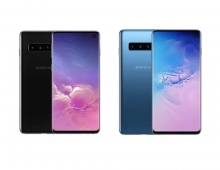
Starting this week, Galaxy S10 users will be able to download a software update that brings favorite innovations from the Galaxy Note10 and Note10+ to the Galaxy S10, S10+, S10e and S10 5G.

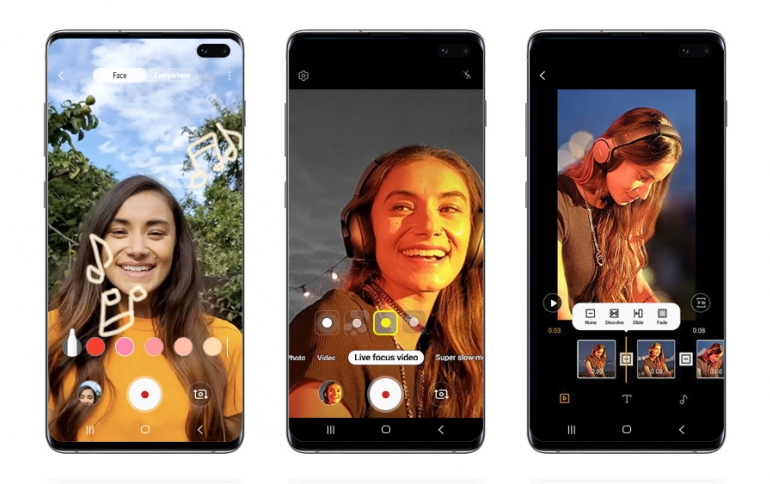
The update includes several features such as AR Doodle, a built-in video editor, Link to Windows integration and an expanded Night Mode with a front-facing camera, so you never miss a shot, even after dark.

AR Doodle will give Galaxy S10 users the freedom to customize their videos with augmented-reality drawings and messages. Live Focus video allows users to apply bokeh effects (including blur, big circle, color point and glitch) to videos recorded on the front or rear cameras. The update also brings improved Super steady to stabilize footage, and is now available in Hyperlapse mode.

The camera’s native video editor (accessible in the Gallery app) offers more opportunities to turn captured moments into shared moments. The feature makes it easy to edit videos like a pro wherever you go—with simple tools for trimming clips, stitching them together, adjusting playback speed and more. You can even add subtitles and background music to video clips to personalize and publish footage straight from your Galaxy S10.
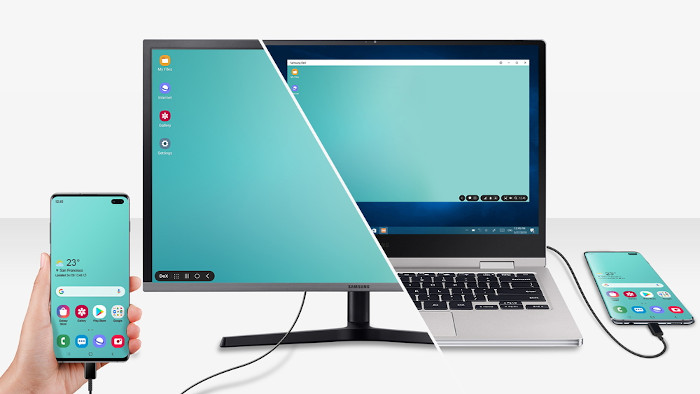
The productivity enhancing features introduced with the Galaxy Note10 are also coming to the Galaxy S10, including Samsung DeX for PC. Once users download the app from SamsungDeX.com, you can launch Samsung DeX on your PC or Mac by simply connecting your Galaxy S10 to your computer via USB. Link to Windows support has also been added to the Galaxy S10, allowing you to wirelessly connect your phone to your Windows 10 PC and see notifications, send and receive messages and review recent photos without pausing to look down at your phone.

This latest update also makes the Samsung Pass and Messages apps more convenient. The set-up process for Samsung Pass has been simplified so Galaxy S10 users can log-in to apps and websites through the device’s biometric technologies. In Messages, new icons for adding photos and videos are positioned to the left of the text so you can effortlessly access the files you need.

Tags: Galaxy Note 10Galaxy S10
Previous Post
Google To Buy Fitbit: Report
Next Post
Sharp Brings the First Certified Windows Collaboration Display to Market

Related Posts

  • Software Update brings New Features to Samsung Galaxy S10 and Galaxy Note10 Smartphones

  • Samsung Galaxy Note 10 Lite Coming Soon

  • Samsung PlayGalaxy Link Service Allows You to Take PC Power in Your Galaxy Note 10

  • Samsung Announces Galaxy Note10+ Star Wars Special Edition

  • Samsung Released Software Fix For Galaxy Fingerprint Recognition Problem

  • Samsung to Correct Galaxy S10 Fingerprint Problem

  • Samsung Launches One UI Android 10 Beta Program For Galaxy S10 Devices

  • Software Update Brings Galaxy Note10 Features to the Galaxy S10

Latest News

G.SKILL Demo New Memory Solutions for Gaming, Server, AI, Workstation Applications at Computex 2026
PC components

G.SKILL Demo New Memory Solutions for Gaming, Server, AI, Workstation Applications at Computex 2026

LIAN LI Launches HydroShift II OLED Curved 360 AIO
Cooling Systems

LIAN LI Launches HydroShift II OLED Curved 360 AIO

LIAN LI Unveils O11 VISION-M
Cooling Systems

LIAN LI Unveils O11 VISION-M

CORSAIR PRO launches AI Workstations and Servers
Cooling Systems

CORSAIR PRO launches AI Workstations and Servers

ASUS Announces T1 GeForce RTX 5070 and RTX 5060 Ti Graphics Cards
GPUs

ASUS Announces T1 GeForce RTX 5070 and RTX 5060 Ti Graphics Cards

Popular Reviews

Akaso 360 Action camera

Akaso 360 Action camera

Dragon Touch Digital Calendar

Dragon Touch Digital Calendar

be quiet! Pure Loop 3 280mm

be quiet! Pure Loop 3 280mm

Noctua NF-A12x25 G2 fans

Noctua NF-A12x25 G2 fans

Endorfy Thock V2 Wireless Keyboard

Endorfy Thock V2 Wireless Keyboard

Soft2bet and the unseen hardware that makes instant play possible

Soft2bet and the unseen hardware that makes instant play possible

Crucial T710 2TB NVME SSD

Crucial T710 2TB NVME SSD

JSAUX 65Wh Rog Ally Battery

JSAUX 65Wh Rog Ally Battery

Main menu

  • Home
  • News
  • Reviews
  • Essays
  • Forum
  • Legacy
  • About
    • Submit News

    • Contact Us
    • Privacy

    • Promotion
    • Advertise

    • RSS Feed
    • Site Map
  • About
  • Privacy
  • Contact Us
  • Promotional Opportunities @ CdrInfo.com
  • Advertise on out site
  • Submit your News to our site
  • RSS Feed