Breaking News

ZOTAC GAMING Launches GeForce RTX 5080 SOLID CORE OC 20th Anniversary Edition Google Unveils Pixel 11 Series, Pixel 11 Pro Fold, Pixel Watch 5, and Pixel Tag Insta360 Expands Its Content Creation Ecosystem with Flagship X6 8K 360 Camera and Next-Generation Audio Solutions Razer Unveils the Artisan Keycap – Triple-Headed Snake Edition Razer Unveils the Naga V3 Pro

logo

  • Share Us
    • Facebook
    • Twitter
  • Home
  • Home
  • News
  • Reviews
  • Essays
  • About
    • Submit News

    • Contact Us
    • Privacy

    • Promotion
    • Advertise

    • RSS Feed

Search form

Software Update Brings Galaxy Note10 Features to the Galaxy S10

Software Update Brings Galaxy Note10 Features to the Galaxy S10

Smartphones Sep 24,2019 0

An update set for release beginning in European markets from September 23, will introduce features like AR Doodle, a built-in video editor and Link to Windows integration – to the Samsung Galaxy S10e, S10, S10+ and S10 5G.

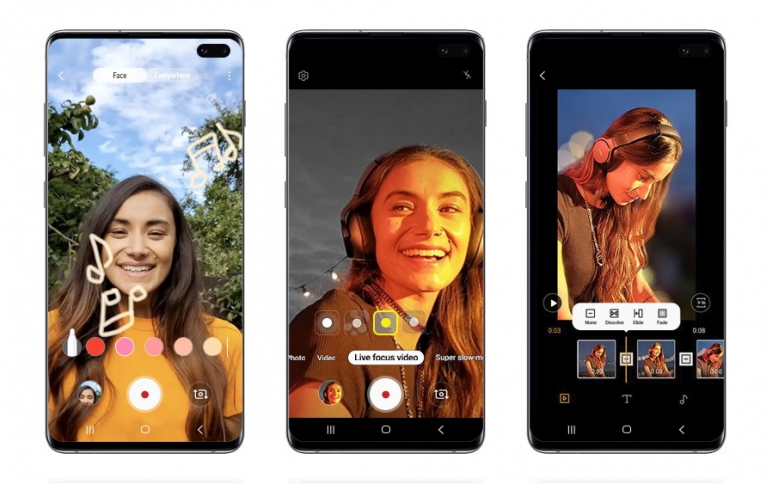
Once Galaxy S10 users download the update, they’ll notice that their smartphone’s pro-grade camera has become even more powerful. The update expands the camera’s Night Mode to include support for the front-facing camera as well. It also introduces enhanced Super steady video stabilization, as well as support for dynamic Galaxy Note10 functions like AR Doodle and Live focus video recording. The former lets users enhance their videos with augmented-reality drawings and messages, while the latter lets them apply bokeh effects (including blur, big circle, color point and glitch) to videos recorded with the front or rear camera.

Whenever Galaxy S10 users capture a memorable clip, the camera’s new, Gallery app-accessible video editor offers all the tools they’ll need to turn it into a share-worthy video. This feature makes it easy to edit videos, and features simple tools for trimming clips, stitching them together, adjusting playback speed and more. You can even use the function to add subtitles and background music to clips.

The update also incorporates support for Samsung DeX for PC. Once users download the app from SamsungDeX.com, they’ll be able to launch Samsung DeX on their PC or Mac simply by connecting their Galaxy S10 to their computer via USB cable. Link to Windows support has also been added, which means that Galaxy S10 users will be able to wirelessly connect their phone to their Windows 10 PC and view its contents, send and receive messages, and sync recent photos directly from their computer.

In addition, Samsung Pass’s setup has been simplified, making it easier for Galaxy S10 users to utilize their device’s biometric technologies to log in to apps and websites securely. In the Messages app, new icons for adding photos and videos have been positioned to the left of the text window to offer users easy access to the files they need.


Tags: Galaxy S10Galaxy Note 10
Previous Post
Samsung Introduces First 0.7μm-pixel Mobile Image Sensor
Next Post
GIFCT to Become an Independent Watchdog to Tackle Online Extremism

Related Posts

  • Software Update brings New Features to Samsung Galaxy S10 and Galaxy Note10 Smartphones

  • Samsung Galaxy Note 10 Lite Coming Soon

  • Samsung PlayGalaxy Link Service Allows You to Take PC Power in Your Galaxy Note 10

  • Samsung Announces Galaxy Note10+ Star Wars Special Edition

  • Galaxy Note10 Features Come to the Galaxy S10

  • Samsung Released Software Fix For Galaxy Fingerprint Recognition Problem

  • Samsung to Correct Galaxy S10 Fingerprint Problem

  • Samsung Launches One UI Android 10 Beta Program For Galaxy S10 Devices

Latest News

ZOTAC GAMING Launches GeForce RTX 5080 SOLID CORE OC 20th Anniversary Edition
GPUs

ZOTAC GAMING Launches GeForce RTX 5080 SOLID CORE OC 20th Anniversary Edition

Google Unveils Pixel 11 Series, Pixel 11 Pro Fold, Pixel Watch 5, and Pixel Tag
Smartphones

Google Unveils Pixel 11 Series, Pixel 11 Pro Fold, Pixel Watch 5, and Pixel Tag

Insta360 Expands Its Content Creation Ecosystem with Flagship X6 8K 360 Camera and Next-Generation Audio Solutions
Cameras

Insta360 Expands Its Content Creation Ecosystem with Flagship X6 8K 360 Camera and Next-Generation Audio Solutions

Razer Unveils the Artisan Keycap – Triple-Headed Snake Edition
Gaming

Razer Unveils the Artisan Keycap – Triple-Headed Snake Edition

Razer Unveils the Naga V3 Pro
Gaming

Razer Unveils the Naga V3 Pro

Popular Reviews

Endorfy Thock V2 Wireless Keyboard

Endorfy Thock V2 Wireless Keyboard

Dragon Touch Digital Calendar

Dragon Touch Digital Calendar

be quiet! Pure Loop 3 280mm

be quiet! Pure Loop 3 280mm

Soft2bet and the unseen hardware that makes instant play possible

Soft2bet and the unseen hardware that makes instant play possible

The Quiet Technology Behind the Spin

The Quiet Technology Behind the Spin

SoundPeats Cove Pro

SoundPeats Cove Pro

Akaso Brave 8 Lite

Akaso Brave 8 Lite

Kioxia Exceria Plus G3 512GB microSD

Kioxia Exceria Plus G3 512GB microSD

Main menu

  • Home
  • News
  • Reviews
  • Essays
  • About
    • Submit News

    • Contact Us
    • Privacy

    • Promotion
    • Advertise

    • RSS Feed
  • About
  • Privacy
  • Contact Us
  • Promotional Opportunities @ CdrInfo.com
  • Advertise on out site
  • Submit your News to our site
  • RSS Feed