Breaking News

Geometric Future Unveils Model 3 Case, Eskimo Plus 36 AIO, and Squama 3003-12 Fans ZOTAC GAMING Launches GeForce RTX 5080 SOLID CORE OC 20th Anniversary Edition Google Unveils Pixel 11 Series, Pixel 11 Pro Fold, Pixel Watch 5, and Pixel Tag Insta360 Expands Its Content Creation Ecosystem with Flagship X6 8K 360 Camera and Next-Generation Audio Solutions Razer Unveils the Artisan Keycap – Triple-Headed Snake Edition

logo

  • Share Us
    • Facebook
    • Twitter
  • Home
  • Home
  • News
  • Reviews
  • Essays
  • About
    • Submit News

    • Contact Us
    • Privacy

    • Promotion
    • Advertise

    • RSS Feed

Search form

Samsung PlayGalaxy Link Service Allows You to Take PC Power in Your Galaxy Note 10

Samsung PlayGalaxy Link Service Allows You to Take PC Power in Your Galaxy Note 10

Smartphones Nov 27,2019 0

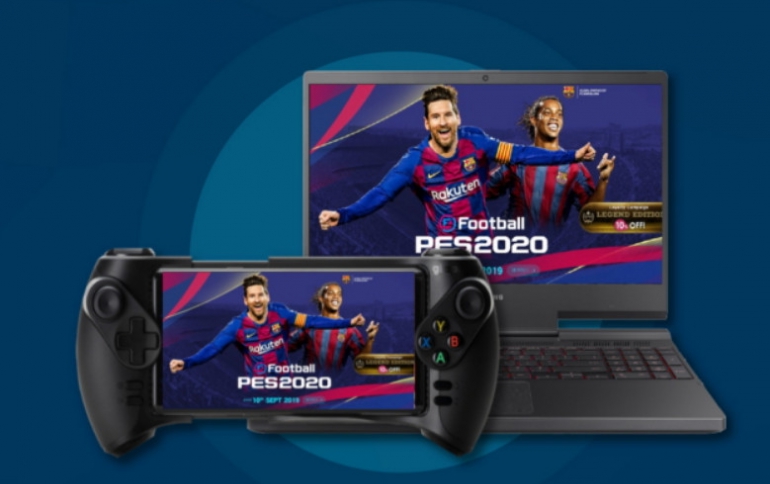
PlayGalaxy Link, a streaming service available from the Galaxy Store on the Galaxy Note10, allows you to bring your PC games with you on the go.

The new service goes beyond cloud gaming by allowing you to stream your game library to your device if you already have a powerful PC. With PlayGalaxy Link, Samsung is enabling you to create a customizable streaming experience by connecting the Galaxy Note10 to your own PC and the games you already own.

You can use the PlayGalaxy Link app on the Galaxy Note10 to connect to your PC using Wi-Fi or mobile data (4G/5G) and pick up right where you left off in the game.

Samsung says that lag and latency will be less of a problem as PlayGalaxy Link is designed with a P2P connection which provides you with simplicity for better performance without a relay server. The service also uses Adaptive FPS to ensure better connectivity even in poor network environments. However, it should be noted that speeds are dependent on your network connection and reliability will vary depending on local network providers and regional stability.

Since PlayGalaxy Link uses a PC to power your gaming session, the Galaxy Note10 avoids becoming hot and dropping frame rates as a result. PlayGalaxy Link is also compatible with all graphics card manufacturers.

Best of all, PlayGalaxy Link is expanding the opportunities for gaming on the go by opening up a library of PC exclusive titles for your mobile device. Whether you’re into casual side-scrollers or hardcore RPGs, you can extend your gameplay with both a game controller or a traditional keyboard connection.

Getting started with PlayGalaxy Link is easy. All you have to do to get set up is install the PlayGalaxy Link app on both your PC and Galaxy Note10, add your games, and then start streaming. For a better experience, you can connect wired or Bluetooth-enabled controllers to your device.

Since the app uses your computer to stream games, the bulk of the processing is done on your home computer. As a result, the better the specs your computer has, the better your PlayGalaxy Link experience will be.

The PlayGalaxy Link Beta has launched and is now available in South Korea, US, UK, Canada, Italy, the Netherlands, France, Singapore, and Russia. In addition to the Galaxy Note10, Galaxy S10 owners can now download the MR software update to access PlayGalaxy Link. The update will be coming to the Galaxy Fold, Galaxy S9, Galaxy Note9, and Galaxy A90 in early December 2019.

Tags: Galaxy Note 10
Previous Post
ASRock Announces New Mars Mini PCs
Next Post
Xiaomi's Profit Increased in the Third Quarter

Related Posts

  • Software Update brings New Features to Samsung Galaxy S10 and Galaxy Note10 Smartphones

  • Samsung Galaxy Note 10 Lite Coming Soon

  • Samsung Announces Galaxy Note10+ Star Wars Special Edition

  • Galaxy Note10 Features Come to the Galaxy S10

  • Samsung Released Software Fix For Galaxy Fingerprint Recognition Problem

  • Software Update Brings Galaxy Note10 Features to the Galaxy S10

  • Samsung Galaxy Note10 Users to Get Upgraded Weather Data

  • Meet the Galaxy Note10

Latest News

Geometric Future Unveils Model 3 Case, Eskimo Plus 36 AIO, and Squama 3003-12 Fans
Cooling Systems

Geometric Future Unveils Model 3 Case, Eskimo Plus 36 AIO, and Squama 3003-12 Fans

ZOTAC GAMING Launches GeForce RTX 5080 SOLID CORE OC 20th Anniversary Edition
GPUs

ZOTAC GAMING Launches GeForce RTX 5080 SOLID CORE OC 20th Anniversary Edition

Google Unveils Pixel 11 Series, Pixel 11 Pro Fold, Pixel Watch 5, and Pixel Tag
Smartphones

Google Unveils Pixel 11 Series, Pixel 11 Pro Fold, Pixel Watch 5, and Pixel Tag

Insta360 Expands Its Content Creation Ecosystem with Flagship X6 8K 360 Camera and Next-Generation Audio Solutions
Cameras

Insta360 Expands Its Content Creation Ecosystem with Flagship X6 8K 360 Camera and Next-Generation Audio Solutions

Razer Unveils the Artisan Keycap – Triple-Headed Snake Edition
Gaming

Razer Unveils the Artisan Keycap – Triple-Headed Snake Edition

Popular Reviews

Endorfy Thock V2 Wireless Keyboard

Endorfy Thock V2 Wireless Keyboard

Dragon Touch Digital Calendar

Dragon Touch Digital Calendar

be quiet! Pure Loop 3 280mm

be quiet! Pure Loop 3 280mm

Soft2bet and the unseen hardware that makes instant play possible

Soft2bet and the unseen hardware that makes instant play possible

The Quiet Technology Behind the Spin

The Quiet Technology Behind the Spin

SoundPeats Cove Pro

SoundPeats Cove Pro

Akaso Brave 8 Lite

Akaso Brave 8 Lite

Kioxia Exceria Plus G3 512GB microSD

Kioxia Exceria Plus G3 512GB microSD

Main menu

  • Home
  • News
  • Reviews
  • Essays
  • About
    • Submit News

    • Contact Us
    • Privacy

    • Promotion
    • Advertise

    • RSS Feed
  • About
  • Privacy
  • Contact Us
  • Promotional Opportunities @ CdrInfo.com
  • Advertise on out site
  • Submit your News to our site
  • RSS Feed