
Breaking News

Apple introduces the new M5 Pro/Max powered laptops and new Studio Display Elgato Unveils Wave Next - The Audio Ecosystem Powering a New Era Samsung Advances Galaxy AI and Its Connected Ecosystem at MWC 2026 AMD Ryzen AI PRO 400 Series CPUs Deliver Advanced AI for Desktops Micron Sets New Benchmark With the World's First High-Capacity 256GB LPDRAM SOCAMM2 for Data Center Infrastructure

logo

  • Share Us
    • Facebook
    • Twitter
  • Home
  • Home
  • News
  • Reviews
  • Essays
  • Forum
  • Legacy
  • About
    • Submit News

    • Contact Us
    • Privacy

    • Promotion
    • Advertise

    • RSS Feed
    • Site Map

Search form

SuperTalent MegaScreen

Feb 11,2007 0

3. Working with menus


Review Pages

1. Introduction
2. Retail package
3. Working with menus
4. Conversion Software
5. Performance
6. Conclusion


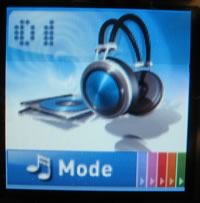
To power up the player, hold down the play/stop button for a few seconds. The player will display the SuperTalent logo and then brings up the main menu. Here, you can set important features concerning playback mode, sound equalization, MP3 display (ID3 tags), time and other player settings and functions (recording properties, about, upgrade and format):
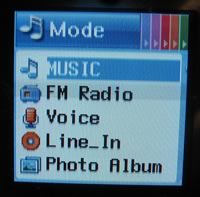
Pressing the hold/exit button, you enter the basic navigation menu. From here, you select what you want to do - listen to music, radio, record voice or from line-in, or see the photo album:
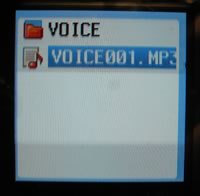
From the Music menu, you can view the directories found in the MP3 player. There are five folders, and each folder serves a different function, as you can understand from its name:
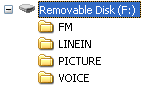
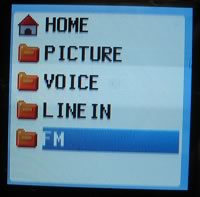
You can place MP3 files where you want. Just navigate to them and press the Menu button to start playback.
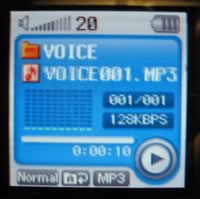
The MP3 Playback screen offers several bits of information, like the filename or ID3 tag, the file bitrate, equalization mode, repeat mode, and volume/battery information. Pressing the ">>" or "<<" buttons, you can move forwards and backwards, but the response is a little sluggish, and with big files can be a headache.
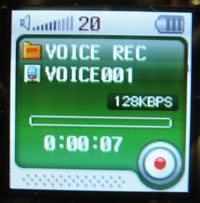
Pressing the record button, you enter directly into recording mode.
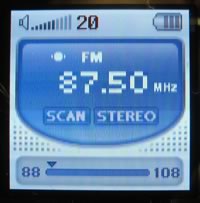
Listening to FM radio is also possible, and you can make a quick scan to find available stations.
Lastly, the SuperTalent MegaScreen player can play Videos and display Photos in a special format, with good colour.

 

Review Pages

1. Introduction
2. Retail package
3. Working with menus
4. Conversion Software
5. Performance
6. Conclusion

 

Pages

  • « first
  • ‹ previous
  • 1
  • 2
  • 3
  • 4
  • 5
  • 6
  • next ›
  • last »

Super Talent

mobiles

USB

MP3

Tags: Super Talent mobiles USB MP3
Previous Post
Asus P5W64WS Pro
Next Post
F-Tech Solar MT

Related Posts

  • MP3 Has Been Set Free Of Licensing

  • Super Talent Launches The PCIe Nova U.2 SSDs

  • Super Talent Introduces USB 3.1 Portable RAIDDrive

  • Super Talent Portable Storage Device Features SSD RAID And USB 3.0

  • Super Talent Releases New mSATA SJ2 SSD

  • USB-IF Completes Media Agnostic Wireless USB Specification

  • Super Talent Launches The RAIDDrive II Plus PCIe SSDs

  • Next Generation USB Connector Underway

Latest Reviews

Why Streaming Live Casino Games Demands Smarter Tech
Enterprise & IT

Why Streaming Live Casino Games Demands Smarter Tech

Kioxia Exceria Plus G3 512GB microSD
Cameras

Kioxia Exceria Plus G3 512GB microSD

SoundPeats Cove Pro
Consumer Electronics

SoundPeats Cove Pro

Asustor AS5404T 4-Bay NAS System
Enterprise & IT

Asustor AS5404T 4-Bay NAS System

be quiet! Pure Power 13M 1200W
PC components

be quiet! Pure Power 13M 1200W

Popular News

COLORFUL Introduces CVN B850I GAMING FROZEN Motherboard

COLORFUL Introduces CVN B850I GAMING FROZEN Motherboard

COLORFUL Presents CVN X870 ARK FROZEN Motherboard for AMD Ryzen 9000 CPUs

COLORFUL Presents CVN X870 ARK FROZEN Motherboard for AMD Ryzen 9000 CPUs

TEAMGROUP Launches EXPERT P34F Find My External SSD

TEAMGROUP Launches EXPERT P34F Find My External SSD

Samsung announces Galaxy Tab S11 and Galaxy S25 FE series

Samsung announces Galaxy Tab S11 and Galaxy S25 FE series

Viltrox Showcases Upcoming Lens Lineup and New TTL Flash at IBC 2025

Viltrox Showcases Upcoming Lens Lineup and New TTL Flash at IBC 2025

CORSAIR announces Vanguard Pro 96 and Vanguard 96 Gaming Keyboards

CORSAIR announces Vanguard Pro 96 and Vanguard 96 Gaming Keyboards

Panasonic Introduces the First Ultra-Telephoto Zoom Lens in the LUMIX S Series

Panasonic Introduces the First Ultra-Telephoto Zoom Lens in the LUMIX S Series

MSI Launches DATAMAG 40Gbps Magnetic Portable SSD

MSI Launches DATAMAG 40Gbps Magnetic Portable SSD

Main menu

  • Home
  • News
  • Reviews
  • Essays
  • Forum
  • Legacy
  • About
    • Submit News

    • Contact Us
    • Privacy

    • Promotion
    • Advertise

    • RSS Feed
    • Site Map
  • About
  • Privacy
  • Contact Us
  • Promotional Opportunities @ CdrInfo.com
  • Advertise on out site
  • Submit your News to our site
  • RSS Feed


