Sony BDX-S500U
24. BD-R burning - Verbatim BD-R 25GB LTH VERBATIMu 6x @ 6x
Review Pages
2. CD and DVD reading tests
3. Reading damaged CDs
4. Reading damaged DVDs
5. Reading Blu-ray discs
6. CD DVD media quality testbed
7. CD-R burning - Verbatim 48x @ 24x
8. CD-R burning - Maxell 52x @24x
9. DVD-R burning - TDK TTH02 16x @ 8x
10. DVD-R burning - Verbatim MCC03RG20 16x @ 8x
11. DVD-R burning - CMC MAG AM3 16x @ 8x
12. DVD-R burning - Moser Baer India MBI01RG40 16x @ 8x
13. DVD-R burning - Taiyo Yuden TYG03 16x @ 8x
14. DVD+R burning - Philips INFOME R30 16x @ 8x
15. DVD+R burning - Moser Baer India MBIPG101 R05 16x @ 8x
16. DVD+R burning - Verbatim MCC004 16x @ 8x
17. DVD+R burning - PRODISC R04 16x @ 8x
18. DVD+R DL burning - Moser Baer India MBIPG101 R10 8x
19. DVD+R DL burning - Verbatim MKM 003 8x @ 4x
20. DVD-R DL burning - Verbatim MKM 03RD30 8x @ 4x
21. DVD-RW burning - Verbatim MKM 01RW6X01 6x @ 4x
22. DVD+RW burning - Verbatim MKM A03 8x @ 4x
23. DVD-RAM burning - Maxell MXL16 5x @ 5x
24. BD-R burning - Verbatim BD-R 25GB LTH VERBATIMu 6x @ 6x
25. BD-R burning - Verbatim BD-R 25GB VERBATIMe 6x @ 6x
26. BD-R burning - TDK BD-R 25GB TDKBLDRBB 4x @ 4x
27. BD-R burning - Sony BD-R 25GB SONY N3 6x @ 6x
28. BD-R burning - Verbatim BD-R 25GB VERBATIMc 4x @ 4x
29. BD-R burning - Verbatim BD-R 50GB VERBATIMf 6x @ 4x
30. BD-R burning - Verbatim BD-R 25GB VERBATIM0 2x @ 2x
31. BD-RE burning - Verbatim BD-RE 50GB VERBATIM1 2x @ 2x
32. BD-RE burning - Verbatim BD-RE 7GB VERBATIM0 2x @ 2x
33. BD-RE burning - TDK BD-R 50GB TDKBLDRFB 4x @ 2x
34. Summary of CD/DVD/BD quality tests, Booktype, Overburning
35. Final thoughts
We start our disc recording tests with the Sony BDX-S500U drive. We used some of the latest BD-R/RE SL and DL media for these tests. Each disc was burned at the highest allowed recording speeds as well as in lower speeds.
We remind you that the drive supports 6x BD-R SL and 4x BD-R DL recording with specific media. The discs we used for this test were kindly provided by Mitsubishi Kangaku Media (MKM), the manufacturer of the popular Verbatim branded discs, Moser Baer India, Panasonic and Imation/TDK.
We also used Erik Deppe' s Opti Drive Control software for testing the writing quality of each recorded BD-R/RE disc. The software could give you an idea of the writing quality of each disc. For BDs, the following parameters are measured:
- LDC (Long Distance Code): number of parity errors on LDC codewords per ECC block (32 sectors)
- BIS (Burst Indication Subcode): number of parity errors on BIS codewords per ECC block (32 sectors)
On a good disc, the average LDC should stay below 13 and BIS should stay below 15, according to the author of the software.
If you are interested in the data recovery methods of the Blu-ray discs, keep reading below. If not, skip the following text and proceed directly to the tests found later on this page :)
Blu-ray Data Recovery Methods: Partial Response - Maximum Likelihood (PRML)
For CD and DVD, the method for data detection was based on a zero crossing point method, using a conventional slicer. Basically, when the analogue signal (output from the optical pick-up) crosses a reference level, it indicates a binary transition. This method has its limitations, notably when the feature size (smallest pit/land) is less than the spot size, the modulation of the light is relatively small (the smaller the pit/spot size ratio the smaller the modulation). Thus, the conventional slicer can create data with non-exact mark/space lengths - otherwise known as jitter, and when this jitter becomes greater than 0.5 of a clock cycle, it becomes a bit error.
For BD, the minimum spot radius ratios are 0.88 and 0.85 of the ratio of DVD. This reduced resolution (low modulation of light by 2T pits) means that it is much more difficult to have effective data detection using a conventional slicer. Boosting the high frequency part of the signal has limited effect because this also increases the InterSymbol Interference (ISI), which is where adjacent pits and lands interfere with each other. This is mainly a problem with the shortest run lengths, particularly those that are smaller than the spot size.
Hence for BD, the Partial Response- Maximum likelihood (PRML) method is used for recovering the data from the signal.
Partial Response (PR) equalization is used to limit the effects of ISI, and then a sequence of bits is evaluated to define the most likely sequence of bits, based upon known allowed sequences. This is the Maximum Likelihood (ML) detection and uses a Viterbi algorithm to determine the ML sequence.
The Blu-Ray disc is more sensitive to burst errors compared to the DVD system. Therefore, the error correction system of Blu-Ray disc should be able to cope well with long burst errors, rather with single (random) errors.
The maximum number of errors that can be corrected depends on the number of parity symbols added. For each two parity symbols added, one error can be corrected. But Blu-Ray uses a more efficient approach to correct the burst errors. It uses a burst indicator mechanism that can detect bursts of errors before the correction starts. The advantage of this method is actually the prior knowledge of the error locations on the decoding process.
These burst indicator used in the Blu-Ray format is called picket code. The pickets are columns that are inserted in between columns of the main data at regular intervals. The main data is protected by a Reed Solomon code, while the pickets are protected by a second independent Reed Solomon code. When decoding (reading), first the picket columns are corrected. The correction information can be used to estimate the location of possible burst errors in the main data.
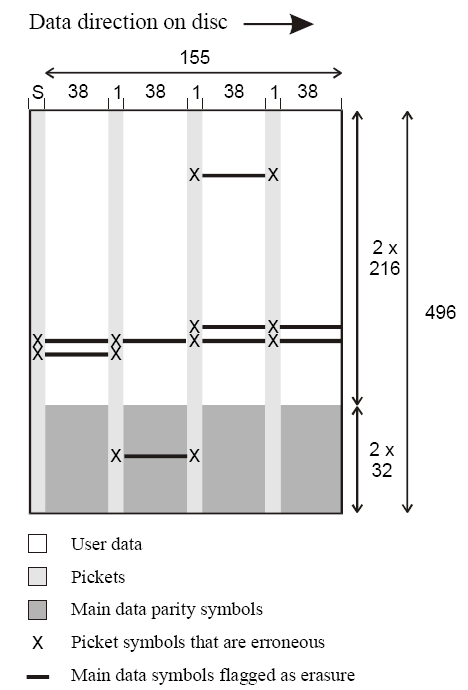
A BluRay Disc Error Correction Block (ECC Block) can store 64 Kilobytes of user data. This data is protected by the Long Distance Code (LDC) which has 304 code words with 216 information symbols and 32 parity symbols giving a code word of length 248. These code words are interleaved two by two in the vertical direction such that a block if 152 bytes x 469 bytes is formed as shown in the picture above.
A Blu-Ray Disc ECC block contains 4 equally spaced picket columns. The left most picket is formed by the sync pattern at the start of each row. If the sync pattern was not detected properly, that can be an indication for a burst error similar to the knowledge that a symbol of a picket column had to be corrected. The other three pickets are protected by the so-called Burst Indicator Subcode (BIS). The BIS code words are interleaved into three columns of 496 bytes each. Both LDC and BIS codes are decoded by the Reed Solomon decoder.
Reference: BD-ROM Physical Specifications
For the first test we used the Verbatim BD-R 25GB certified for 6x burning (VERBATIMu (000)) . The specific discs have been manufactured using the "Low-To-High" (LTH) process. The LTH write-once BD-R media feature an organic dye recording layer, making them different that the currently available BD-R discs that use inorganic materials.
- Media Info
Verbatim BD-R SL 6x LTH
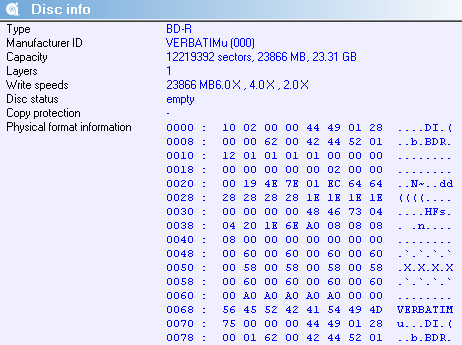
- Writing @6x (4.36X average) in 21:21 min)
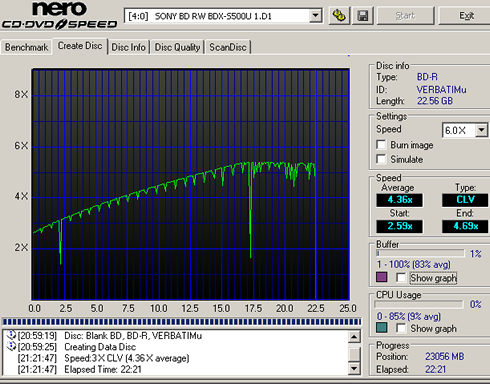
The Sony BDX-S500U recognized the disc and allowed us to select the 6X burning speed. However, the drive did not reach the 6X speed and the burning speed topped at 5.33X at the 16GB mark. From that point and toward the end of the disc, the drive struggled to keep that speed and finally finished the burning in 22:51 minutes and an average speed of 4.36X.
It was obvious that there was an issue with the USB 2.0 interface here. The 6X speed offered by the BDX-S500U when writing to single-sided discs translates into a write speed of 216Mbps. The PC's USB 2.0 port has has a theoretical maximum speed of 480MBps, but it runs much slower in real-world. Some of that speed is taken away by networking overheads built into the protocol, and more by inefficiencies in USB interface chips. Although the drive was the only USB device connected to the specific USB bus, the USB interface seems to reached its limits at ~192Mbps, which is translated to 5.33X in terms of BD speed (1X = 36Mbps).
We installed the drive in three different PCs and USB 2.0 controllers with no better luck. At that point, we realized that our hopes for fast transfers encountered a bottleneck in the form of the computer.
In case of USB 2.0 hard drives USB 2.0 ports generally offer sustained 288 to 320 Mbps in the absolute best scenario. USB flash drives have also reach 280Mbps. However real world testing shows that the bandwidth requirement of 6x BD is higher. The Sony BDX-S500U drive could be alternatively be equipped with an eSATA port (or a USB 3.0 port) in order to offer exactly what it is supposed to, at lest to everyone no matter how his PC performs.
On the bright side, the Sony BDX-S500U drive did not stop writing as soon as our PC's USB 2.0 interface stopped feeding the drive's buffer with data. The drive's Buffer underun protection kicked in and writing was stopping burning every now and then in order to maintain sufficient data flow and resume writing.
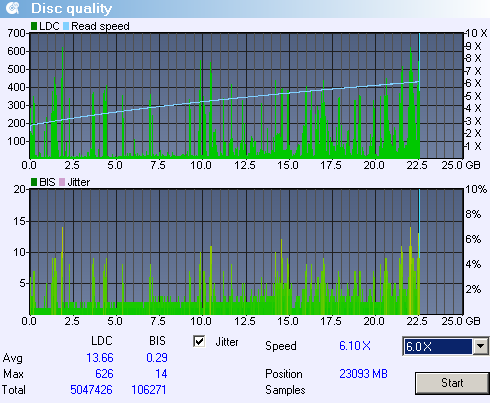
We were curious to see the impact of this writing behavior to the writing quality and readability of the disc. Hopefully, the disc was fully readable and the average reported LDC was 13.66, while the BIS was just 0.29. However, LDC hit very high values throughout the data area, as you see in the below graphs (spikes):
Review Pages
2. CD and DVD reading tests
3. Reading damaged CDs
4. Reading damaged DVDs
5. Reading Blu-ray discs
6. CD DVD media quality testbed
7. CD-R burning - Verbatim 48x @ 24x
8. CD-R burning - Maxell 52x @24x
9. DVD-R burning - TDK TTH02 16x @ 8x
10. DVD-R burning - Verbatim MCC03RG20 16x @ 8x
11. DVD-R burning - CMC MAG AM3 16x @ 8x
12. DVD-R burning - Moser Baer India MBI01RG40 16x @ 8x
13. DVD-R burning - Taiyo Yuden TYG03 16x @ 8x
14. DVD+R burning - Philips INFOME R30 16x @ 8x
15. DVD+R burning - Moser Baer India MBIPG101 R05 16x @ 8x
16. DVD+R burning - Verbatim MCC004 16x @ 8x
17. DVD+R burning - PRODISC R04 16x @ 8x
18. DVD+R DL burning - Moser Baer India MBIPG101 R10 8x
19. DVD+R DL burning - Verbatim MKM 003 8x @ 4x
20. DVD-R DL burning - Verbatim MKM 03RD30 8x @ 4x
21. DVD-RW burning - Verbatim MKM 01RW6X01 6x @ 4x
22. DVD+RW burning - Verbatim MKM A03 8x @ 4x
23. DVD-RAM burning - Maxell MXL16 5x @ 5x
24. BD-R burning - Verbatim BD-R 25GB LTH VERBATIMu 6x @ 6x
25. BD-R burning - Verbatim BD-R 25GB VERBATIMe 6x @ 6x
26. BD-R burning - TDK BD-R 25GB TDKBLDRBB 4x @ 4x
27. BD-R burning - Sony BD-R 25GB SONY N3 6x @ 6x
28. BD-R burning - Verbatim BD-R 25GB VERBATIMc 4x @ 4x
29. BD-R burning - Verbatim BD-R 50GB VERBATIMf 6x @ 4x
30. BD-R burning - Verbatim BD-R 25GB VERBATIM0 2x @ 2x
31. BD-RE burning - Verbatim BD-RE 50GB VERBATIM1 2x @ 2x
32. BD-RE burning - Verbatim BD-RE 7GB VERBATIM0 2x @ 2x
33. BD-RE burning - TDK BD-R 50GB TDKBLDRFB 4x @ 2x
34. Summary of CD/DVD/BD quality tests, Booktype, Overburning
35. Final thoughts