Breaking News

LIAN LI Announces Edge Platinum V2, Edge Gold V2, and GPU Cable Thermal Monitoring via Edge Hub ADV Razer Unveils the Huntsman V3 Pro Mini 8KHz ASRock DeskSlim Series Delivers RTX PRO Blackwell Performance in a Compact 5L Workstation Samsung Introduces Galaxy Tab S12 Series PlayStation Plus Monthly Games for October 2026

logo

  • Share Us
    • Facebook
    • Twitter
  • Home
  • Home
  • News
  • Reviews
  • Essays
  • About
    • Submit News

    • Contact Us
    • Privacy

    • Promotion
    • Advertise

    • RSS Feed

Search form

Shuttle X2700B

Jan 12,2009 0

3. Booting Up


Review Pages

1. Specifications, features
2. Opening the package
3. Booting Up
4. Memory, CPU
5. BIOS
6. Basic HDD tests
7. Basic DVD-RW tests
8. Basic GPU tests
9. Basic CPU tests
10. Final words


The device is powered by an external power adapter. Although the idea not to include the power supply in the main body of the device made it lighter, we are not very sure that plugging an external device to power the barebone up is convenient. Anyway, the power adapter is small and it doesn't make any noise since its fanless.

The next step is to connect the required cables (mouse, keyboard, VGA). We are ready-to-go.

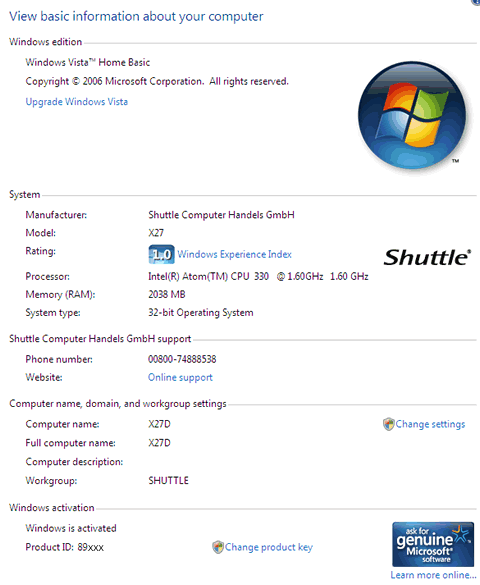
After booting up a welcome screen comes up and after a while you are into the Windows Vista Home Basic environment. Nothing special in this Welcome screen here, except the background Shuttle logo. The welcome screen also shows some details about the system:

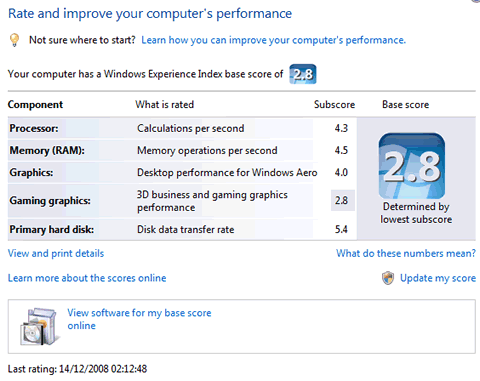
Immediately after booting, the the system is rated by Windows Vista at "1.0" (Windows Experience Index) and it is pre-activated:
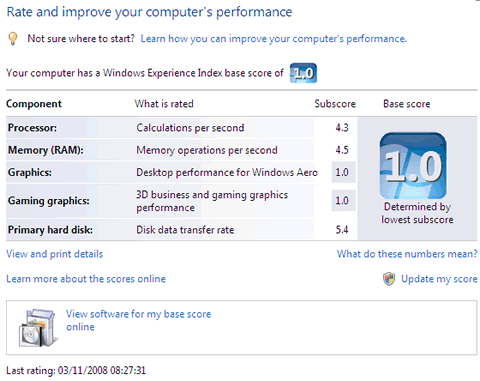
Below you can see how Windows evaluate and rate the components currently on board, without the latest drivers or updates installed. It seems that the low rating of the graphics engine results to a low overall score.
After a while, Windows prompt us for several updates .Our sample came without box even SP1 installed so we had to download all the important and recommended updates:
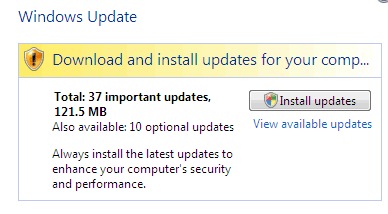
After rebooting and checking the installed updates, we saw that new Intel graphics driver had been installed and this time, the graphics scores were much higher, resulting to an overall base score of "2.8"
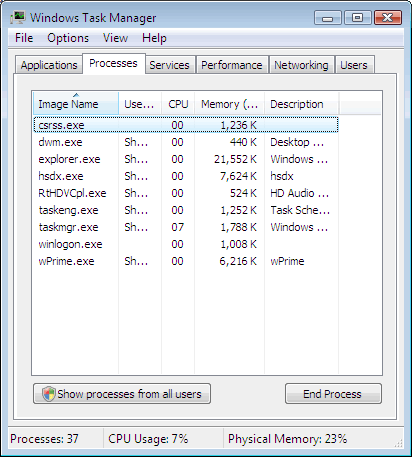
As you can see in the screen shot below, the processes that are running are the essential. It's good to see that Shuttle has not overloaded the X27D with extra software that usually ad extra load to the OS:
A rather annoying box was coming up every time we rebooted.
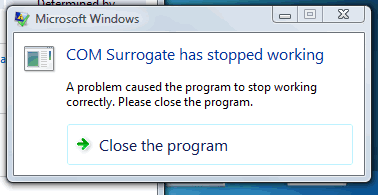
After a quick look at Google, we saw that a quick fix was available for this issue.
 

Review Pages

1. Specifications, features
2. Opening the package
3. Booting Up
4. Memory, CPU
5. BIOS
6. Basic HDD tests
7. Basic DVD-RW tests
8. Basic GPU tests
9. Basic CPU tests
10. Final words


Pages

  • « first
  • ‹ previous
  • 1
  • 2
  • 3
  • 4
  • 5
  • 6
  • 7
  • 8
  • 9
  • next ›
  • last »

Shuttle

Tags: Shuttle
Previous Post
LiteOn eSAU208
Next Post
LITEON iHAS422 22x

Related Posts

  • Shuttle Launches the XZ890G2

  • Shuttle Introduces SPCNV03 Ultra-Compact Edge AI Computer

  • Shuttle announces DN11H at InfoComm 2025

  • Shuttle announces NA10H - NT10H

  • Flat Mini-PC Barebones for the latest LGA1700 processors from Shuttle

  • Shuttle announces Xeon-compatible Mini-PC Barebone with 4x LAN and ECC RAM support

  • Shuttle announces Mini-PC Barebone in a 4.7-litre format for two PCI Express cards

  • Shuttle Announces DH32 Mini-PC

Latest Reviews

Fanxiang MP83 M.2 NVMe SSD Enclosure
Enterprise & IT

Fanxiang MP83 M.2 NVMe SSD Enclosure

Ugreen CM642 USB4.0 Enclosure
PC components

Ugreen CM642 USB4.0 Enclosure

be quiet! Dark Power 14 IO
PC components

be quiet! Dark Power 14 IO

SanDisk High Endurance 512GB microSDXC
Cameras

SanDisk High Endurance 512GB microSDXC

Samsung PRO Ultimate 512GB microSDXC
Cameras

Samsung PRO Ultimate 512GB microSDXC

Popular News

MSI’s Latest AMD X870E MAX & EVO Series Motherboards

MSI’s Latest AMD X870E MAX & EVO Series Motherboards

COLORFUL Launches iGame B850M ULTRA Series Micro-ATX Motherboards

COLORFUL Launches iGame B850M ULTRA Series Micro-ATX Motherboards

COLORFUL Presents Limited Edition Chitu MAG-60 Magnetic Keyboard Inspired by the Year of the Horse

COLORFUL Presents Limited Edition Chitu MAG-60 Magnetic Keyboard Inspired by the Year of the Horse

COLORFUL Launches iGame B850I MINI OC V14 Motherboard

COLORFUL Launches iGame B850I MINI OC V14 Motherboard

COLORFUL Presents iGame Z890 ULTRA-S W and iGame Z890M ULTRA Z Motherboards

COLORFUL Presents iGame Z890 ULTRA-S W and iGame Z890M ULTRA Z Motherboards

COLORFUL Expands B850 Motherboard Lineup with New CVN, Battle-Ax, and MEOW Models

COLORFUL Expands B850 Motherboard Lineup with New CVN, Battle-Ax, and MEOW Models

ASRock Adds Support for One Sub-Channel DRAM Module on Intel DDR5 Motherboards

ASRock Adds Support for One Sub-Channel DRAM Module on Intel DDR5 Motherboards

COLORFUL Launches the iGame X870E VULCAN W OC Motherboard

COLORFUL Launches the iGame X870E VULCAN W OC Motherboard

Main menu

  • Home
  • News
  • Reviews
  • Essays
  • About
    • Submit News

    • Contact Us
    • Privacy

    • Promotion
    • Advertise

    • RSS Feed
  • About
  • Privacy
  • Contact Us
  • Promotional Opportunities @ CdrInfo.com
  • Advertise on out site
  • Submit your News to our site
  • RSS Feed