Breaking News

Akasa introduces Euler CMX Compact Fanless Mini‑ITX Case WD Unifies its Professional Content Creator Storage Portfolio Under the G-DRIVE Brand Samsung Introduces the New Bixby in One UI 8.5 Razer Unveils the Huntsman Signature Edition CORSAIR Introduces Limited-Edition FRAME 4000D Nova and Galaxy cases with Color-Shift Finishes

logo

  • Share Us
    • Facebook
    • Twitter
  • Home
  • Home
  • News
  • Reviews
  • Essays
  • Forum
  • Legacy
  • About
    • Submit News

    • Contact Us
    • Privacy

    • Promotion
    • Advertise

    • RSS Feed
    • Site Map

Search form

Ricoh MP5316DA

Jan 4,2005 0

19. DVD+R DL - Page 1


Review Pages

1. Introduction
2. Transfer Rate Reading Tests
3. CD Error Correction Tests
4. DVD Error Correction Tests
5. Protected Disc Tests
6. DAE Tests
7. Protected AudioCDs
8. CD Recording Tests
9. Writing Quality Tests - 3T Jitter Tests
10. Writing Quality Tests - C1 / C2 Error Measurements
11. DVD Recording Tests
12. CDSpeed/PlexTools Scans - Page 1
13. CDSpeed/PlexTools Scans - Page 2
14. CDSpeed/PlexTools Scans - Page 3
15. CDSpeed/PlexTools Scans - Page 4
16. CDSpeed/PlexTools Scans - Page 5
17. CDSpeed/PlexTools Scans - Page 6
18. CDSpeed/PlexTools Scans - Page 7
19. DVD+R DL - Page 1
20. DVD+R DL - Page 2
21. BookType Setting
22. Conclusion


RICOH MP5316DA DVD Burner

DVD+R DL - Page 1

- Writing Tests

We burned some DVD+R DL discs with DVD-Video content. The source disc was "Gladiator Movie - Special Edition" disc1 with a total size of 6.86GB. First we transferred the movie to the hard disc with DVD Decrypter as ISO format (single file). We used Double Layer media provided by Ricoh and Verbatim (MKM). The following screenshot shows the media code for these Double Layer discs.


You might notice that the Ricoh media Id Code speed cannot be read by the drive. This means that this media is not supported with the current firmware loaded on the Ricoh MP5316DA. It's funny, a drive bearing the Ricoh brand not supporting Ricoh media, isn' it?

We then used CopyToDVD v3.0.29.48 with Verbatim Double Layer media, and specifically the "Movie & Pictures" option, and then "Write DVD Video". The software prompts us to select the Video_TS/ISO image folder. We chose the "GLADIATOR.ISO" image and we selected the RICOH MP5316DA burner.


After pressing "OK", the burning procedure started without any unexpected delays. It should be noted that we did change the default booktype setting prior to writing the disc to DVD-ROM booktype, with the latest DVDInfoPro software.
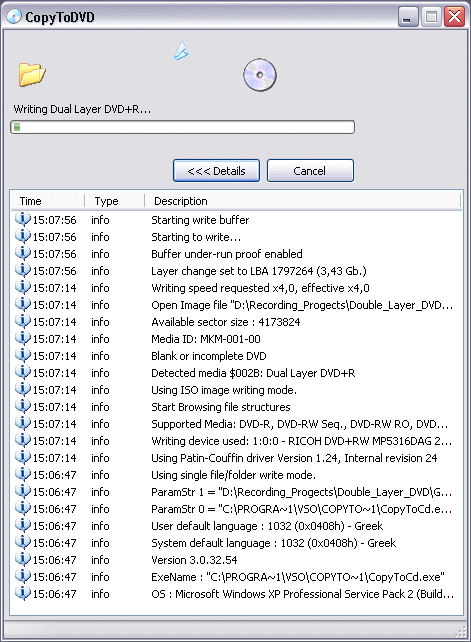

The writing process was finished after 22:35 minutes. The average speed was 3.91X as reported by the CopyToDVD software.

Performing the same with the Ricoh DL media, we got the following:
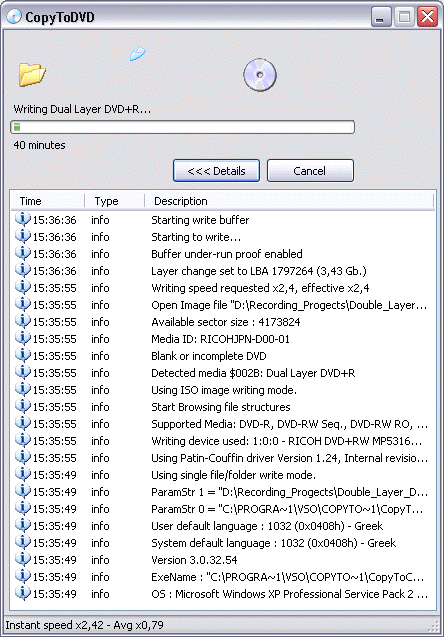


The writing process was finished after 37:50 minutes. The average speed was 2.33X as reported by the CopyToDVD software. The drive burned the Ricoh DL media at 2.4X speed, apparently because it could not read the media id code speed field that we saw in the second screenshot previously on this page.


Review Pages

1. Introduction
2. Transfer Rate Reading Tests
3. CD Error Correction Tests
4. DVD Error Correction Tests
5. Protected Disc Tests
6. DAE Tests
7. Protected AudioCDs
8. CD Recording Tests
9. Writing Quality Tests - 3T Jitter Tests
10. Writing Quality Tests - C1 / C2 Error Measurements
11. DVD Recording Tests
12. CDSpeed/PlexTools Scans - Page 1
13. CDSpeed/PlexTools Scans - Page 2
14. CDSpeed/PlexTools Scans - Page 3
15. CDSpeed/PlexTools Scans - Page 4
16. CDSpeed/PlexTools Scans - Page 5
17. CDSpeed/PlexTools Scans - Page 6
18. CDSpeed/PlexTools Scans - Page 7
19. DVD+R DL - Page 1
20. DVD+R DL - Page 2
21. BookType Setting
22. Conclusion


Pages

  • « first
  • ‹ previous
  • …
  • 14
  • 15
  • 16
  • 17
  • 18
  • 19
  • 20
  • 21
  • 22
  • next ›
  • last »

Ricoh

Tags: Ricoh
Previous Post
Abit SV-1A AMD Athlon 64 Server Board
Next Post
SATA 3Gb/s, the Next Generation of Serial ATA Speed

Related Posts

  • Ricoh announces GR IV Monochrome

  • RICOH announces GR IV Monochrome and GR IV HDF High-end Compact Digital Cameras

  • RICOH announces GR IV and GF-2 external flash

  • Ricoh 360 Theta A1 camera officially announced

  • RICOH announces development of GR IV

  • Ricoh establishes new industrial computer company in Japan

  • PENTAX 17 is simply a fixed-focal length compact film camera

  • Ricoh announces PENTAX WG-8 and PENTAX WG-1000 waterproof cameras

Latest Reviews

Kioxia Exceria Plus G3 512GB microSD
Cameras

Kioxia Exceria Plus G3 512GB microSD

SoundPeats Cove Pro
Consumer Electronics

SoundPeats Cove Pro

Asustor AS5404T 4-Bay NAS System
Enterprise & IT

Asustor AS5404T 4-Bay NAS System

be quiet! Pure Power 13M 1200W
PC components

be quiet! Pure Power 13M 1200W

Server-Side Gaming Why Canadian Online Casinos Are Abandoning Local Clients for HTML5 Clouds
Enterprise & IT

Server-Side Gaming Why Canadian Online Casinos Are Abandoning Local Clients for HTML5 Clouds

Popular News

COLORFUL Introduces CVN B850I GAMING FROZEN Motherboard

COLORFUL Introduces CVN B850I GAMING FROZEN Motherboard

COLORFUL Presents CVN X870 ARK FROZEN Motherboard for AMD Ryzen 9000 CPUs

COLORFUL Presents CVN X870 ARK FROZEN Motherboard for AMD Ryzen 9000 CPUs

TEAMGROUP Launches EXPERT P34F Find My External SSD

TEAMGROUP Launches EXPERT P34F Find My External SSD

Samsung announces Galaxy Tab S11 and Galaxy S25 FE series

Samsung announces Galaxy Tab S11 and Galaxy S25 FE series

Viltrox Showcases Upcoming Lens Lineup and New TTL Flash at IBC 2025

Viltrox Showcases Upcoming Lens Lineup and New TTL Flash at IBC 2025

CORSAIR announces Vanguard Pro 96 and Vanguard 96 Gaming Keyboards

CORSAIR announces Vanguard Pro 96 and Vanguard 96 Gaming Keyboards

Panasonic Introduces the First Ultra-Telephoto Zoom Lens in the LUMIX S Series

Panasonic Introduces the First Ultra-Telephoto Zoom Lens in the LUMIX S Series

MSI Launches DATAMAG 40Gbps Magnetic Portable SSD

MSI Launches DATAMAG 40Gbps Magnetic Portable SSD

Main menu

  • Home
  • News
  • Reviews
  • Essays
  • Forum
  • Legacy
  • About
    • Submit News

    • Contact Us
    • Privacy

    • Promotion
    • Advertise

    • RSS Feed
    • Site Map
  • About
  • Privacy
  • Contact Us
  • Promotional Opportunities @ CdrInfo.com
  • Advertise on out site
  • Submit your News to our site
  • RSS Feed