Breaking News

ASUS Announces ProArt Router PRT-BE5000 and ProArt Switch PQG-U1080 CORSAIR Expands the Popular FRAME Series Case Lineup DeepCool Launches the LT360 VISION ARGB Noctua and Asetek Announce Flagship AIO Liquid Coolers Toshiba Begins Sampling of 30-34 TB SMR Nearline Hard Disk Drives

logo

  • Share Us
    • Facebook
    • Twitter
  • Home
  • Home
  • News
  • Reviews
  • Essays
  • Forum
  • Legacy
  • About
    • Submit News

    • Contact Us
    • Privacy

    • Promotion
    • Advertise

    • RSS Feed
    • Site Map

Search form

Pioneer DVR-A08XLA

Sep 17,2004 0

13. QuietDrive Technology


Review Pages

1. Introduction
2. DVD Recording Tests
3. CDSpeed/PlexTools Scans - Page 1
4. CDSpeed/PlexTools Scans - Page 2
5. CDSpeed/PlexTools Scans - Page 3
6. CDSpeed/PlexTools Scans - Page 4
7. CDSpeed/PlexTools Scans - Page 5
8. CDSpeed/PlexTools Scans - Page 6
9. CDSpeed/PlexTools Scans - Page 7
10. DVD+R DL - Page 1
11. DVD+R DL - Page 2
12. BookType Setting
13. QuietDrive Technology
14. Conclusion


Pioneer DVR-A08XLA DL Recorder - Page 13

QuietDrive Technology

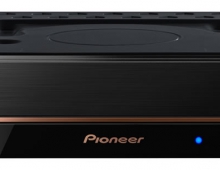
When the disc's rotation gets faster, noise levels become much more audible. To dampen this noise level, the DVR-A08XL has adopted a "Quiet Firmware" which is used in conjunction with the "Quiet Drive Utility" to limit the disc's rotation speed "Automatically". According to Pioneer, this technology reduces the playback noise up to 75% compared with the previous DVR-107 series.


(Picture: courtesy of Pioneer)

Pioneer has made several tests and according to them, the DVR-A08XL series has the lowest CD-DA playback noise when compared with other well known recorders:
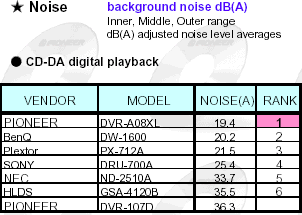

(Picture: Courtesy of Pioneer)

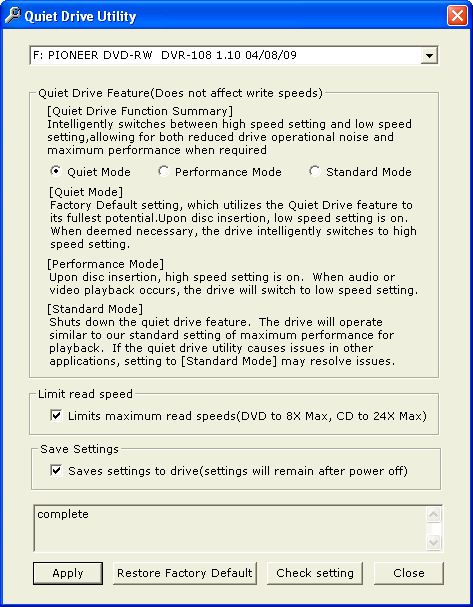
In order to use the QuietDrive technology, you have to use the QuietDrive Utility, which can be downloaded from Pioneer's website. The latest version is 1.05 which was used for all our tests:
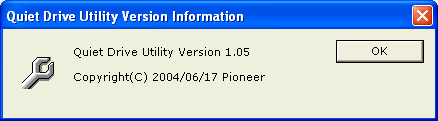
The QuietDrive utility interface is rather simple and gives all the neseccery information to the users. There are three modes to choose from, Quiet, Performance and Standard:
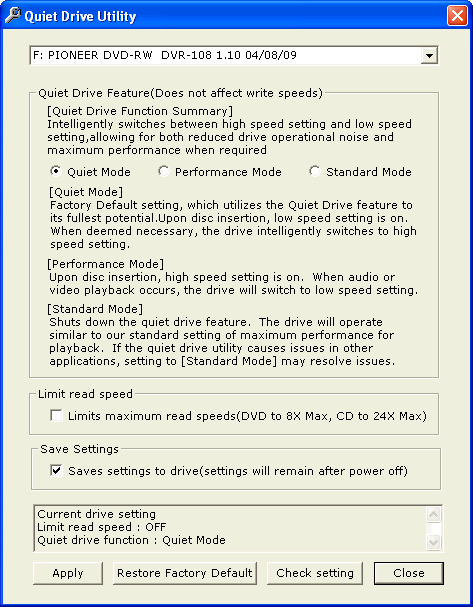
The settings can be stored in the drive's memory and you can also limit all reading speeds up to 8X for DVD and 24X for CD to further reduce playback noise:
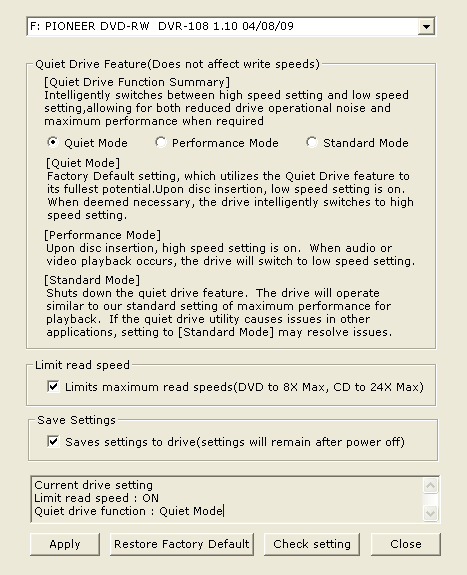
By pressing the "Check Setting" option, you can see which settings are already chosen:
For our tests, we tried to rip the Matrix DVD with the latest build of DVD Decrypter. Below are the test results:

  • Standard Mode

  • Quiet mode

  • Performance mode

As we can see, a side effect of the utility is that when we choose the Quiet and Performance modes, the ripping speed of CSS DVD-Video protected discs rises from 5.3X max to 12.4X max, cutting down the needed time by half.


Review Pages

1. Introduction
2. DVD Recording Tests
3. CDSpeed/PlexTools Scans - Page 1
4. CDSpeed/PlexTools Scans - Page 2
5. CDSpeed/PlexTools Scans - Page 3
6. CDSpeed/PlexTools Scans - Page 4
7. CDSpeed/PlexTools Scans - Page 5
8. CDSpeed/PlexTools Scans - Page 6
9. CDSpeed/PlexTools Scans - Page 7
10. DVD+R DL - Page 1
11. DVD+R DL - Page 2
12. BookType Setting
13. QuietDrive Technology
14. Conclusion


Pages

  • « first
  • ‹ previous
  • …
  • 6
  • 7
  • 8
  • 9
  • 10
  • 11
  • 12
  • 13
  • 14
  • next ›
  • last »

Pioneer

Tags: Pioneer
Previous Post
AMD Athlon 64 3800+
Next Post
AOpen XCcube EZ65-II Mini Barebone System

Related Posts

  • Pioneer announces microSD for dashcam

  • Pioneer Japan announces BDR-WX01DM for US market

  • Pioneer Japan announces new optical storage drives for JIS X6257 archive format

  • Pioneer Japan updates its CD-DVD Software utility

  • Pioneer Japan announces new BDR-X13J-X external BD Writer and BDR-WX01DM for archiving

  • Pioneer Japan releases new firmware updates for external Blu-Ray Recorders

  • Pioneer BDR-XD08UMB-S External Blu-Ray Recorder

  • Pioneer Japan updates firmware for their X13 lineup (30-01-2023)

Latest Reviews

In the Age of AI Phishing, the Best User Experience Might Be the One That Feels Safest
Enterprise & IT

In the Age of AI Phishing, the Best User Experience Might Be the One That Feels Safest

SoundPeats C30
Consumer Electronics

SoundPeats C30

Why Streaming Live Casino Games Demands Smarter Tech
Enterprise & IT

Why Streaming Live Casino Games Demands Smarter Tech

Kioxia Exceria Plus G3 512GB microSD
Cameras

Kioxia Exceria Plus G3 512GB microSD

SoundPeats Cove Pro
Consumer Electronics

SoundPeats Cove Pro

Popular News

TEAMGROUP Launches EXPERT P34F Find My External SSD

TEAMGROUP Launches EXPERT P34F Find My External SSD

Samsung announces Galaxy Tab S11 and Galaxy S25 FE series

Samsung announces Galaxy Tab S11 and Galaxy S25 FE series

Viltrox Showcases Upcoming Lens Lineup and New TTL Flash at IBC 2025

Viltrox Showcases Upcoming Lens Lineup and New TTL Flash at IBC 2025

CORSAIR announces Vanguard Pro 96 and Vanguard 96 Gaming Keyboards

CORSAIR announces Vanguard Pro 96 and Vanguard 96 Gaming Keyboards

Panasonic Introduces the First Ultra-Telephoto Zoom Lens in the LUMIX S Series

Panasonic Introduces the First Ultra-Telephoto Zoom Lens in the LUMIX S Series

MSI Launches DATAMAG 40Gbps Magnetic Portable SSD

MSI Launches DATAMAG 40Gbps Magnetic Portable SSD

MSI Launches FORGE GK600 TKL WIRELESS Special Edition Compact Mechanical Keyboard

MSI Launches FORGE GK600 TKL WIRELESS Special Edition Compact Mechanical Keyboard

Viltrox Joins the L-Mount Alliance, Expanding Creative Possibilities

Viltrox Joins the L-Mount Alliance, Expanding Creative Possibilities

Main menu

  • Home
  • News
  • Reviews
  • Essays
  • Forum
  • Legacy
  • About
    • Submit News

    • Contact Us
    • Privacy

    • Promotion
    • Advertise

    • RSS Feed
    • Site Map
  • About
  • Privacy
  • Contact Us
  • Promotional Opportunities @ CdrInfo.com
  • Advertise on out site
  • Submit your News to our site
  • RSS Feed