Breaking News

GoPro Unveils GP3 Lenovo Unveils Adaptive AI PCs, Modular Concepts, and Lenovo Qira Rollout at MWC 2026 Say hello to MacBook Neo Seagate Delivers Industry’s Highest Capacity Hard Drives with Next-Generation Mozaic 4 Plus ZTE Launches Linkpro plus Wi-Fi 8 Solution at MWC Barcelona 2026

logo

  • Share Us
    • Facebook
    • Twitter
  • Home
  • Home
  • News
  • Reviews
  • Essays
  • Forum
  • Legacy
  • About
    • Submit News

    • Contact Us
    • Privacy

    • Promotion
    • Advertise

    • RSS Feed
    • Site Map

Search form

OCZ Synapse Cache 64GB SSD review

Jan 19,2012 0

5. Installing the Dataplex software


Review Pages

1. Features
2. Package, drive
3. Benchmarks - Synapse as a regular non-cache SSD - page 1
4. Benchmarks - Synapse as a regular non-cache SSD - page 2
5. Installing the Dataplex software
6. Benchmarks - Synapse Cache DataPlex Vs Intel RST
7. Final words


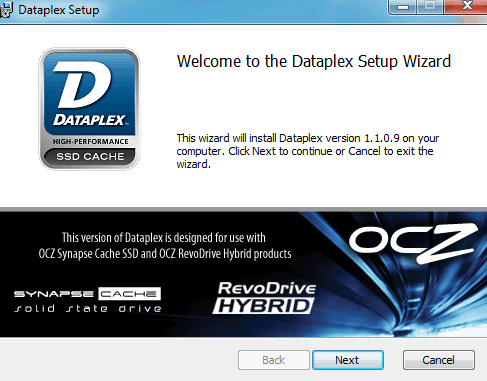
We already saw how the drive performs as a normal SSD, without cache. Of course, the basic reason to go and buy the Synapse Cache series is its caching feature, powered by the DataPlex software. Available for download at OCZ's website, the software should be enabled using the serial number found at the rear side of the drive and also in the manual bundled with it.

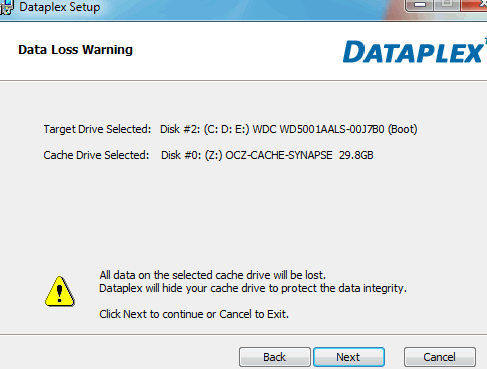
The installation process is easy. All you have to do is select the target drive - the WD 500GB 7200rpm HDD in our case - and the cache drive, which is the Synapse SSD:
After a successful installation and a reboot, you can check whether the DataPlex software is enabled using with a shortcut created on your desktop:

Congratulations, the Dataplex software is installed and ready to accelerate your system! Keep in mind that due the software's licensing method, you cannot install the same version of the software (same serial No) in another system . If two or more components of your system change, it is considered a “different” machine. If only one component changes, Dataplex automatically revalidates the license without issues, as long as the user is connected to the internet when the PC is rebooted after the change. Prior to changing two or more components, you should uninstall Dataplex to release the license. Licenses cannot be released after the system is no longer valid. In this case, you will need to be in touch with OCZ to reset the license.


Review Pages

1. Features
2. Package, drive
3. Benchmarks - Synapse as a regular non-cache SSD - page 1
4. Benchmarks - Synapse as a regular non-cache SSD - page 2
5. Installing the Dataplex software
6. Benchmarks - Synapse Cache DataPlex Vs Intel RST
7. Final words


Pages

  • « first
  • ‹ previous
  • 1
  • 2
  • 3
  • 4
  • 5
  • 6
  • 7
  • next ›
  • last »

OCZ Technology

Tags: OCZ Technology
Previous Post
ACRyan Veolo review
Next Post
Asus Maximus IV Gene-Z review

Related Posts

  • Toshiba completes acquisition of OCZ Technology Group's Assets and launches new subsidiary, OCZ Storage Solutions

  • Value-Optimized Toshiba RC100 NVMe SSDs Now Available

  • Toshiba Introduces New XS700 Series of Portable SSDs

  • Toshiba OCZ RD400 512GB M.2 PCIe SSD

  • Toshiba Introduces the Value-oriented OCZ TL100 SATA SSD Series

  • Toshiba Introduces the OCZ VX500 SATA SSD Series

  • OCZ RD400 NVMe SSD Series Released

  • OCZ Z-Drive 6000 And 6300 NVMe U.2 SSDs Released With Dual-port Functionality

Latest Reviews

Why Streaming Live Casino Games Demands Smarter Tech
Enterprise & IT

Why Streaming Live Casino Games Demands Smarter Tech

Kioxia Exceria Plus G3 512GB microSD
Cameras

Kioxia Exceria Plus G3 512GB microSD

SoundPeats Cove Pro
Consumer Electronics

SoundPeats Cove Pro

Asustor AS5404T 4-Bay NAS System
Enterprise & IT

Asustor AS5404T 4-Bay NAS System

be quiet! Pure Power 13M 1200W
PC components

be quiet! Pure Power 13M 1200W

Popular News

COLORFUL Introduces CVN B850I GAMING FROZEN Motherboard

COLORFUL Introduces CVN B850I GAMING FROZEN Motherboard

COLORFUL Presents CVN X870 ARK FROZEN Motherboard for AMD Ryzen 9000 CPUs

COLORFUL Presents CVN X870 ARK FROZEN Motherboard for AMD Ryzen 9000 CPUs

TEAMGROUP Launches EXPERT P34F Find My External SSD

TEAMGROUP Launches EXPERT P34F Find My External SSD

Samsung announces Galaxy Tab S11 and Galaxy S25 FE series

Samsung announces Galaxy Tab S11 and Galaxy S25 FE series

Viltrox Showcases Upcoming Lens Lineup and New TTL Flash at IBC 2025

Viltrox Showcases Upcoming Lens Lineup and New TTL Flash at IBC 2025

CORSAIR announces Vanguard Pro 96 and Vanguard 96 Gaming Keyboards

CORSAIR announces Vanguard Pro 96 and Vanguard 96 Gaming Keyboards

Panasonic Introduces the First Ultra-Telephoto Zoom Lens in the LUMIX S Series

Panasonic Introduces the First Ultra-Telephoto Zoom Lens in the LUMIX S Series

MSI Launches DATAMAG 40Gbps Magnetic Portable SSD

MSI Launches DATAMAG 40Gbps Magnetic Portable SSD

Main menu

  • Home
  • News
  • Reviews
  • Essays
  • Forum
  • Legacy
  • About
    • Submit News

    • Contact Us
    • Privacy

    • Promotion
    • Advertise

    • RSS Feed
    • Site Map
  • About
  • Privacy
  • Contact Us
  • Promotional Opportunities @ CdrInfo.com
  • Advertise on out site
  • Submit your News to our site
  • RSS Feed