Micron M600 128GB SSD review
3. Benchmarks - HDTachRW, HDTune Pro
Here is our testbed:
- Motherboard: Foxconn Quantum Force Rattler P67 vP04 BIOS
- Processor: Intel Core i5-2500K
- Case: Open Air testbed
- Power Supply Unit: Club 3D CSP-X1000CB 1000 Watt
- Graphics card: Club3D Radeon HD 6790 CoolStream Edition
- Memory: OCZ Gold PC3-10600 4x2GB 1333@CL9
- HDD: WD 500GB 7200RPM
- Monitor: LG L246WH-BH 24"
- Windows 7 x64 SP1 with latest updates installed
For the tests, we used the following software:
- HDTachRW v3.0.1.0
- HD Tune v4.50 Pro
- Crystal DiskMark v3
- ATTO Disk Benchmark v2.46
- ASS SSD Benchmark 1.5xxx
- IOMeter v2006.07.27 with Xtreme Benchmark template
- PCMark Professional edition v1.04
- Anvil Storage Utilities 1.0.34. Beta 11
We start the tests with the HDTachRW software. The software measures the sequential read speed, the random access speed and sequential write speed.
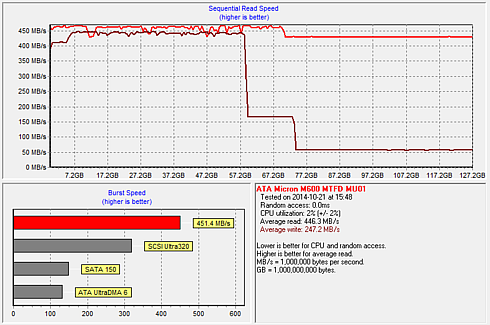
Three distinct performance regions are evident in the picture below. The first is the accelerated region, which persists until 46% logical saturation or 59GB are written in total. First writes go to SLC and performance is a steady 400MB/s.
The first drop indicates that the drive is now switching to MLC NAND. The drive writes in the non-acceleration region, where data is written in MLC to slow down the rate of physical saturation.
The third region, starting at 58% logical saturation or 74GB written in total, occurs when the drive must transform data written as SLC into MLC mode at the same time that new data is being written by the host. You see a significant overhead from the internal IOs that result in less than 100MB/s host write speeds.
If the drive was filled a second time in the same
address sequence, without first decreasing logical
and physical saturation, performance results would
alternate between regions 2 and 3.
Without dynamic write acceleration, performance
in a sequential fill from an FOB (fresh out of box) state would
correspond to consistent region 2 behavior, without
the accelerated region 1 or the reduced region 3.
Subsequent drive fills performed in the same write
address sequence as the first fill would also result in
continuous region 2 behavior.
HDTach returned average speeds of 446.3 MB/s and 247.2 MB/s for read and write, respectively. Obviously, in real world client scenarios it is unlikely that one would constantly write to the drive like HD Tach does. Typically write bursts are smaller so all writes should hit the SLC portion at full speed.
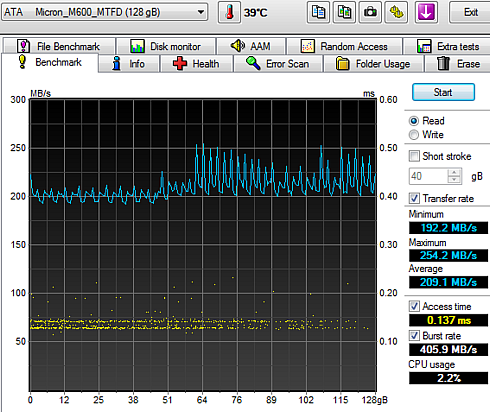
We move on to the HD Tune Pro software, another utility we used to measure the drive's reading and writing performances. Although not necessarily representative of real-world workloads, HD Tune's targeted tests give us a glimpse of each drive's raw capabilities.
The M600 read the data sequentially at 209.1 MB/s (average):
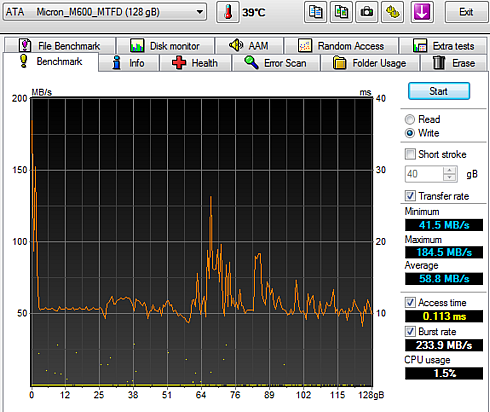
As you see in the screenshot below, writing was slow and the behavior matches what we experienced previously in the HD Tach test. The SSD is obviously transformed data written as SLC into MLC mode at the same time that new data was being written by the host.
We were expecting a "region 2" behavior, with average write speeds around 160 MB/s. But since the drive was not in a FOB condition, the subsequent drive fills we performed in the same write address sequence as the first fill (previous benchmark) kept the drive's performance in reduced, "region 3" levels. In order to return the drive to fresh out of box conditions you may perform an ATA SECURITY ERASE command, which returns logical and physical saturation to zero.
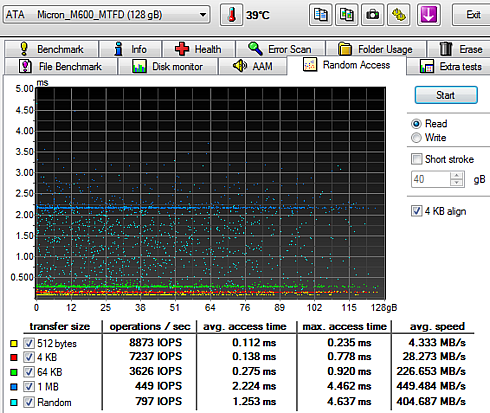
Below you see random reading test, where the Micron M600 SSD gave a 449 MB/s average reading speed for an 1MB transfer size and a 404 MB/s average reading for transferring files with random sizes - an adequate good performance.
In the corresponding random write test, we also experienced a strange behavior. The drive was very slow with random and 1MB data files, and it seems that garbage collection kicked in several time, delaying the writing procedure. Have in mind that dynamic write acceleration is not performed during garbage collection, so the overall random speed was low:
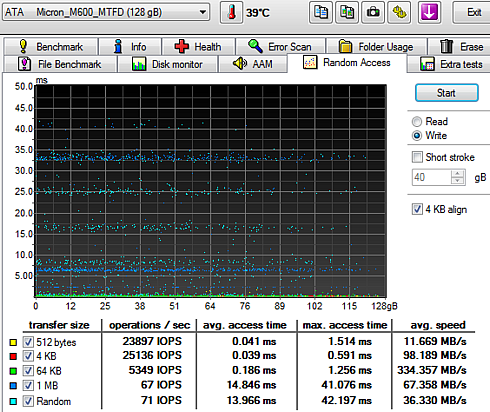
The Micron M600 drive offered middling performing according to HD Tune in the transfer tests, but access times were among the best we've seen.
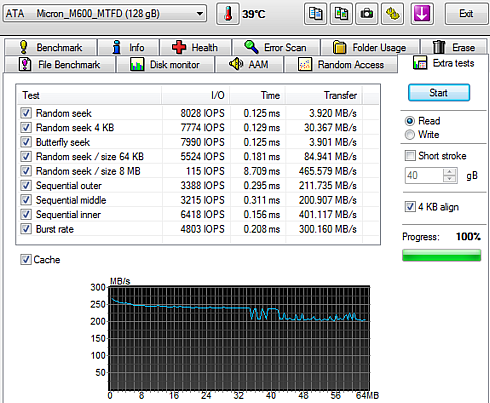
Below you see some additional sequential and random reading and writing tests: