Breaking News

Firewalla App 1.67 Brings Enterprise Wi-Fi, RADIUS, and Advanced AP7 Controls to Small Businesses and Power Users Samsung To Unveil AI Vision Built With Google Gemini at CES 2026 Samsung Unveils New Odyssey Gaming Monitor Lineup COLORFUL Launches iGame GeForce RTX 50 MINI OC Series Graphics Cards for Compact PCs LG Display unveils world’s first 240Hz RGB stripe OLED panel

logo

  • Share Us
    • Facebook
    • Twitter
  • Home
  • Home
  • News
  • Reviews
  • Essays
  • Forum
  • Legacy
  • About
    • Submit News

    • Contact Us
    • Privacy

    • Promotion
    • Advertise

    • RSS Feed
    • Site Map

Search form

Intel Simplifies Password Management with True Key

Intel Simplifies Password Management with True Key

Enterprise & IT Mar 7,2016 0

Intel Security has started offering a new feature in True Key, the app that lets users say goodbye to the hassle of remembering multiple passwords. True Key by Intel Security is an application you can download on all your devices to remove the hassle of passwords. You can log in to the True Key app using factors such as your face, a fingerprint or a device you own.

From there, the app works in the background to make your current passwords stronger, remembers them and instantly logs you in – so you don’t have to. The True Key app offers customizable security so you can log in with one factor for fast access, or combine multiple factors together for added security.

Until today, if a user forgot their Master Password there was no way to reset it. Now, Master Password Reset allows you to reset your forgotten Master Password by verifying other unique factors like their face or, fingerprint or via a second device.

If you choose to use your face to log-in to a device, the True Key app measures your unique facial math to sign you. Thi soption is available an all platforms - PC, Mac, iOS and Adnroid.
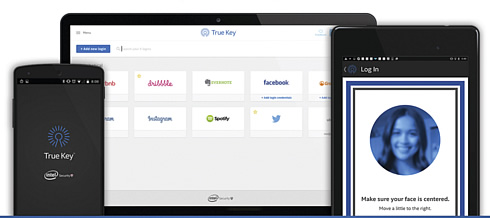
You can also Use a mobile phone or tablet as an additional factor. When you sign in on your PC or Mac, the True Key app sends a notification to your iOS or Android 2nd device - just swipe the screen on your 2nd device to verify it's you.

True Key auto-saves and enters your passwords, so you don't have to. The passwords are stored locally on your device and synced to your profile using the strongest encryption available.

When you launch an app or visit a website, True Key auto-fills your passwords and logs in for you. The app also syncs across all your devices so you can access your information whenever you need it.

True Key uses at least two factors to verify it's you. You choose the first, and True Key verifies you're on a trusted device - multi-factor made easy.

If you want more security, you can add additional factors when you sign in to make your profile even stronger.

The True Key app is a freemium product. You can download across all your devices and store up to 15 logins for free. If you require additional storage, upgrade to a premium subscription ($19.99/year)

The True Key app is the platforms and browsers below:

  • Desktop OS
    • Mac OS X 10.9+
    • Windows 7, 8, 8.1, 10
  • Browsers
    • Internet Explorer 10+
    • Google Chrome 37+
    • Firefox 41+
  • Mobile:
    • Android OS 4.03+
    • iOS 8+

Tags: IntelTrue key
Previous Post
Apple To Pay $450 million As Part Of A Settlement Related to e-books Price-fixing Case
Next Post
New OS X Targeted In Ransomware Campaign

Related Posts

  • Intel and NVIDIA to Jointly Develop AI Infrastructure and Personal Computing Products

  • An Intel-HP Collaboration Delivers Next-Gen AI PCs

  • New Intel Xeon 6 CPUs to Maximize GPU-Accelerated AI Performance

  • Intel Unveils New GPUs for AI and Workstations at Computex 2025

  • G.SKILL Releases DDR5 Memory Support List for Intel 200S Boost

  • Intel and its partners release BIOS update for Intel 15th Gen to increase performance

  • Intel-AMD new motherboards announced

  • Intel at CES 2025

Latest News

Firewalla App 1.67 Brings Enterprise Wi-Fi, RADIUS, and Advanced AP7 Controls to Small Businesses and Power Users
Enterprise & IT

Firewalla App 1.67 Brings Enterprise Wi-Fi, RADIUS, and Advanced AP7 Controls to Small Businesses and Power Users

Samsung To Unveil AI Vision Built With Google Gemini at CES 2026
Consumer Electronics

Samsung To Unveil AI Vision Built With Google Gemini at CES 2026

Samsung Unveils New Odyssey Gaming Monitor Lineup
Consumer Electronics

Samsung Unveils New Odyssey Gaming Monitor Lineup

COLORFUL Launches iGame GeForce RTX 50 MINI OC Series Graphics Cards for Compact PCs
GPUs

COLORFUL Launches iGame GeForce RTX 50 MINI OC Series Graphics Cards for Compact PCs

LG Display unveils world’s first 240Hz RGB stripe OLED panel
Enterprise & IT

LG Display unveils world’s first 240Hz RGB stripe OLED panel

Popular Reviews

be quiet! Dark Mount Keyboard

be quiet! Dark Mount Keyboard

Terramaster F8-SSD

Terramaster F8-SSD

be quiet! Light Mount Keyboard

be quiet! Light Mount Keyboard

Soundpeats Pop Clip

Soundpeats Pop Clip

Akaso 360 Action camera

Akaso 360 Action camera

Dragon Touch Digital Calendar

Dragon Touch Digital Calendar

Noctua NF-A12x25 G2 fans

Noctua NF-A12x25 G2 fans

be quiet! Pure Loop 3 280mm

be quiet! Pure Loop 3 280mm

Main menu

  • Home
  • News
  • Reviews
  • Essays
  • Forum
  • Legacy
  • About
    • Submit News

    • Contact Us
    • Privacy

    • Promotion
    • Advertise

    • RSS Feed
    • Site Map
  • About
  • Privacy
  • Contact Us
  • Promotional Opportunities @ CdrInfo.com
  • Advertise on out site
  • Submit your News to our site
  • RSS Feed