Breaking News

ASUS Announces WiFi 8 Router DJI Launches Osmo 360 II Razer introduces Clio X Wireless Speaker Head Cushion That Delivers THX Spatial Audio LiberNovo Showcases Ergonomic Innovation at IFA 2026 with Maxis Series for Big And Tall Users TIMEKETTLE UNVEILS NEW W4 PLUS AI INTERPRETER EARBUDS EXPANDING REAL-TIME TRANSLATION ACROSS CALLS, MEETINGS AND MULTIMEDIA CONTENT

logo

  • Share Us
    • Facebook
    • Twitter
  • Home
  • Home
  • News
  • Reviews
  • Essays
  • About
    • Submit News

    • Contact Us
    • Privacy

    • Promotion
    • Advertise

    • RSS Feed

Search form

Intel P35 Motherboard Roundup Vol2

Oct 11,2007 0

7. Biostar TP35D3-A7 Deluxe BIOS


Review Pages

1. Introduction
2. Asus Blitz Formula SE Retail Package
3. Asus Blitz Formula SE BIOS
4. Asus Blitz Extreme Retail Package
5. Asus Blitz Extreme BIOS
6. Biostar TP35D3-A7 Deluxe Retail Package
7. Biostar TP35D3-A7 Deluxe BIOS
8. Test Configuration
9. Everest Ultimate Edition 2007
10. SiSOFT Sandra
11. PCMARK - 3DMARK
12. Science Mark - PovRay - x264 Benchmark
13. Maxon Cinebench
14. SuperPi
15. SYSmark 2007 - WorldBench
16. Lost Planet: Extreme Condition
17. Overclocking DDR2 Motherboards
18. Overclocking DDR3 motherboards
19. Conclusion


The Biostar TP35D3-A7 Deluxe BIOS is based on the Phoenix - Award BIOS.
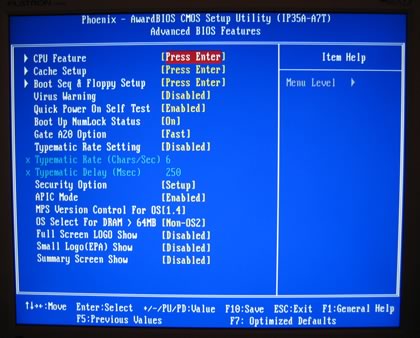
The most interesting tab is the "Overclock Navigator Engine" .

There are three pre-defined overclocking settings:

  • V6 Tech Engine: This setting will raise about 10%~15% of whole system performance.
  • V8 Tech Engine: This setting will raise about 15%~25% of whole system performance.
  • V12 Tech Engine: This setting will raise about 25%~30% of whole system performance

Manual overclocking allows most settings to be set according to your needs.
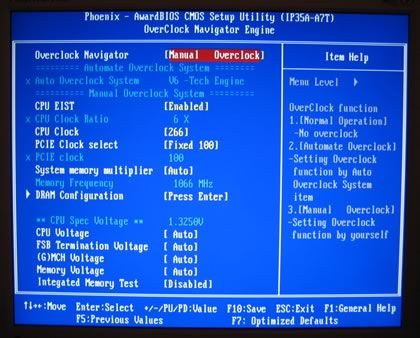
Most settings are easy to understand, however the System Memory Multiplier, could be made easier:
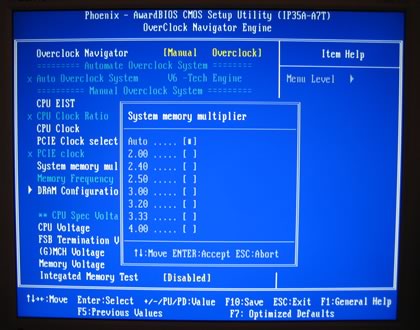
DRAM timings can be set either from SPD or manually. Note that you cannot set DRAM 1T working mode.
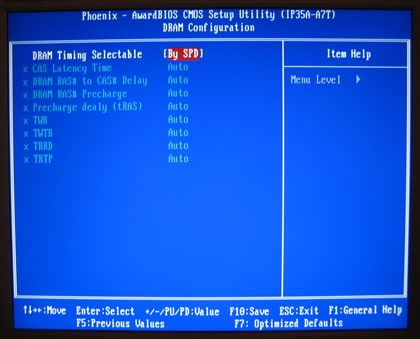
What's rather annoying is the fact that you cannot set voltages in absolute values, but only offsets from the the BIOS default.
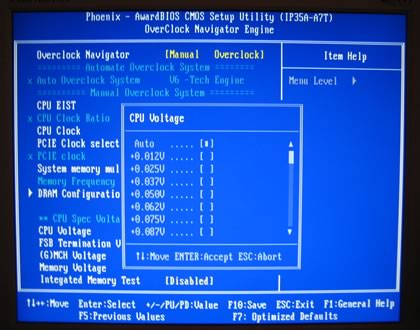
The rest of the voltages are not what we have seen with the Asus boards. They are rather limited.

  • FSB: 1.35~1.55V
  • MCH: 1.35~1.55V
  • DRAM: +0.05V~0.35V

Under PC Health Status, we can see the voltages and temperatures. Note that there seems to be some kind of Vcore leakage in the displayed values, since not all times do you get what you set in the voltage corresponding page...

- Installation

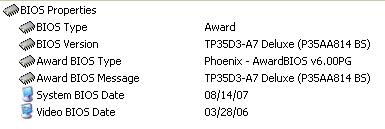
Using Everest Ultimate Edition 2007, we can get more information about the board:
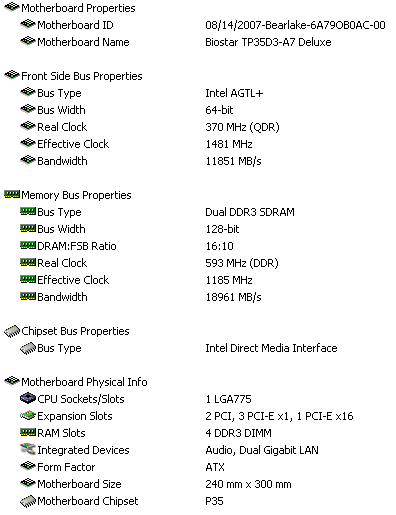
Both the North Bridge and South Bridge chipsets unveiled:


For all tests, we used the latest available BIOS.
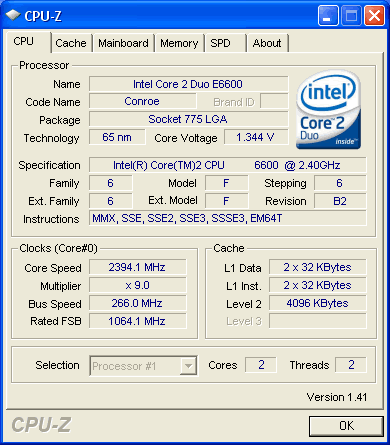
Let's now see how our CPU was identified by CPU-Z:
 

Review Pages

1. Introduction
2. Asus Blitz Formula SE Retail Package
3. Asus Blitz Formula SE BIOS
4. Asus Blitz Extreme Retail Package
5. Asus Blitz Extreme BIOS
6. Biostar TP35D3-A7 Deluxe Retail Package
7. Biostar TP35D3-A7 Deluxe BIOS
8. Test Configuration
9. Everest Ultimate Edition 2007
10. SiSOFT Sandra
11. PCMARK - 3DMARK
12. Science Mark - PovRay - x264 Benchmark
13. Maxon Cinebench
14. SuperPi
15. SYSmark 2007 - WorldBench
16. Lost Planet: Extreme Condition
17. Overclocking DDR2 Motherboards
18. Overclocking DDR3 motherboards
19. Conclusion
 

Pages

  • « first
  • ‹ previous
  • …
  • 3
  • 4
  • 5
  • 6
  • 7
  • 8
  • 9
  • 10
  • 11
  • …
  • next ›
  • last »

Intel

ASUS

P35

DDR2

DDR3

Tags: Intel ASUS P35 DDR2 DDR3
Previous Post
Intel X38 Motherboard Roundup
Next Post
Crucial BallistiX DDR3-1600

Related Posts

  • ASUS Announces WiFi 8 Router

  • Asus announces ExpertBook B3 G2 and ExpertBook P3 G2

  • Intel Gamer Days 2026 Kicking Off with AAA Gaming Bundle - Partnerships

  • ASUS Announces Prime AP304 PC Case

  • ASUS Announces ProArt Display OLED PA279CDV and PA329CDV

  • Intel Arc G-Series Processors Set a New Standard for Handheld PC Gaming

  • ASUS Announces T1 GeForce RTX 5070 and RTX 5060 Ti Graphics Cards

  • ASUS Announces ProArt GeForce RTX 5090 Graphics Card

Latest Reviews

be quiet! Dark Power 14 IO
PC components

be quiet! Dark Power 14 IO

SanDisk High Endurance 512GB microSDXC
Cameras

SanDisk High Endurance 512GB microSDXC

Samsung PRO Ultimate 512GB microSDXC
Cameras

Samsung PRO Ultimate 512GB microSDXC

be quiet! Light Mount TKL
Consumer Electronics

be quiet! Light Mount TKL

be quiet! Light Loop IO LCD
Cooling Systems

be quiet! Light Loop IO LCD

Popular News

CORSAIR announces Vanguard Pro 96 and Vanguard 96 Gaming Keyboards

CORSAIR announces Vanguard Pro 96 and Vanguard 96 Gaming Keyboards

MSI Launches FORGE GK600 TKL WIRELESS Special Edition Compact Mechanical Keyboard

MSI Launches FORGE GK600 TKL WIRELESS Special Edition Compact Mechanical Keyboard

Viltrox Showcases Upcoming Lens Lineup and New TTL Flash at IBC 2025

Viltrox Showcases Upcoming Lens Lineup and New TTL Flash at IBC 2025

Panasonic Introduces the First Ultra-Telephoto Zoom Lens in the LUMIX S Series

Panasonic Introduces the First Ultra-Telephoto Zoom Lens in the LUMIX S Series

MSI Launches DATAMAG 40Gbps Magnetic Portable SSD

MSI Launches DATAMAG 40Gbps Magnetic Portable SSD

MSI’s Latest AMD X870E MAX & EVO Series Motherboards

MSI’s Latest AMD X870E MAX & EVO Series Motherboards

COLORFUL Launches iGame B850M ULTRA Series Micro-ATX Motherboards

COLORFUL Launches iGame B850M ULTRA Series Micro-ATX Motherboards

COLORFUL Presents Limited Edition Chitu MAG-60 Magnetic Keyboard Inspired by the Year of the Horse

COLORFUL Presents Limited Edition Chitu MAG-60 Magnetic Keyboard Inspired by the Year of the Horse

Main menu

  • Home
  • News
  • Reviews
  • Essays
  • About
    • Submit News

    • Contact Us
    • Privacy

    • Promotion
    • Advertise

    • RSS Feed
  • About
  • Privacy
  • Contact Us
  • Promotional Opportunities @ CdrInfo.com
  • Advertise on out site
  • Submit your News to our site
  • RSS Feed