GP2X Portable Gaming Console
11. Conclusion
 The GamePark Holdings GP2X console is based on Linux and attempts to fill the gap between wide spread commercial consoles from Nintendo/Sony and open source. With the GP2X, you buy an open source console, where you can modify/develop your own applications/games and expand you creativity. According to GamePark Holdings, more than 30,000 consoles have been sold around the world up till now, and that number keeps increasing everyday. To be honest, I had never heard about this console until a friend mentioned it and urged me to test it. First of all, I have to admit I am not a game addict. Due to work load, my gaming days are over, but I always look for interesting gadgets. The GP2X is a perfect platform for users who want to get free games developed by other users. With the PSP and GBA, you have to pay each game, up to €50. Of course, there are homebrew games there but, the GP2X community has a more open community.
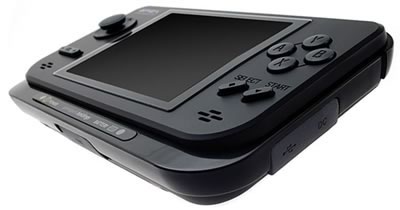
The GP2X is well built. It has many of the usual buttons and an 8-way joystick to control most games. There is an option to connect it with a PC, via the embedded USB port. In fact, you can connect USB devices, but due to insufficient power, the GP2X cannot work as a host, so only USB powered devices will work. There is an optional cable for connecting the GP2X to a TV, via S-Video cable. In this case, avoid LCD TVs since the colours and resolution are not the best. Prefer instead the traditional tube TVs. What we didn't like from the GP2X hardware, is the included TFT screen. While it has very nice colours, its not as bright as we would like it to be, and its viewing angle is not very good. This means you have to hold the console at a specific angle to get the best view. The 8-way joystick wasn't very good either. It sometimes stuck in the middle, resulting is a loss of control of our character. Maybe this was a glitch with our sample, since we didn't see other users complaining about this.

The GP2X play back perfectly DivX 3/4/5 and Xvid files with or without subtitles. Of course, it's suggested to avoid using advanced encoding features like GMC and Qpel. MPG/WMV and x264 files, which are not currently supported. It is quite possible that a newer firmware will support the x264 since the GP2X is supposed to have a dedicated video decoder. English users will have no problem viewing subtitles directly, other European language users (like Greek) have to use a modified version of the included MPlayer to view subtitles. We elaborated in our review why there are not many commercial games for the GP2X. Payback is the only commercial game that is being sold currently for the GP2X console. While its graphics are very good, it didn't particularly impress us. Perhaps it was the specific type of game we didn't like.
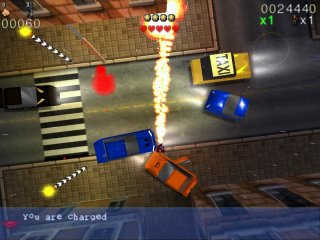
What we did like, was the fact that there are emulators for many "older" systems like NES, GB, MD, NeoGeo and of course arcades (via MAME). Each emulator has its own plus and minus, there are many you can try and find what works best for you. The Mame GP2X project works very well with specific titles. So far, it supports over 1100 games. However, not all games run at 100% speed (60FPS). Older games will run just fine, newer/NeoGeo games will run at 13~28FPS maximum (with overclocking aid).

Overall we feel that the GP2X is a "utility" for experienced users who want to search and discover the secrets of this platform. The open source firmware makes development even easier and there is already a big community that supports the whole idea. Gamers who want to play the latest game titles and don't want to go reading through threads on why this and that doesn't work and how to fix it, should look at a commercial console (like PSP or GBA), with of course the additional cost of buying games. You should make you decision based on your needs and decide what's best for you. After all, Xmas holidays are just around the corner :-)
The positive
- Based on Linux with all benefits from this
- 3.5" TFT screen offers good visual quality
- Supports DivX, Xvid, Mp3, OGG, Subtitle formats out of the box
- Supports TV-Out with optional cable
- Wide support for emulators and homebrew applications
- Users can download free games and applications
- Based on SD format (cheaper than Memory Stick)
- Good construction/assembly
- Works with AA batteries
- Relatively cheap, cheaper than the PSP
- Very big community supports the whole project
The negative
- 3.5" TFT screen needs specific viewing angle to get best image
- Not many commercial games are being developed
- In many cases you would have to read forums/tweak/replace files to fix issues
- Not as CPU powerful as we would like, newer MAME games run at 13~28FPS
- Doesn't include any networking functions (out of-the-box) nor Wi-Fi
- Rechargeable Ni-Mh batteries are an absolute need and are an expensive addition
- 8-way joystick didn't feel very comfortable or responsive in our hands