Asus P6T Deluxe Vs Foxconn Renaissance
2. Asus P6T Deluxe/OC Palm Edition - Opening the box
Review Pages
2. Asus P6T Deluxe/OC Palm Edition - Opening the box
3. Asus P6T Deluxe/OC Palm Edition - BIOS
4. Foxconn Renaissance - Specifications
5. Foxconn Renaissance - Opening the box
6. Foxconn Renaissance - BIOS
7. Testbed
8. Benchmarks - Everest Ultimate Edition, SiSoftware Sandra
9. Benchmarks - PCMark Vantage, BAPCo's SYSmark 2007 Preview
10. Benchmarks - MAXON CINEBENCH, x264 HD Benchmark, TMPGEnc 4 Xpress
11. Benchmarks - SuperPI, wPrime
12. Benchmarks - 3DMark 06, Crysis v1.2
13. Overclocking tests - Asus P6T Deluxe
14. Overclocking tests - Foxconn Renaissance
15. Conclusion
As we previously mentioned, the Asus P6T Deluxe/OC Palm Edition is one of the most feature-rich motherboards the Taiwanese company is currently offering. As a result, it is highly priced at $338.99.
The retail package follows the usual design met in the Deluxe series of Asus' motherboards. The logos found on the box are teasing the wannabe overclockers with the the board's multiple features:

In the box everything is placed in the right order and secured in plastic shells.
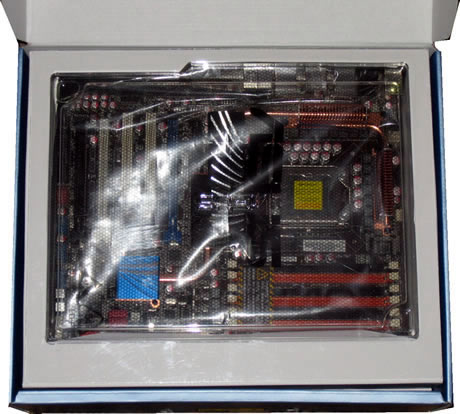
Here is what you will find in the retail box:
- OC Palm screen
- UltraDMA 133/100/66 cable
- 6 x Serial ATA cables
- 2 x SAS cables
- ASUS Q-Shield
- User's manual
- 2 in 1 Q-connector
- 1 x 2-port USB2.0 / 1-port IEEE1394 (4-pin) module
- 1 x SLI bridge cable
- 2 x Screw pillar
- 1 x Optional Fan for Water-Cooling or Passive-Cooling only
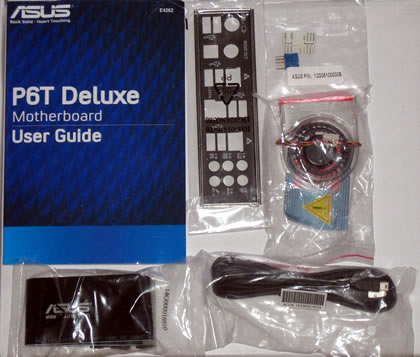

For extra performance, you may purchase an extra cooling fan (40x40mm) that would keep the main passive heatsink of the board cool.

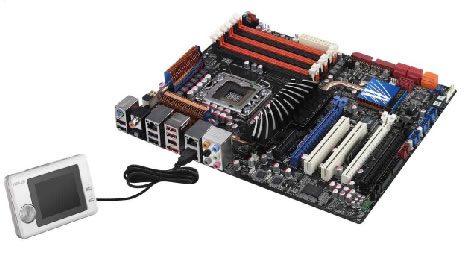
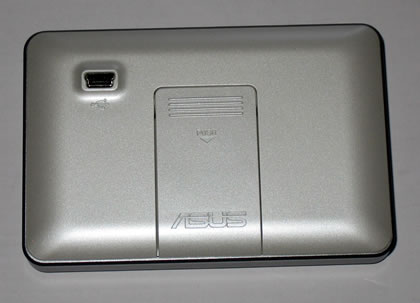
As we previously mentioned, the OC Palm: OC controller included in the package can be connected to the motherboard's USB port. The stylish device allows you to overclock the motherboard in real-time without interrupting ongoing work and games. You can also monitor system temperatures and fan speeds with ease. It also supports the Yahoo! Widgets feature for online displays of real-time info like weather, stock prices and web-mail alerts.

Finally, let's have a look at the the motherboard. At a glance, its layout looks very clean and straightforward. The overall passive heatsinks are very low-heighted and they are connected via copper heatpipes.
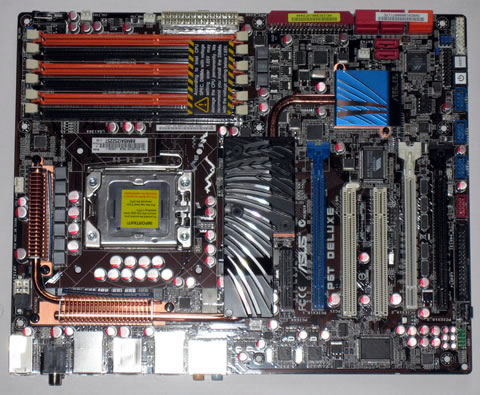
The massive black heatsink can get an additional fan as we mentioned earlier to further improve the overall stability under overclocking conditions.
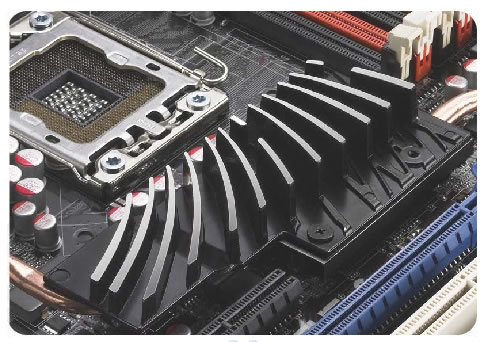
Asus uses a 16+2 phase VRM design to all X58-based motherboards. 16-phases go for vCore and the extra 2 phases for QPI/Memory controller inside the CPU which provide the highest power efficiency and hence generates less heat to enhance the overclocking capability.
The free area around the CPU should be enough in order to install any CPU cooler bigger than the Intel's custom one. The components (capacitors, MOSFETs etc) in the area are also short enough to make the installation of the cooler easier. This was confirmed in one of our previous reviews with the GlacialTech UFO V51 cpu cooler for 1366.

The Asus Stack Cool 2 design also dissipates the produced heat.

Six DDR3 DIMMs are available for up to 24GB memory configurations, properly colored for triple-channel installations. Before buying any DDR3 modules, it would be wise to check the list of the supported memory models at Asus' web site.
A sticker covers the memory area warning you that the DDR3 voltage should not be set over 1.65V, for CPU safety reasons. While there are reports that this claim is not valid for latest Core i7 series, you'd better follow this rule.

A blue led will light up as soon as you install all three memory modules correctly.

At the lower left side of the board you can find six (6) SATAII connectors, two (2) SATA SAS connectors and of course the ATA133 connector. In the picture below you can also see a passive copper heatsink that covers the Southbridge chip. Two handy switches (reset/power on) are also placed there for your convenience when you are trying to overclock the motherboard.

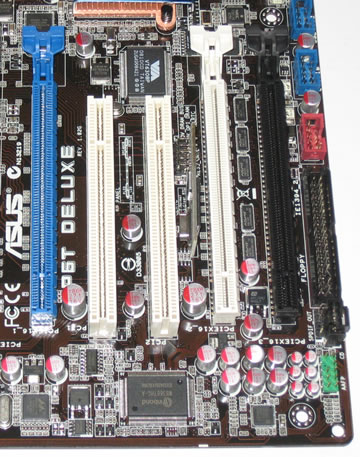
The Asus P6T Deluxe/OC Palm edition supports both the Crossfire and Nvidia's SLI technologies. The board offers three (3x) PCIe 2.0 X16 slots that can operate at x16/x16/x1 or x16/x8/x8 modes, depending on the number of graphics cards you have installed at the same time (two or three).
We should note here that you can only use two Nvidia-based cards at the same time, since full 3-ple SLI (x16) is only supported by the Nvidia nForce 200 chipset. Asus offers such a solution with the Asus P6T6 WS Revolution motherboard.
The available SATA ports are also ergonomically placed on the board, allowing you to install even long graphics cards:
The rear I/O panel has the following ports and connectors:
- 1 x PS/2 Keyboard/ Mouse combo port
- 1 x S/PDIF Out (Coaxial + Optical)
- 1 x External SATA
- 1 x IEEE1394a
- 2 x RJ45 port
- 8 x USB 2.0/1.1
- 8-channel Audio I/O

Review Pages
2. Asus P6T Deluxe/OC Palm Edition - Opening the box
3. Asus P6T Deluxe/OC Palm Edition - BIOS
4. Foxconn Renaissance - Specifications
5. Foxconn Renaissance - Opening the box
6. Foxconn Renaissance - BIOS
7. Testbed
8. Benchmarks - Everest Ultimate Edition, SiSoftware Sandra
9. Benchmarks - PCMark Vantage, BAPCo's SYSmark 2007 Preview
10. Benchmarks - MAXON CINEBENCH, x264 HD Benchmark, TMPGEnc 4 Xpress
11. Benchmarks - SuperPI, wPrime
12. Benchmarks - 3DMark 06, Crysis v1.2
13. Overclocking tests - Asus P6T Deluxe
14. Overclocking tests - Foxconn Renaissance
15. Conclusion