Breaking News

SAMA Introduces the S32 WOOD, a Compact M-ATX Case Bundled with an 80 PLUS Gold PSU Thypoch Completes Simera-C Cine Prime Lineup with New 100mm T1.9 Lens CORSAIR Launches the RM1200e Power Supply with Built-in PinProtect GPU Overcurrent Protection and Platinum-certified Efficiency CORSAIR Changes the Game with PureVector, a Science-Based Personalized Aiming Technology, Launching Exclusively in the SABRE v3 PRO PureVector Mouse Series AMD FSR Upscaling 4.1 Boosts Frames and Image Quality on More Devices

logo

  • Share Us
    • Facebook
    • Twitter
  • Home
  • Home
  • News
  • Reviews
  • Essays
  • About
    • Submit News

    • Contact Us
    • Privacy

    • Promotion
    • Advertise

    • RSS Feed

Search form

Primera Signature Z6 CD/DVD Printer

Aug 20,2004 0

2. Hardware Installation


Review Pages

1. Introduction
2. Hardware Installation
3. Software Setup
4. Software Preview
5. Printing Preferences
6. Properties Menu - Other Options
7. Tests - Page 1
8. Tests - Page 2
9. Coclusion


Primera Signature Z6 CD/DVD Printer - Page 2

Hardware Installation

For installing the Signature Z6 on your PC, you'll need the following included media:

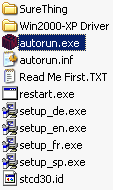
The installation should start automatically when you insert the CD. If you have disabled Autorun, then you'll have to run the installation procedure manually from the disc. Open the CD and find and run autorun.exe.
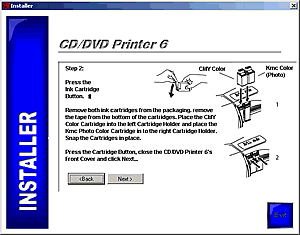
In either case, the following window will appear. Choose "Quickstart Install".

Just make sure you follow the onscreen instuctions and hopefully, you should have no problems.

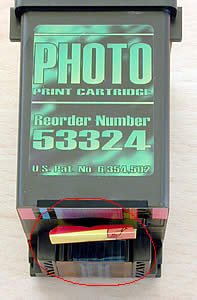
Make sure you remove the security strips before installing the ink cartridges.
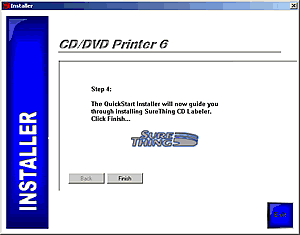
After pressing the Finish button, SureThing CD Labeler will be installed.
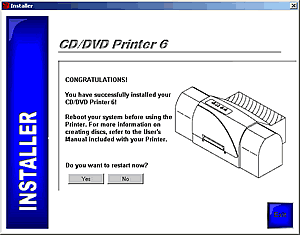
Before completing the setup, you will be asked to restart you computer.
 

Review Pages

1. Introduction
2. Hardware Installation
3. Software Setup
4. Software Preview
5. Printing Preferences
6. Properties Menu - Other Options
7. Tests - Page 1
8. Tests - Page 2
9. Coclusion


Pages

  • « first
  • ‹ previous
  • 1
  • 2
  • 3
  • 4
  • 5
  • 6
  • 7
  • 8
  • 9
  • next ›
  • last »

Primera Technology

Tags: Primera Technology
Previous Post
TEAC DV-W512G
Next Post
Gainward CoolFX 6800 Ultra - Updated

Related Posts

  • Primera Introduces The LX600 Color Label Printer

  • New Primera Bravo 4200-Series Disc Publishers Are Now Available

  • Primera Trio All-in-One Printer Fits In Your Bag

  • Primera Introduces The DL500 Durable Label Printer

  • Primera Announces More Affordable Version of Bravo 4051 Disc Publisher

  • Primera Cuts Bravo SE Blu Disc Publisher Price

  • Primera And JVC TO Offer New Archive-Series Disc Publisher

  • Primera Announces Heavy-duty Bravo 4102 XRP Disc Publishers

Latest Reviews

Why Intelligent Firmware Matters More Than Peak Throughput in NAS Systems
Enterprise & IT

Why Intelligent Firmware Matters More Than Peak Throughput in NAS Systems

Fanxiang MP83 M.2 NVMe SSD Enclosure
Enterprise & IT

Fanxiang MP83 M.2 NVMe SSD Enclosure

Ugreen CM642 USB4.0 Enclosure
PC components

Ugreen CM642 USB4.0 Enclosure

be quiet! Dark Power 14 IO
PC components

be quiet! Dark Power 14 IO

SanDisk High Endurance 512GB microSDXC
Cameras

SanDisk High Endurance 512GB microSDXC

Popular News

MSI’s Latest AMD X870E MAX & EVO Series Motherboards

MSI’s Latest AMD X870E MAX & EVO Series Motherboards

COLORFUL Launches iGame B850M ULTRA Series Micro-ATX Motherboards

COLORFUL Launches iGame B850M ULTRA Series Micro-ATX Motherboards

COLORFUL Presents Limited Edition Chitu MAG-60 Magnetic Keyboard Inspired by the Year of the Horse

COLORFUL Presents Limited Edition Chitu MAG-60 Magnetic Keyboard Inspired by the Year of the Horse

COLORFUL Launches iGame B850I MINI OC V14 Motherboard

COLORFUL Launches iGame B850I MINI OC V14 Motherboard

COLORFUL Launches the iGame X870E VULCAN W OC Motherboard

COLORFUL Launches the iGame X870E VULCAN W OC Motherboard

COLORFUL Presents iGame Z890 ULTRA-S W and iGame Z890M ULTRA Z Motherboards

COLORFUL Presents iGame Z890 ULTRA-S W and iGame Z890M ULTRA Z Motherboards

COLORFUL Expands B850 Motherboard Lineup with New CVN, Battle-Ax, and MEOW Models

COLORFUL Expands B850 Motherboard Lineup with New CVN, Battle-Ax, and MEOW Models

ASRock Adds Support for One Sub-Channel DRAM Module on Intel DDR5 Motherboards

ASRock Adds Support for One Sub-Channel DRAM Module on Intel DDR5 Motherboards

Main menu

  • Home
  • News
  • Reviews
  • Essays
  • About
    • Submit News

    • Contact Us
    • Privacy

    • Promotion
    • Advertise

    • RSS Feed
  • About
  • Privacy
  • Contact Us
  • Promotional Opportunities @ CdrInfo.com
  • Advertise on out site
  • Submit your News to our site
  • RSS Feed