
Memorex D² External
1. Introduction - Retail Package
Review Pages
2. Transfer Rate Reading Tests
3. CD Error Correction Tests
4. DVD Error Correction Tests
5. Protected Disc Tests
6. DAE Tests
7. Protected AudioCDs
8. CD Recording Tests
9. 3T Jitter Tests
10. C1 / C2 Error Measurements
11. DVD Recording Tests
12. CDSpeed/PlexTools Scans - Page 1
13. CDSpeed/PlexTools Scans - Page 2
14. CDSpeed/PlexTools Scans - Page 3
15. CDSpeed/PlexTools Scans - Page 4
16. DVD+R DL - Page 1
17. DVD+R DL - Page 2
18. F16 vs. SA300 - Page 1
19. F16 vs. SA300 - Page 2
20. F16 vs. SA300 - Page 3
21. F16 vs. SA300 - Page 4
22. BookType Setting
23. Conclusion
Memorex D² External Burner- Page 1
 It
was only very recently that Memorex had released the D² (or F16)
internal burner. Now, the same drive becomes external. The external version
of the D² offers maximum compatibility, with Firewire IEEE 1394a and
USB2.0 support. The specifications
for this device
are the same as those of the internal model. However, different writing and
reading behavior is usually observed between internal and external models.
Let us
see how this external burner performed.
It
was only very recently that Memorex had released the D² (or F16)
internal burner. Now, the same drive becomes external. The external version
of the D² offers maximum compatibility, with Firewire IEEE 1394a and
USB2.0 support. The specifications
for this device
are the same as those of the internal model. However, different writing and
reading behavior is usually observed between internal and external models.
Let us
see how this external burner performed.
The drive supports 16X writing for DVD+R, and 8X for DVD-R. Of course, Double Layer writing is supported, at 2.4X. It can also write CD media at 48X and ReWrite at 24X. Buffer underrun protection is introduced for safe burning.
- Specifications
Interface: |
IEEE 1394a and USB2.0 |
Write Speeds: |
DVD+R:16X / -R: 8X, DVD+R9:2.4X DVD+RW: 4X, DVD-RW: 4X |
CD-R: 48X, CD-RW: 24X |
|
Read Speeds: |
DVD+R/-R/+RW/-RW: 8X |
DVD-ROM: 16X, CD-R/RW: 48X |
|
Random Access: |
DVD: 160msec, CD: 160msec |
Buffer Size: |
2MB |
Supported Disc Formats: |
DVD-ROM, DVD-Video, DVD+R, DVD+RW, DVD-R, DVD+R9, DVD-RW, CD-Extra, CD-I, CD-ROM, Audio CD, CDR,CD-RW, CD-ROM, CD-ROM XA, CD Test, Photo CD, Hybrid CD |
Supported Writing Types: |
DVD±RW: Disc-at-once, Incremental recording, Multi-border recording, Restricted overwriting |
| CD-R/RW: Variable Packet, TAO, SAO, DAO, Raw Mode Burning & Over-Burn | |
| Software Details: | Nero Express 6, Nero InCD, Nero Vision Express 2, Nero BackITup, Nero Showtime, Nero Recode 2, Nero Cover-Designer, Nero Tool Kit, PhotoShow Deluxe |
Below are the drive's main specs as given by NeroInfoTool and DVDInfoPro:

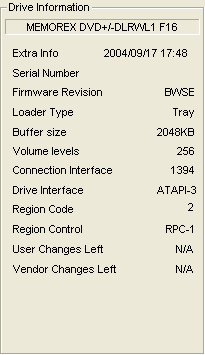
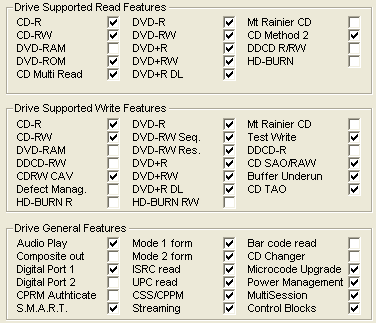
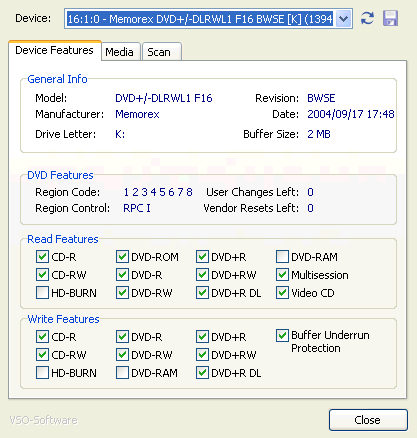
The drive also uses the RPC II region control, allowing a user to change the drive's region at most 5 times. However, since this is a LiteOn based drive, you can set the drive to region free using several utilities such as Kprobe.
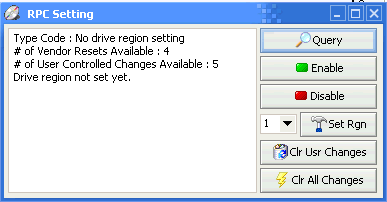
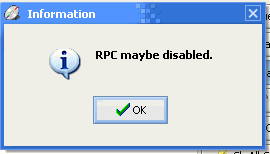

Below is some additional information from KProbe regarding LiteON based drives:

- European Retail package
 The retail box includes the external drive, one USB 2.0 cable, one
Now let's take a look at the drive itself.
The dark colored front panel of the drive remains the same as the internal model, with the Memorex logo and the DVD+R Double Layer and 16X speed logos. The activity led is again blue.

The rear panel has the USB2.0, IEEE 1394a and Audio Out connections, along with the power connector and the power switch.

Removing the screws and opening the drive's cover voids the drive's warranty. So, for reference reasons, we post the following pictures. You can click on the mainboard picture for a higher resolution image:


The following picture shows the laser lens assembly of the Memorex D² External recorder. By clicking on the picture, you can see a higher resolution image.

- Installation
The drive was installed using the firewire connection and under WindowsXP was recognized as "Memorex DVD+/-DLRWL1 F16 ". Below is a picture from Nero Burning Rom, showing supported options such as overburn and buffer underrun protection support.

During this review, we will be comparing the drive with the LiteON SOHW-1633s
and LG GSA-4160B.
(Editors Note: While many may have expected that we
would have included the Memorex D² internal drive in our comparison, as
it turned out the differences between internal and external devices was so
insignificant
that
it would have proved fruitless.)
In order to perform our tests we used:
- Nero CD-DVD Speed v3.30
- CDVD Benchmark v1.21
- ExactAudioCopy v0.9 beta5
- Nero Info Tool v2.27
- KProbe v2.4.2 (Reader: LiteOn LDW-811S firmware vHS0Q, LiteOn SOHD-167T firmware 9S13, LiteOn XJ-HD165H firmware CH11, and LiteOn LTD-163 firmware GH5S, Reading speed 8X CAV)
- PlexTools v2.17 (Reader: Plextor PX-712A firmware v1.05, Reading speed 8X CLV for CD-R)
- DVDInfoPro v3.16
- Nero Burning Rom v6.3.1.25
- DVD Decrypter 3.5.1.0
- CopyToDVD 3.0.29.48
Review Pages
2. Transfer Rate Reading Tests
3. CD Error Correction Tests
4. DVD Error Correction Tests
5. Protected Disc Tests
6. DAE Tests
7. Protected AudioCDs
8. CD Recording Tests
9. 3T Jitter Tests
10. C1 / C2 Error Measurements
11. DVD Recording Tests
12. CDSpeed/PlexTools Scans - Page 1
13. CDSpeed/PlexTools Scans - Page 2
14. CDSpeed/PlexTools Scans - Page 3
15. CDSpeed/PlexTools Scans - Page 4
16. DVD+R DL - Page 1
17. DVD+R DL - Page 2
18. F16 vs. SA300 - Page 1
19. F16 vs. SA300 - Page 2
20. F16 vs. SA300 - Page 3
21. F16 vs. SA300 - Page 4
22. BookType Setting
23. Conclusion








