
Yamaha CRW2100IX CD-RW
2. Installation
Review Pages
-What's in the Box?
 This
Yamaha drive comes in it's own box, with an internal power supply, an air
blower to avoid internal heating, two FireWire inputs and two audio outputs
in the back.
This
Yamaha drive comes in it's own box, with an internal power supply, an air
blower to avoid internal heating, two FireWire inputs and two audio outputs
in the back.
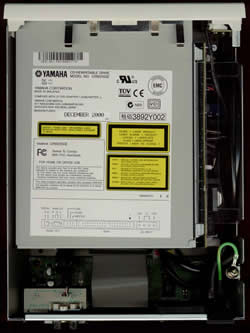
 We
couldn't really stare at it from outside and we unscrewed the five screws
which were keeping the case. Not surpisingly we discovered a good ol' friend
inside. You wouldn't guess, but it's a CRW-2100E!!
We
couldn't really stare at it from outside and we unscrewed the five screws
which were keeping the case. Not surpisingly we discovered a good ol' friend
inside. You wouldn't guess, but it's a CRW-2100E!!
 A
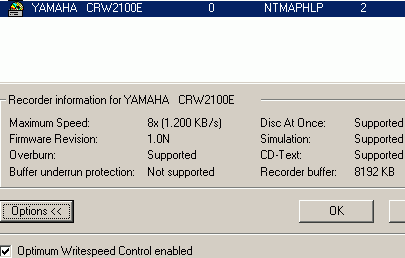
further inspection wouldn't be really necessary. Like all the models in this
series, this drive doesn't include any kind of anti-coaster technology (which
is also proved by the drive identification of the Nero Burning Rom) in order
to avoid buffer underruns. As we were informed, the newer CDRW drives from
Yamaha, of a higher speed (>20x models?) will, however, include such a
technology, which will make you less anxious when you are burning your CDs
while doing something else. In order to avoid the coaster problems Yamaha
included an 8MB Buffer into the drive. This is supposed to solve the buffer
underrun problems but you wouldn't want to push too hard your system to find
out how reliable these 8 Mbs are. Especially with software other than Ahead's
Nero Burning Rom (we were using version 5.5.1.8 during this test) which in
this case has been proved a much better solution than the Adaptec's EZ Cd
Creator 4.0 which comes in the drive package and it caused many coasters when
we pushed the system too hard. :(
A
further inspection wouldn't be really necessary. Like all the models in this
series, this drive doesn't include any kind of anti-coaster technology (which
is also proved by the drive identification of the Nero Burning Rom) in order
to avoid buffer underruns. As we were informed, the newer CDRW drives from
Yamaha, of a higher speed (>20x models?) will, however, include such a
technology, which will make you less anxious when you are burning your CDs
while doing something else. In order to avoid the coaster problems Yamaha
included an 8MB Buffer into the drive. This is supposed to solve the buffer
underrun problems but you wouldn't want to push too hard your system to find
out how reliable these 8 Mbs are. Especially with software other than Ahead's
Nero Burning Rom (we were using version 5.5.1.8 during this test) which in
this case has been proved a much better solution than the Adaptec's EZ Cd
Creator 4.0 which comes in the drive package and it caused many coasters when
we pushed the system too hard. :(
- Installation:
 The installation was easy. We opened the case and installed the IEEE-1394
FireWire PCI card into a free PCI slot. After booting the Operating system
identified the FireWire card and asked from us the CD-Rom of Windows ME; it
only took 5 seconds for the proper device driver to be installed. After that
we plugged the one edge of the FireWire cable into one slot of the card (The
Windows were running) and the other into the back of the drive. We powered
on the Drive (from the power button in the front) and...
The installation was easy. We opened the case and installed the IEEE-1394
FireWire PCI card into a free PCI slot. After booting the Operating system
identified the FireWire card and asked from us the CD-Rom of Windows ME; it
only took 5 seconds for the proper device driver to be installed. After that
we plugged the one edge of the FireWire cable into one slot of the card (The
Windows were running) and the other into the back of the drive. We powered
on the Drive (from the power button in the front) and...
-Plug or Eject Hardware Icon:
 A
new CDRom was identified at this point, while at the same time, a new icon
has been added on the task bar. This will detect whether the drive is -or
not- connected and operational. If for some reason you want to unplug the
device, you should first double-click on this icon and then choose the STOP
option. This will prevent a system crash and/or loss of data. A significant
detail is that the computer needed not to be rebooted after the drive was
identified. We then checked fot the auto-insert notification tickbox in the
drive properties but for some reason it was already disabled (a coincidence?).
The supplied drive was manufactured in December 2000 and the onboard firmware
revision was version 1.0h. We used the latest firmware v1.0N and we also installed
the bulked Ez CD Creator 4.02d-s25 for tests but we mainly used Nero 5.1.1.8
and Ahead InCD v1.67.
A
new CDRom was identified at this point, while at the same time, a new icon
has been added on the task bar. This will detect whether the drive is -or
not- connected and operational. If for some reason you want to unplug the
device, you should first double-click on this icon and then choose the STOP
option. This will prevent a system crash and/or loss of data. A significant
detail is that the computer needed not to be rebooted after the drive was
identified. We then checked fot the auto-insert notification tickbox in the
drive properties but for some reason it was already disabled (a coincidence?).
The supplied drive was manufactured in December 2000 and the onboard firmware
revision was version 1.0h. We used the latest firmware v1.0N and we also installed
the bulked Ez CD Creator 4.02d-s25 for tests but we mainly used Nero 5.1.1.8
and Ahead InCD v1.67.
Note that according to the manual, you must have at least a P-II at 300mhz with a fast HD in order to be able to enjoy the drive. If not you will probably get poor performance.
- Our Test Machine:
WinMe OS
QDI Synactix 2E (i815 chipset)
Pentium III 1,0 GHz
256MB SDRAM PC 133 (In 2 DIMMs)
IBM 30GB UDMA 100
DAWI 2974 - PCI SCSI Host Adapter
Voodoo 5500, 64 Mb Ram, AGP
Hitachi GD7500 DVD-Rom, EIDE
Plextor CD-ROM PX-40TS firmware v1.04 (SCSI-ID 5)
Plextor PXW-1210S CDR firmware v1.02 (SCSI-ID 6)
Yamaha CRW2100ix firmware v1.0N (Identified as a CRW-2100E)
Review Pages




