Breaking News

LG Display launches 24.5-inch 720Hz Gaming OLED Panel Razer Unveils the Mako Desktop Gaming Speakers TerraMaster Launches 725 Series Xeon Rackmount NAS Viltrox Brings Its Full-Frame Air Series to L-Mount with Four Compact Prime Lenses CORSAIR Deploys the WARTHOG Airflow Mid-Tower PC Case

logo

  • Share Us
    • Facebook
    • Twitter
  • Home
  • Home
  • News
  • Reviews
  • Essays
  • About
    • Submit News

    • Contact Us
    • Privacy

    • Promotion
    • Advertise

    • RSS Feed

Search form

Windows XP Professional x64 Edition

May 9,2005 0

9. Drivers Installation


Review Pages

1. Introduction
2. System Specifications
3. Product Overview
4. Compatibility
5. Security Issues
6. Gaming Experience
7. Availability And Price
8. Windows Installation
9. Drivers Installation
10. Test System
11. Game Benchmarks - Far Cry
12. Game Benchmarks - Colin McRae 2005
13. Game Benchmarks - Half Life 2
14. Application Benchmarks - 3DMark2003
15. Application Benchmarks - 3DMark2005
16. Application Benchmarks - PCMark04
17. Application Benchmarks - SiSoftware Sandra 2004
18. Application Benchmarks - Science Mark 2
19. Application Benchmarks - Pov-Ray
20. Conclusion
21. Drivers Availability
22. Programs that are not supported


Most probably after the OS installation, the system will not recognize some of your hardware components and in the device manager tab, you will see something like this:

Click to enlarge - The device manager after the windows installation
Device Manager Window

Don't panic. We are going to solve this problem.

Windows XP Professional x64 Edition requires the installation of 64-Bit drivers only. You cannot install 32-Bit drivers. There are some device drivers that have been modified to allow installation of 64-Bit and 32-Bit drivers from the same .inf file. This is necessary to avoid installing wrong drivers under the wrong platform.

When installing drivers for the Windows XP Professional x64 Edition, be sure that the provider says that the driver works on “Windows XP Professional x64 Edition” and not on the “Microsoft Windows XP” or “Windows XP Professional”.
Some users will probably remember a time when Windows 2000 had exactly the same problem after their initial release when the operating system didn’t recognize a whole lot of hardware. We have already mentioned our list of companies that have released drivers for their products which is also posted in our forums. Click here to see the full list.

You must install drivers in the following order, in order to install the drivers correctly and to avoid conflicts with other drivers. After any install you make, it is recommended you restart your computer.

1. Motherboard Drivers
2. Graphic Card Drivers
3. Sound Card Drivers
4. Any other device drivers
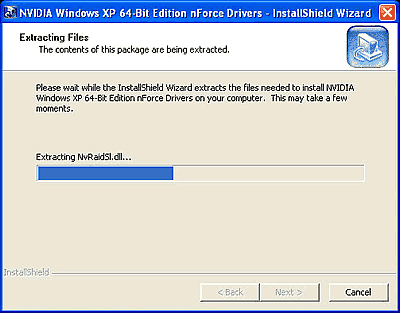
Drivers installation procedure. Don't forget to check that the drivers you install are for Windows XP Professional x64 Edition and not for Windows XP Home or Proffesional Edition
Driver Installation procedure

After the driver installation, we are ready to test our system. In the next page you will find information about the computer that we used to run all the tests on and what programs we used.


Review Pages

1. Introduction
2. System Specifications
3. Product Overview
4. Compatibility
5. Security Issues
6. Gaming Experience
7. Availability And Price
8. Windows Installation
9. Drivers Installation
10. Test System
11. Game Benchmarks - Far Cry
12. Game Benchmarks - Colin McRae 2005
13. Game Benchmarks - Half Life 2
14. Application Benchmarks - 3DMark2003
15. Application Benchmarks - 3DMark2005
16. Application Benchmarks - PCMark04
17. Application Benchmarks - SiSoftware Sandra 2004
18. Application Benchmarks - Science Mark 2
19. Application Benchmarks - Pov-Ray
20. Conclusion
21. Drivers Availability
22. Programs that are not supported

 

Pages

  • « first
  • ‹ previous
  • …
  • 5
  • 6
  • 7
  • 8
  • 9
  • 10
  • 11
  • 12
  • 13
  • …
  • next ›
  • last »

Windows

Tags: Windows
Previous Post
Thermaltake Beetle
Next Post
Star Wars Knights of the Old Republic II

Related Posts

  • Microsoft latest update for Windows 11 includes support for Android applications

  • GIGABYTE Motherboards Feature TPM 2.0 + BIOS Function to Support Windows 11 Upgrade

  • Introducing Windows 11

  • Migrate Windows Installation to SSD

  • Microsoft Works on New Windows logo and App Icons

  • Microsoft Talks About a "Modern OS"

  • Visual Studio Supports Development of 64-bit Apps for Windows 10 on ARM

  • Next Windows version Coming In 2015: report

Latest Reviews

Fanxiang MP83 M.2 NVMe SSD Enclosure
Enterprise & IT

Fanxiang MP83 M.2 NVMe SSD Enclosure

Ugreen CM642 USB4.0 Enclosure
PC components

Ugreen CM642 USB4.0 Enclosure

be quiet! Dark Power 14 IO
PC components

be quiet! Dark Power 14 IO

SanDisk High Endurance 512GB microSDXC
Cameras

SanDisk High Endurance 512GB microSDXC

Samsung PRO Ultimate 512GB microSDXC
Cameras

Samsung PRO Ultimate 512GB microSDXC

Popular News

CORSAIR announces Vanguard Pro 96 and Vanguard 96 Gaming Keyboards

CORSAIR announces Vanguard Pro 96 and Vanguard 96 Gaming Keyboards

MSI’s Latest AMD X870E MAX & EVO Series Motherboards

MSI’s Latest AMD X870E MAX & EVO Series Motherboards

Panasonic Introduces the First Ultra-Telephoto Zoom Lens in the LUMIX S Series

Panasonic Introduces the First Ultra-Telephoto Zoom Lens in the LUMIX S Series

COLORFUL Launches iGame B850M ULTRA Series Micro-ATX Motherboards

COLORFUL Launches iGame B850M ULTRA Series Micro-ATX Motherboards

COLORFUL Presents Limited Edition Chitu MAG-60 Magnetic Keyboard Inspired by the Year of the Horse

COLORFUL Presents Limited Edition Chitu MAG-60 Magnetic Keyboard Inspired by the Year of the Horse

COLORFUL Presents iGame Z890 ULTRA-S W and iGame Z890M ULTRA Z Motherboards

COLORFUL Presents iGame Z890 ULTRA-S W and iGame Z890M ULTRA Z Motherboards

COLORFUL Launches iGame B850I MINI OC V14 Motherboard

COLORFUL Launches iGame B850I MINI OC V14 Motherboard

COLORFUL Expands B850 Motherboard Lineup with New CVN, Battle-Ax, and MEOW Models

COLORFUL Expands B850 Motherboard Lineup with New CVN, Battle-Ax, and MEOW Models

Main menu

  • Home
  • News
  • Reviews
  • Essays
  • About
    • Submit News

    • Contact Us
    • Privacy

    • Promotion
    • Advertise

    • RSS Feed
  • About
  • Privacy
  • Contact Us
  • Promotional Opportunities @ CdrInfo.com
  • Advertise on out site
  • Submit your News to our site
  • RSS Feed