Breaking News

Intel Launches new Intel Xeon 600 Processors for Workstation Club 3D Announced their first new products of 2026 Samsung 2026 OLED TVs and Monitors Are NVIDIA G-SYNC Compatible for Elite Gaming Performance Kioxia and Sandisk Extend Yokkaichi Joint Venture Agreement Through 2034 KIOXIA Unveils EXCERIA PRO G2 SD Memory Card Series

logo

  • Share Us
    • Facebook
    • Twitter
  • Home
  • Home
  • News
  • Reviews
  • Essays
  • Forum
  • Legacy
  • About
    • Submit News

    • Contact Us
    • Privacy

    • Promotion
    • Advertise

    • RSS Feed
    • Site Map

Search form

Toshiba OCZ RD400 512GB M.2 PCIe SSD

Oct 4,2016 0

2. A closer look, software


Review Pages

1. Features
2. A closer look, software
3. ATTO Disk Benchmark
4. CrystalDiskMark
5. AS SSD benchmark
6. IOMeter
7. Anvil Pro
8. PCMark 7, PCMark 8
9. Summary


The RD400 packaging ahs the familiar OCZ color and theme, but Toshiba has added its name on it. Our 512GB sample shipped with the add-in card. The card comes with a full-height adapter bracket installed.

Toshiba listed several product features and details about the RD400 on the package, and also notes that Toshiba does not support the Intel RST driver. Without RST support, users cannot assemble a RAID 0, 1 or 5 array on the Intel PCH with Z70 (and future) motherboards.
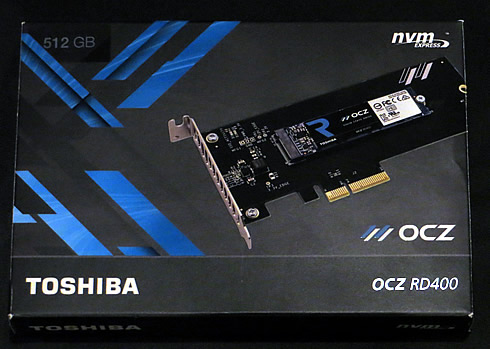
 

The OCZ RD400 ships ships with or without an add-in card (AIC) adapter, but in our case the 512GB model incudes a card. The RD400 models that include an OCZ-branded M.2 to PCIe 3.0 x4 adapter increase the cost of each drive by $20. You can find M.2 to PCIe adapters at online retailers close to this price point, but to increase compatibility with other systems we recommend purchasing the drive with the adapter card.

The add-in card is a basic design, but it includes a thermal pad under the flash processor. The pad distributes heat to the copper card and reduces the amount of heat passing to the flash.

The RD400 512GB uses a single-sided design with just two NAND flash packages.


PCIe-NVMe. The first uses the SATA bus that some M.2 sockets implement, and is no faster than 2.5-inch SATA SSDs. The advantages are small size and convenience. The other two types use M.2’s PCIe channels (not all M.2 slots have them) and vary only in the transport protocol: the older AHCI, or the newer NVMe. The RD400, as mentioned earlier, uses NVMe. In most designs to date, AHCI can hang with NVMe when writing, at around 1.2GBps, but NVMe is far faster at reading. You’ll usually get 2GBps or more with NVMe compared to AHCI’s range of 1.1GBps to 1.4GBps.

Note that even if your M.2 slot supports PCIe, your motherboard’s BIOS must support NVMe to boot from an M.2 PCIe-NVMe drive. Most performance motherboards have been upgraded for this, but many mainstream models have not. Older PCIe-AHCI M.2 drives are far more likely to be hassle-free boot drives.

The OCZ RD400 is is compatible with the latest OCZ SSD Utility. With it you can monitor your drive, manually TRIM and secure erase, you can even update your firmware and send support requests to OCZ too. Feel free to click on each of the following screenshots of the OCZ SSD Utility, and see all th detials. Not much have changced from OCZ's SSD Toolbox:


We tested the RD400 512GB SSD in a X99-based MSI motherboard, as you can see below:


Review Pages
1. Features
2. A closer look, software
3. ATTO Disk Benchmark
4. CrystalDiskMark
5. AS SSD benchmark
6. IOMeter
7. Anvil Pro
8. PCMark 7, PCMark 8
9. Summary


Pages

  • « first
  • ‹ previous
  • 1
  • 2
  • 3
  • 4
  • 5
  • 6
  • 7
  • 8
  • 9
  • next ›
  • last »

OCZ Technology

SSDs

Tags: OCZ Technology SSDs
Previous Post
Shuttle DH110 review
Next Post
Kingston DC400 960GB SSD review

Related Posts

  • Toshiba MG10 20TB HDD

  • JEDEC Publishes Automotive Solid State Drive (SSD) Device Standard

  • Toshiba completes acquisition of OCZ Technology Group's Assets and launches new subsidiary, OCZ Storage Solutions

  • Toshiba P300 2TB 7200 HDD

  • KIOXIA TransMemory U366 128GB USB Flash Drive

  • KIOXIA TransMemory U365 256GB USB Flash Drive

  • Crucial launch 500GB & 4TB X6 Portable SSDs

  • Intel Launches SSD for Everyday Computing, Mainstream Gaming

Latest Reviews

Acemagic W1
PC components

Acemagic W1

be quiet! Power Zone 2 1200W
PC components

be quiet! Power Zone 2 1200W

The Difference Between American and European Stakes and Why It Changes How People Bet
Enterprise & IT

The Difference Between American and European Stakes and Why It Changes How People Bet

Endorfy Thock V2 Wireless Keyboard
PC components

Endorfy Thock V2 Wireless Keyboard

Noctua NH-D15 G2 Chromax.Black
Cooling Systems

Noctua NH-D15 G2 Chromax.Black

Popular News

COLORFUL Introduces CVN B850I GAMING FROZEN Motherboard

COLORFUL Introduces CVN B850I GAMING FROZEN Motherboard

COLORFUL Presents CVN X870 ARK FROZEN Motherboard for AMD Ryzen 9000 CPUs

COLORFUL Presents CVN X870 ARK FROZEN Motherboard for AMD Ryzen 9000 CPUs

TEAMGROUP Launches EXPERT P34F Find My External SSD

TEAMGROUP Launches EXPERT P34F Find My External SSD

ASRock AM5 Motherboards Now Fully Support AMD Ryzen 9 9950X3D & 9900X3D Processors

ASRock AM5 Motherboards Now Fully Support AMD Ryzen 9 9950X3D & 9900X3D Processors

Samsung announces Galaxy Tab S11 and Galaxy S25 FE series

Samsung announces Galaxy Tab S11 and Galaxy S25 FE series

Viltrox Showcases Upcoming Lens Lineup and New TTL Flash at IBC 2025

Viltrox Showcases Upcoming Lens Lineup and New TTL Flash at IBC 2025

CORSAIR announces Vanguard Pro 96 and Vanguard 96 Gaming Keyboards

CORSAIR announces Vanguard Pro 96 and Vanguard 96 Gaming Keyboards

Panasonic Introduces the First Ultra-Telephoto Zoom Lens in the LUMIX S Series

Panasonic Introduces the First Ultra-Telephoto Zoom Lens in the LUMIX S Series

Main menu

  • Home
  • News
  • Reviews
  • Essays
  • Forum
  • Legacy
  • About
    • Submit News

    • Contact Us
    • Privacy

    • Promotion
    • Advertise

    • RSS Feed
    • Site Map
  • About
  • Privacy
  • Contact Us
  • Promotional Opportunities @ CdrInfo.com
  • Advertise on out site
  • Submit your News to our site
  • RSS Feed