Breaking News

ASUS Hardware Showcase: AI Accelerators, Collector GPUs, and Esport Monitors Apple Unveils Major Hardware and Creative Suite Ecosystem Updates XPG Launches Third-Generation CORE REACTOR III for Next-Gen Power Safety TCL’s New Monitor Range Fits Every Kind of Gaming Setup Viltrox Launches AF 35mm F1.4 Pro FE/Z

logo

  • Share Us
    • Facebook
    • Twitter
  • Home
  • Home
  • News
  • Reviews
  • Essays
  • About
    • Submit News

    • Contact Us
    • Privacy

    • Promotion
    • Advertise

    • RSS Feed

Search form

TEAC MP-350

Dec 28,2005 0

3. Menu


Review Pages

1. Introduction
2. Retail Package
3. Menu
4. Setting up
5. Tests
6. Conclusion


The device came with firmware version 2.521.103. We read on the package, that there is also FM functionality but only with a firmware update. For this review to be complete, we updated the player to include radio functionality. You can download the latest firmware file, along with the software updater, by clicking here. The software updater comes from SigmaTel. All you have to do is install the program on your PC and then run it.
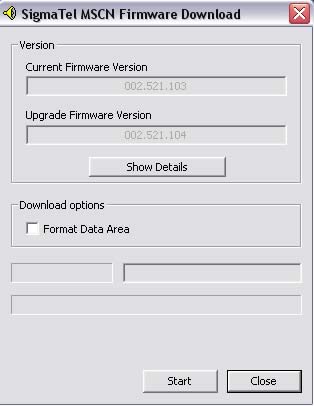
You should have the player connected to the PC at all times, since the software searches for compatible devices to update.

As you can see in the snapshot above, only the boot manager does not change with the updated firmware.

You can also choose to "format the data area". This will first perform a full format of the MP-350 (you will lose all data stored on it), and then start the firmware update process.

Immediately after the firmware updates, the device is restarted automatically and when connected to a PC, you can see the firmware version installed. You cannot operate the MP-350 as a multimedia player when it is connected to the PC, since it operates as a USB flash disk which also sinks power from the USB port to recharge the internal Lion battery. The player's screen keeps you informed at all times of the status of the player. For example, it will tell you when the PC is reading data from or writing data to the MP-350.
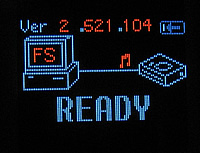
This is the main menu...

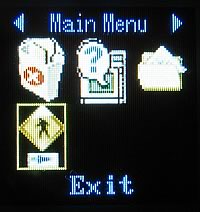
From here, you can select the playing mode of the player and change the settings.
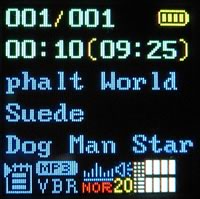
When listening to mp3 files, there is a lot of information displayed on the screen. You can see the encoding method (CBR or VBR), equalizer setting, played and remaining time and volume level. Of course, the player is capable of displaying ID3 tags.

The FM radio is very simple to use. As with most players and cell phones, the earphones are used as the antenna. You can have preset radio stations, you can use "autoscan" mode (searches the next radio station available), or set the frequency manually. We should point out that reception was excellent, even better than our stand-alone radio receiver.


You can't expect much from a player of this size when it comes to picture slideshows and video playback. Although the LCD screen is excellent, the small size of the screen does not help. However, the device is mostly intended to be used as an mp3 player and not as a video player, so we prefer to stick with the small size, even if video does not look that good.

The MP-350 can also be used as a voice or line-in recorder. These are the recording settings. You can choose the audio source, the encoder used and the encoding quality. 512MB is enough for hours of recording.

You can also view your files with the "folder-like" viewer.

The "About" option will present you with information about the storage capacity and the firmware version.

As already mentioned, holding down the "play" button will shut down the MP-350.

 

Review Pages

1. Introduction
2. Retail Package
3. Menu
4. Setting up
5. Tests
6. Conclusion


Pages

  • « first
  • ‹ previous
  • 1
  • 2
  • 3
  • 4
  • 5
  • 6
  • next ›
  • last »

TEAC

Tags: TEAC
Previous Post
Mushkin XP4000 Redline
Next Post
Intel D 820

Related Posts

  • New TEAC AX-505 Amplifier Looks Retro But Packs Power

  • New TEAC Power Amplifier Offers a Sonic Impact From a Tiny Box

  • TEAC Announces new High Performance Integrated Amplifier

  • TEAC TN-4D Turntable Coming This Quarter

  • TASCAM Introduces New DR-X Series Digital Audio Recorder and USB Audio Interface

  • Teac LP-R560K Supports Recording of Vinyl Records and Cassette Tapes on CDs

  • Teac Sees No Impact from Gibson Brands Filling for Bankruptcy

  • TEAC Releases New Reference Series Hi-Res Audio Models

Latest Reviews

be quiet! Light Wings Pro IO fan
Cooling Systems

be quiet! Light Wings Pro IO fan

Why Intelligent Firmware Matters More Than Peak Throughput in NAS Systems
Enterprise & IT

Why Intelligent Firmware Matters More Than Peak Throughput in NAS Systems

Fanxiang MP83 M.2 NVMe SSD Enclosure
Enterprise & IT

Fanxiang MP83 M.2 NVMe SSD Enclosure

Ugreen CM642 USB4.0 Enclosure
PC components

Ugreen CM642 USB4.0 Enclosure

be quiet! Dark Power 14 IO
PC components

be quiet! Dark Power 14 IO

Popular News

MSI’s Latest AMD X870E MAX & EVO Series Motherboards

MSI’s Latest AMD X870E MAX & EVO Series Motherboards

COLORFUL Launches iGame B850M ULTRA Series Micro-ATX Motherboards

COLORFUL Launches iGame B850M ULTRA Series Micro-ATX Motherboards

COLORFUL Presents Limited Edition Chitu MAG-60 Magnetic Keyboard Inspired by the Year of the Horse

COLORFUL Presents Limited Edition Chitu MAG-60 Magnetic Keyboard Inspired by the Year of the Horse

COLORFUL Launches iGame B850I MINI OC V14 Motherboard

COLORFUL Launches iGame B850I MINI OC V14 Motherboard

COLORFUL Launches the iGame X870E VULCAN W OC Motherboard

COLORFUL Launches the iGame X870E VULCAN W OC Motherboard

COLORFUL Presents iGame Z890 ULTRA-S W and iGame Z890M ULTRA Z Motherboards

COLORFUL Presents iGame Z890 ULTRA-S W and iGame Z890M ULTRA Z Motherboards

COLORFUL Expands B850 Motherboard Lineup with New CVN, Battle-Ax, and MEOW Models

COLORFUL Expands B850 Motherboard Lineup with New CVN, Battle-Ax, and MEOW Models

ASRock Adds Support for One Sub-Channel DRAM Module on Intel DDR5 Motherboards

ASRock Adds Support for One Sub-Channel DRAM Module on Intel DDR5 Motherboards

Main menu

  • Home
  • News
  • Reviews
  • Essays
  • About
    • Submit News

    • Contact Us
    • Privacy

    • Promotion
    • Advertise

    • RSS Feed
  • About
  • Privacy
  • Contact Us
  • Promotional Opportunities @ CdrInfo.com
  • Advertise on out site
  • Submit your News to our site
  • RSS Feed