Breaking News

Western Digital Accelerates Storage Innovation for AI Era Leica LUX Case for the iPhone 17 Pro/Pro Max ASUS Announces ROG Strix Aiolos Viltrox Launches AF 16mm F1.8 L for Full Frame Casio to Release G-SHOCK with Minimalist Metal Design and Even Better Fit

logo

  • Share Us
    • Facebook
    • Twitter
  • Home
  • Home
  • News
  • Reviews
  • Essays
  • Forum
  • Legacy
  • About
    • Submit News

    • Contact Us
    • Privacy

    • Promotion
    • Advertise

    • RSS Feed
    • Site Map

Search form

Swiftech Apex Ultra H20-220

Jan 7,2008 0

5. Test Configuration


Review Pages

1. Introduction
2. Retail package - Page 1
3. Retail Package - Page 2
4. Installation
5. Test Configuration
6. Test Results
7. Conclusion


In order to test the SwifTech Apex Ultra H20-220 water cooling system, we used the following system setup:

  • CPU: Intel E6750 Retail
  • Case: ThermalTake Soprano
  • Motherboard: Asus Blitz Extreme Bios 0904
  • Memory: 2x1GB SuperTalent DDR3-1600CL7
  • PSU: Corsair HX620W, OCZ 720W
  • HDD: WD 80JB
  • Operating system Windows XP with all the latest updates installed
  • Software: Intel Thermal Analysis Tool (TAT) & CoreTemp 0.95.4
  • Thermal Paste: Arctic Cooling TX-2
  • Idle time: ~30min
  • Load time: ~30min
  • Case fan rpm: 1250 rpm (full speed)

To to produce the most possible heat, we used Intel's Thermal Analysis Tool (TAT) that offers much higher heat, compared with Prime95 (3~4° C more). This has been mentioned at several online forums and it was also confirmed in our tests.
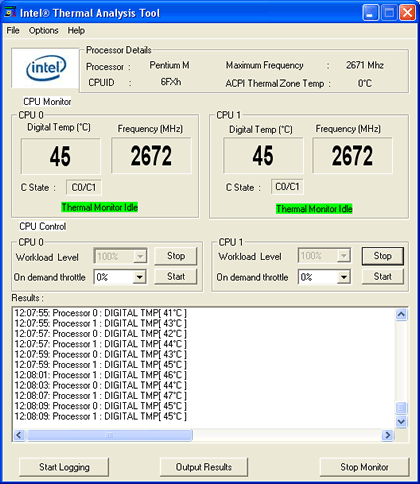
We left both cores running at full load for almost 30 minutes. All temperatures were logged with CoreTemp 0.95.4. On the Asus Blitz Extreme, we set the same voltages in order to have the same conditions for all coolers:

  • PLL Voltage: 1.60V
  • DDR3 Voltage: 1.90V
  • Vcore: 1.3375V (normal)

  • Vcore: 1.4500V (overclock)

We measured the produced noise from all CPU coolers with Precision Gold N09AQ Environment Meter. We decided to measure the noise with and without the two system 120mm fans (by Thermaltake) and of course the noise that the power supply produces. All measurements were made just outside the case, mostly on the side panel and at the front, so we had an overall picture of the produced noise. To better understand the overall performance, we also used the included adapters from 12V-7V and from 12V-5V and recorded the corresponding temperatures.

For all CPU coolers, we used the same thermal paste from Arctic Cooling TX-2. We tried to apply the same amount of thermal paste and in an identical way. All in all, we tried to provide exactly the same environmental conditions for all tested CPU coolers. It's possible, due to Vdroop (Vcore variations), to have 1~2° C differences in performance from system to system. Lastly, all tests were performed with the front panel closed, which should give the worst case in terms of internal air flow.


Review Pages

1. Introduction
2. Retail package - Page 1
3. Retail Package - Page 2
4. Installation
5. Test Configuration
6. Test Results
7. Conclusion


Pages

  • « first
  • ‹ previous
  • 1
  • 2
  • 3
  • 4
  • 5
  • 6
  • 7
  • next ›
  • last »

Swiftech

coolers

water cooling

Tags: Swiftech coolers water cooling
Previous Post
Battle of the CPU Coolers
Next Post
Club3D HD3850

Related Posts

  • Akasa presents Maxwell Pro, the most powerful case for cooling Mini-ITX motherboards

  • CES: Phanteks Launches New Chassis, Speakers and Liquid Cooling Products

  • CES: Thermaltake Releases The Pacific Series of Liquid Cooling Components

  • Thermaltake at CES 2020

  • CORSAIR Offers Components for 3rd Gen AMD Ryzen Threadripper Builds

  • ARCTIC Unveils the Liquid Freezer II series

  • Noctua Showcased Many New Prototypes at Computex 2019

  • Corsair Introduces Hydro X Series

Latest Reviews

Akaso Brave 8 Lite
Cameras

Akaso Brave 8 Lite

Soundpeats Air 5
Consumer Electronics

Soundpeats Air 5

XbotGo Chamaleon
Consumer Electronics

XbotGo Chamaleon

be quiet! Dark Perk Mice
Gaming

be quiet! Dark Perk Mice

Acemagic W1
PC components

Acemagic W1

Popular News

COLORFUL Introduces CVN B850I GAMING FROZEN Motherboard

COLORFUL Introduces CVN B850I GAMING FROZEN Motherboard

COLORFUL Presents CVN X870 ARK FROZEN Motherboard for AMD Ryzen 9000 CPUs

COLORFUL Presents CVN X870 ARK FROZEN Motherboard for AMD Ryzen 9000 CPUs

TEAMGROUP Launches EXPERT P34F Find My External SSD

TEAMGROUP Launches EXPERT P34F Find My External SSD

ASRock AM5 Motherboards Now Fully Support AMD Ryzen 9 9950X3D & 9900X3D Processors

ASRock AM5 Motherboards Now Fully Support AMD Ryzen 9 9950X3D & 9900X3D Processors

Samsung announces Galaxy Tab S11 and Galaxy S25 FE series

Samsung announces Galaxy Tab S11 and Galaxy S25 FE series

Viltrox Showcases Upcoming Lens Lineup and New TTL Flash at IBC 2025

Viltrox Showcases Upcoming Lens Lineup and New TTL Flash at IBC 2025

CORSAIR announces Vanguard Pro 96 and Vanguard 96 Gaming Keyboards

CORSAIR announces Vanguard Pro 96 and Vanguard 96 Gaming Keyboards

Panasonic Introduces the First Ultra-Telephoto Zoom Lens in the LUMIX S Series

Panasonic Introduces the First Ultra-Telephoto Zoom Lens in the LUMIX S Series

Main menu

  • Home
  • News
  • Reviews
  • Essays
  • Forum
  • Legacy
  • About
    • Submit News

    • Contact Us
    • Privacy

    • Promotion
    • Advertise

    • RSS Feed
    • Site Map
  • About
  • Privacy
  • Contact Us
  • Promotional Opportunities @ CdrInfo.com
  • Advertise on out site
  • Submit your News to our site
  • RSS Feed