Breaking News

Toshiba to Showcase High-Performance AI and Petabyte-Scale Storage Solutions at Cloudfest 2026 The SAMA V62 brings panoramic design to modern PC builds ASUS Republic of Gamers Announces New Strix OLED monitors PlayStation Plus Game Catalog for March 2026 Intel Announces New Intel Core Ultra 200S Plus Series Desktop Processors

logo

  • Share Us
    • Facebook
    • Twitter
  • Home
  • Home
  • News
  • Reviews
  • Essays
  • Forum
  • Legacy
  • About
    • Submit News

    • Contact Us
    • Privacy

    • Promotion
    • Advertise

    • RSS Feed
    • Site Map

Search form

Spire Gigapod III

Nov 21,2005 0

2. Installation


Review Pages

1. Introduction
2. Installation
3. HD Tach Tests
4. Performance Test v5.0
5. SiSoft Sandra 2005
6. Conclusion


The installation process is quite easy and no experience is required to setup the Gigapod III and get it working. You will need a 3.5" Hard Disk drive since the device is only the case. For our tests, we used a Western Digital 80Gb HDD.
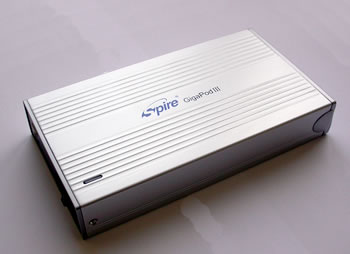
...the Gigapod III...
...the WD80 we used...

In order to open the Gigapod III, you have to remove the back plate which has the connections and power button on it. The back plate is not initially screwed on to the housing so that you can easily pop it off and install your hard disk drive. There are two screws included in the package that you then use to screw the backplate on.
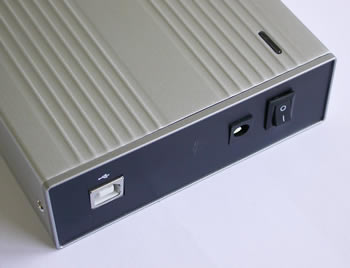
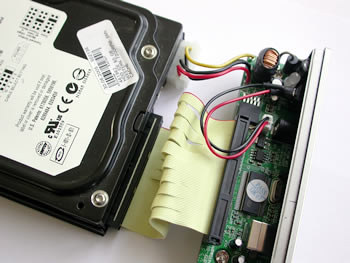
After removing the back plate you'll have to attach the HDD. Connect the IDE cable first and then the power.

...the back plate of Gigapod III...
...the WD80 connections...
...the two devices connected...

In order for the HDD to sit firmly and properly in the Gigapod III case, Spire has included in its retail package, two guides which are positioned on each side of the HDD. The guides have to be aligned correctly, with the three notches on the inside of the guides lining up with the screw holes on the sides of the HDD as shown below:

...the two guides...
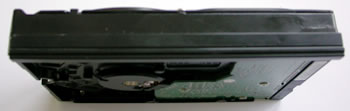
...the side panel on the HDD...
...the HDD with the guides installed...

The only thing left, is to slide the Hard Disk into the Gigapod III and screw it shut.
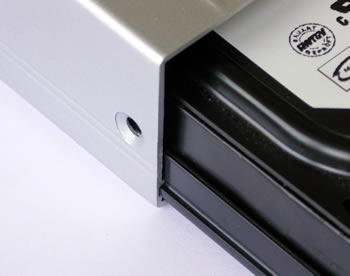
...the guides fit perfectly...
...and don't forget the screws...

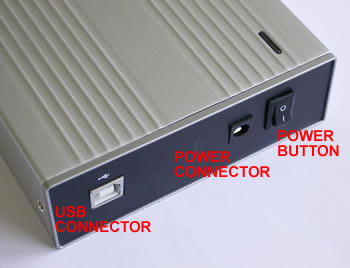
Connect the USB cord from the Gigapod to your PC and then the external power supply and you are ready. Turn on power with the power button and your system should automatically recognize the Gigapod III. In case the device is not recognized by your OS, you can use the included CD with the USB drivers.
 

Review Pages

1. Introduction
2. Installation
3. HD Tach Tests
4. Performance Test v5.0
5. SiSoft Sandra 2005
6. Conclusion


Pages

  • « first
  • ‹ previous
  • 1
  • 2
  • 3
  • 4
  • 5
  • 6
  • next ›
  • last »

Spire

Tags: Spire
Previous Post
LiteOn SHW-1635S
Next Post
Thermaltake Silent Water

Related Posts

  • Spire launches UD50C White PC chassis

  • Spire Unveils Cutting-Edge ARGB Cooling Fan Set: A 25-Year Legacy of Excellence in PC Cooling

  • Introducing Spire’s New Ergonomic Workstations and Desk Peripherals

  • SPIRE PC announces EagleForce series 80PLUS certified

  • Spire Thermal Stone Keeps Your Hands Warm

  • Spire Thermal Eclipse II review

  • Spire Previews Coolers For The Upcoming Intel 1156 Core i5 Platform

  • Spire PowerFuse

Latest Reviews

Why Streaming Live Casino Games Demands Smarter Tech
Enterprise & IT

Why Streaming Live Casino Games Demands Smarter Tech

Kioxia Exceria Plus G3 512GB microSD
Cameras

Kioxia Exceria Plus G3 512GB microSD

SoundPeats Cove Pro
Consumer Electronics

SoundPeats Cove Pro

Asustor AS5404T 4-Bay NAS System
Enterprise & IT

Asustor AS5404T 4-Bay NAS System

be quiet! Pure Power 13M 1200W
PC components

be quiet! Pure Power 13M 1200W

Popular News

COLORFUL Presents CVN X870 ARK FROZEN Motherboard for AMD Ryzen 9000 CPUs

COLORFUL Presents CVN X870 ARK FROZEN Motherboard for AMD Ryzen 9000 CPUs

TEAMGROUP Launches EXPERT P34F Find My External SSD

TEAMGROUP Launches EXPERT P34F Find My External SSD

Samsung announces Galaxy Tab S11 and Galaxy S25 FE series

Samsung announces Galaxy Tab S11 and Galaxy S25 FE series

Viltrox Showcases Upcoming Lens Lineup and New TTL Flash at IBC 2025

Viltrox Showcases Upcoming Lens Lineup and New TTL Flash at IBC 2025

CORSAIR announces Vanguard Pro 96 and Vanguard 96 Gaming Keyboards

CORSAIR announces Vanguard Pro 96 and Vanguard 96 Gaming Keyboards

Panasonic Introduces the First Ultra-Telephoto Zoom Lens in the LUMIX S Series

Panasonic Introduces the First Ultra-Telephoto Zoom Lens in the LUMIX S Series

MSI Launches DATAMAG 40Gbps Magnetic Portable SSD

MSI Launches DATAMAG 40Gbps Magnetic Portable SSD

MSI Launches FORGE GK600 TKL WIRELESS Special Edition Compact Mechanical Keyboard

MSI Launches FORGE GK600 TKL WIRELESS Special Edition Compact Mechanical Keyboard

Main menu

  • Home
  • News
  • Reviews
  • Essays
  • Forum
  • Legacy
  • About
    • Submit News

    • Contact Us
    • Privacy

    • Promotion
    • Advertise

    • RSS Feed
    • Site Map
  • About
  • Privacy
  • Contact Us
  • Promotional Opportunities @ CdrInfo.com
  • Advertise on out site
  • Submit your News to our site
  • RSS Feed