Breaking News

Nikon releases the Z5IIC full-frame mirrorless camera Announcing the New ASUS Googlebook 14 Razer Unveils Kiyo V2 Pro 4K Webcam Transcend Launches 64GB DDR5-6400 Embedded DRAM Modules for High-Speed Performance and Enhanced System Stability Hollyland Introduces LARK M3 Wireless Audio System

logo

  • Share Us
    • Facebook
    • Twitter
  • Home
  • Home
  • News
  • Reviews
  • Essays
  • About
    • Submit News

    • Contact Us
    • Privacy

    • Promotion
    • Advertise

    • RSS Feed

Search form

SONY BW-RU101 PDD

Feb 23,2005 0

7. Installation - Page 2


Review Pages

1. Introduction
2. Blue laser technology
3. Design
4. Specifications
5. The media
6. Installation - Page 1
7. Installation - Page 2
8. Software
9. Tests
10. Conclusion


SONY BW-RU101 PDD - Page 7

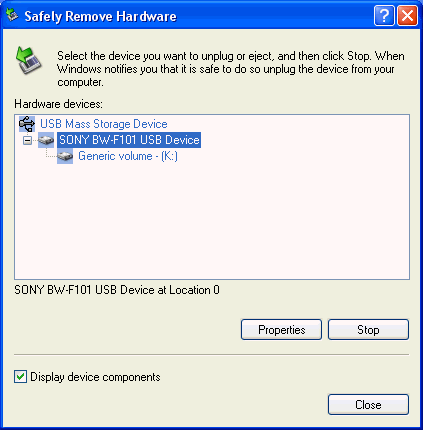
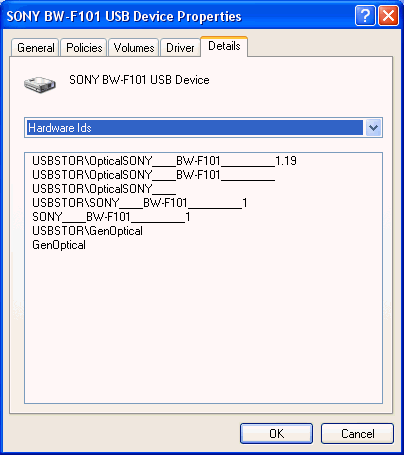
Installation was fairly straightforward, simply plug-in the power and USB 2.0 cables and then switch on the drive. The drive was recognized by Windows XP as a mass storage device on our PC, with device id BW-F101 ID:
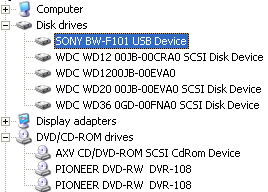
Looking at the system properties, the drive was listed under Disk Drives and not under DVD/CD-ROM drives:
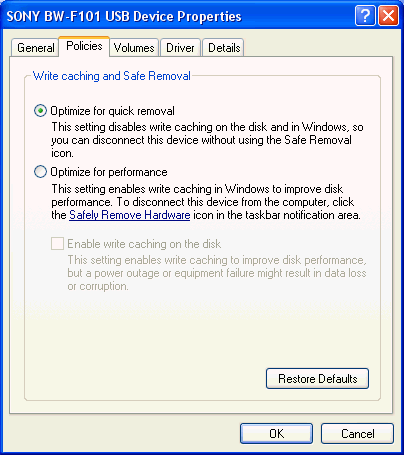
You can set the write caching mode, quick removal or performance, according to your needs from the properties dialog window:
The drive's installed firmware was 1.19, the latest available. SONY offers free firmware upgrades with a password/login process:
The SONY PDD drive is compatible with computers running Windows 2000/XP (FAT32 or NTFS), Windows Server 2003 (NTFS), Mac OS10.x (HFS) and certain varieties of UNIX, including Linux, without installing any special drivers. Information on drivers and software is available from this link. For Windows, the disc drive utility is provided as bundled software for external drives BW-RS101 and BW-RU101.

Before being able to use a disc, the user should carry out a physical format of the disc. This will check the integrity of the disc and relocate bad sectors if present. This can be performed in one of two ways:

The first is available through Sony's Physical Format utility:


Review Pages

1. Introduction
2. Blue laser technology
3. Design
4. Specifications
5. The media
6. Installation - Page 1
7. Installation - Page 2
8. Software
9. Tests
10. Conclusion


Pages

  • « first
  • ‹ previous
  • …
  • 2
  • 3
  • 4
  • 5
  • 6
  • 7
  • 8
  • 9
  • 10
  • next ›
  • last »

Sony

Tags: Sony
Previous Post
MSI NX6600GT AGP
Next Post
Sony SCD-XB790 SACD Player

Related Posts

  • Sony Rewrites the Rules of Super-Telephoto: Announces World's Lightest 400mm and 600mm G Master Primes

  • Sony Expands its ULT POWER SOUND series Lineup with 3 New Bass-Powered Speakers

  • Sony Launches ‘FE 100-400MM F5.6-8 OSS

  • Sony Launches FX5 Camera

  • Sony announces RX10V

  • Sony Semiconductor Solutions to Release Advanced 1/2-type CMOS Sensor for Mobile Applications

  • Sony Expands Professional Display Lineup with Crystal LED UNIFY

  • Sony Introduces BRAVIA 9 II and BRAVIA 7 II RGB TVs and the BRAVIA Theatre Trio

Latest Reviews

Fanxiang MP83 M.2 NVMe SSD Enclosure
Enterprise & IT

Fanxiang MP83 M.2 NVMe SSD Enclosure

Ugreen CM642 USB4.0 Enclosure
PC components

Ugreen CM642 USB4.0 Enclosure

be quiet! Dark Power 14 IO
PC components

be quiet! Dark Power 14 IO

SanDisk High Endurance 512GB microSDXC
Cameras

SanDisk High Endurance 512GB microSDXC

Samsung PRO Ultimate 512GB microSDXC
Cameras

Samsung PRO Ultimate 512GB microSDXC

Popular News

MSI’s Latest AMD X870E MAX & EVO Series Motherboards

MSI’s Latest AMD X870E MAX & EVO Series Motherboards

COLORFUL Launches iGame B850M ULTRA Series Micro-ATX Motherboards

COLORFUL Launches iGame B850M ULTRA Series Micro-ATX Motherboards

COLORFUL Presents Limited Edition Chitu MAG-60 Magnetic Keyboard Inspired by the Year of the Horse

COLORFUL Presents Limited Edition Chitu MAG-60 Magnetic Keyboard Inspired by the Year of the Horse

COLORFUL Presents iGame Z890 ULTRA-S W and iGame Z890M ULTRA Z Motherboards

COLORFUL Presents iGame Z890 ULTRA-S W and iGame Z890M ULTRA Z Motherboards

COLORFUL Launches iGame B850I MINI OC V14 Motherboard

COLORFUL Launches iGame B850I MINI OC V14 Motherboard

COLORFUL Expands B850 Motherboard Lineup with New CVN, Battle-Ax, and MEOW Models

COLORFUL Expands B850 Motherboard Lineup with New CVN, Battle-Ax, and MEOW Models

ASRock Adds Support for One Sub-Channel DRAM Module on Intel DDR5 Motherboards

ASRock Adds Support for One Sub-Channel DRAM Module on Intel DDR5 Motherboards

Exceed the Infinite with New ASRock X870E Taichi White Motherboard

Exceed the Infinite with New ASRock X870E Taichi White Motherboard

Main menu

  • Home
  • News
  • Reviews
  • Essays
  • About
    • Submit News

    • Contact Us
    • Privacy

    • Promotion
    • Advertise

    • RSS Feed
  • About
  • Privacy
  • Contact Us
  • Promotional Opportunities @ CdrInfo.com
  • Advertise on out site
  • Submit your News to our site
  • RSS Feed