Breaking News

Acer Expands Gaming Handheld Portfolio with Predator Atlas 7 Sony Expands its ULT POWER SOUND series Lineup with 3 New Bass-Powered Speakers Sonos Introduces Sonos 27, the Next Generation of Its Audio Operating System EnGenius announces ECW560 Wi-Fi 7 Outdoor Router Club3D announces 40Gbps USB4 NVMe enclosure and Space-Saving dual port Wall Charger

logo

  • Share Us
    • Facebook
    • Twitter
  • Home
  • Home
  • News
  • Reviews
  • Essays
  • About
    • Submit News

    • Contact Us
    • Privacy

    • Promotion
    • Advertise

    • RSS Feed

Search form

Shuttle DH310S mini PC review

Oct 16,2019 0

4. CPU tests


Review Pages

1. About the Shuttle DH310S
2. Opening the box
3. Installing the components, BIOS settings
4. CPU tests
5. GPU tests
6. Audio and video tests
7. Summary


With all the essential components installed, our system is ready for testing. Here are the specs:

  • Box/Motherboard: Shuttle DH310S
  • CPU: Intel Pentium Dual Core Gold G5400
  • CPU Fan: Fanless-build in cooling
  • Memory: Ballistix Sport LT 8GB Kit (2 x 4GB) DDR4-2666 SODIMM kit
  • Storage: Crucial BX500 960GB 3D NAND SATA 2.5-inch SSD
  • Windows: Windows 10x64 + latest updates
  • Software: PCMark 7, PCMark 8, 3DMark, Sisoft Sandra, K-Lite Codec Pack , CineBench R10, R11.5, R15, HWMonitor, AIDA64 Extreme

The Shuttle DH310 supports 8th Gen Socket LGA1151v2 14 nm++ "Coffee Lake S” processors, as long as their TDP is lower than 65W. The 9th gen Socket LGA1151v2 14 nm++ "Coffee Lake S” processors are also supported, again with the same TDP limitation. Processors without graphics built-in (ID ends with “F”) are not supported.
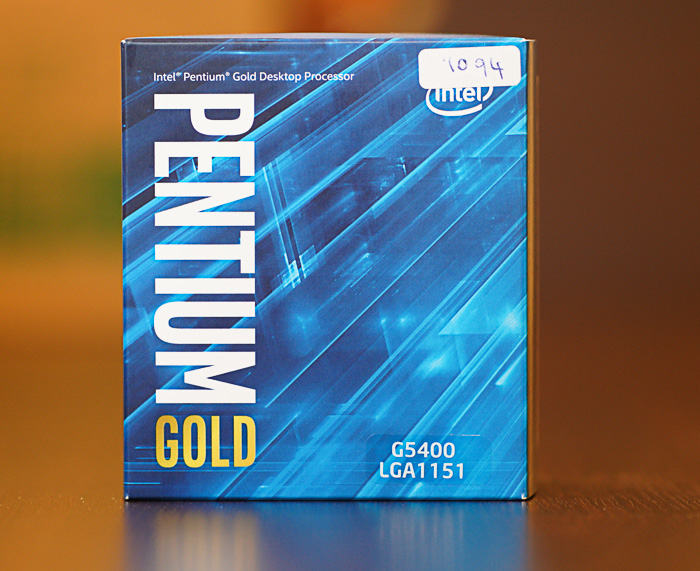
The Pentium Dual Core Gold G5400 we used in the test boosts up to 3.7GHs, supports DDR-4 2400MHz and is rated at 58Watt TDP. It supports: MMX, SSE, SSE2, SSE3, SSSE3, SSE4.1, SSE4.2, SGX, Enhanced Intel SpeedStep Technology (EIST), Intel 64, XD bit (an NX bit implementation), Intel VT-x, Intel VT-d, Hyper-threading, AES-NI, Smart Cache, ECC memory. You may be thinking that an i3-8100 CPU would be a better option, but its2.7x price compared to the G5400 does not justify the expected performance gains. The choice is yours, and depends on your budget.

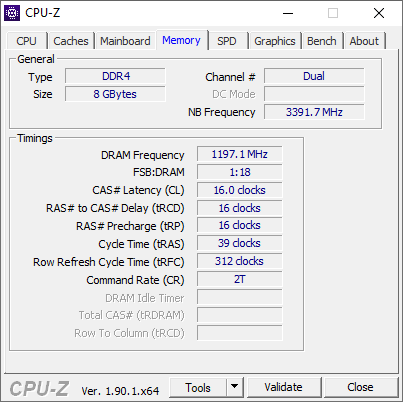
The installed Crucial Memory runs at 2400MHz and CL16:
The CPU-Z benchmark benchmark provides a rough idea of what we should expect from the installed CPU:

The Passmark rating benchmark returned an overall rating of 3001,3 points -- not bad at all.

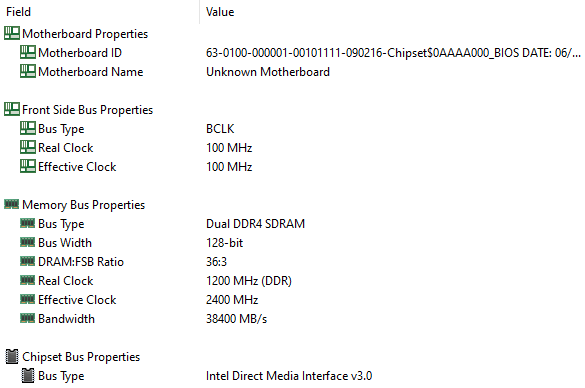
The AIDA64 Extreme Memory tests unveiled some great memory performance, which contributes to the system's overall speed and responsiveness:

Since we are dealing with a very compact barebone, its thermal performance is something we wanted to check out. We remind you that we used the stock cooler in this test.

Hopefully, the tests showed that despite the heavy load added by the AIDA64 and Prime95 benchmarks, no CPU throttling occurred and the highest temperatures recorded are adequate, with the 65Watt Intel Pentium Gold G5400 installed:


The HWinfo64 software confirmed the previous results, showing no impact of the temperature to the CPU's performance:

 

Review Pages

1. About the Shuttle DH310S
2. Opening the box
3. Installing the components, BIOS settings
4. CPU tests
5. GPU tests
6. Audio and video tests
7. Summary


Pages

  • « first
  • ‹ previous
  • 1
  • 2
  • 3
  • 4
  • 5
  • 6
  • 7
  • next ›
  • last »

Shuttle

barebones

Mini PCs

Tags: Shuttle barebones Mini PCs
Previous Post
Samsung 970 PRO 512GB SSD review
Next Post
Rapoo MT550 Multi-Mode Wireless Mouse

Related Posts

  • Shuttle Launches the XZ890G2

  • Shuttle Introduces SPCNV03 Ultra-Compact Edge AI Computer

  • Shuttle announces DN11H at InfoComm 2025

  • Shuttle announces NA10H - NT10H

  • Flat Mini-PC Barebones for the latest LGA1700 processors from Shuttle

  • Shuttle announces Xeon-compatible Mini-PC Barebone with 4x LAN and ECC RAM support

  • Shuttle announces Mini-PC Barebone in a 4.7-litre format for two PCI Express cards

  • Shuttle Announces DH32 Mini-PC

Latest Reviews

be quiet! Dark Power 14 IO
PC components

be quiet! Dark Power 14 IO

SanDisk High Endurance 512GB microSDXC
Cameras

SanDisk High Endurance 512GB microSDXC

Samsung PRO Ultimate 512GB microSDXC
Cameras

Samsung PRO Ultimate 512GB microSDXC

be quiet! Light Mount TKL
Consumer Electronics

be quiet! Light Mount TKL

be quiet! Light Loop IO LCD
Cooling Systems

be quiet! Light Loop IO LCD

Popular News

CORSAIR announces Vanguard Pro 96 and Vanguard 96 Gaming Keyboards

CORSAIR announces Vanguard Pro 96 and Vanguard 96 Gaming Keyboards

MSI Launches FORGE GK600 TKL WIRELESS Special Edition Compact Mechanical Keyboard

MSI Launches FORGE GK600 TKL WIRELESS Special Edition Compact Mechanical Keyboard

TEAMGROUP Launches EXPERT P34F Find My External SSD

TEAMGROUP Launches EXPERT P34F Find My External SSD

Samsung announces Galaxy Tab S11 and Galaxy S25 FE series

Samsung announces Galaxy Tab S11 and Galaxy S25 FE series

Viltrox Showcases Upcoming Lens Lineup and New TTL Flash at IBC 2025

Viltrox Showcases Upcoming Lens Lineup and New TTL Flash at IBC 2025

Panasonic Introduces the First Ultra-Telephoto Zoom Lens in the LUMIX S Series

Panasonic Introduces the First Ultra-Telephoto Zoom Lens in the LUMIX S Series

MSI Launches DATAMAG 40Gbps Magnetic Portable SSD

MSI Launches DATAMAG 40Gbps Magnetic Portable SSD

MSI’s Latest AMD X870E MAX & EVO Series Motherboards

MSI’s Latest AMD X870E MAX & EVO Series Motherboards

Main menu

  • Home
  • News
  • Reviews
  • Essays
  • About
    • Submit News

    • Contact Us
    • Privacy

    • Promotion
    • Advertise

    • RSS Feed
  • About
  • Privacy
  • Contact Us
  • Promotional Opportunities @ CdrInfo.com
  • Advertise on out site
  • Submit your News to our site
  • RSS Feed