Plextor PX-760A
27. Q-Check TA Function
Review Pages
2. Reading Tests
3. CD Error Correction
4. DVD Error Correction
5. Protected Discs
6. CD Recording Tests
7. CD Writing Quality - Plextools
8. CD Writing Quality - Clover System
9. DVD Writing Tests
10. DVD Writing Quality - Page 1
11. DVD Writing Quality - Page 2
12. DVD Writing Quality - Page 3
13. DVD Writing Quality - Page 4
14. DVD Writing Quality - Page 5
15. DVD Writing Quality - Page 6
16. DVD Writing Quality - Page 7
17. DVD Writing Quality - Almedio
18. DVDR DL - Page 1
19. DVDR DL - Page 2
20. PX-760A vs CATS - Page 1
21. PX-760A vs CATS - Page 2
22. PX-760A vs CATS - Page 3
23. PX-760A vs CATS - Page 4
24. Booktype Setting
25. Media Quality Check Utility
26. Conclusion
27. Q-Check TA Function
28. Autostrategy
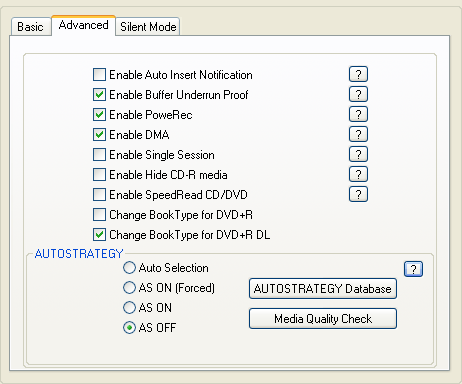
As most of the latest Plextor DVD burners, the PX-760A supports the Autostrategy feature. According to Plextor, this is a technology that determines the standard deviation of any blank disc and automatically optimizes the write strategy for unknown media, enabling high-quality disc recording.
You can learn more about it from Plextools:

Click to enlarge
A separate database collects all strategies that were created by the AUTOSTRATEGY function for media which are not yet supported in the firmware. These strategies are additional to the write strategies of supported media that are stored in the firmware. A maximum of 31 write strategies can be held in the non-volatile memory of the drive. The entries can be activated or de-activated, and deleted.The list of database entries can be viewed and saved or printed.
The user can select if he prefers to use the write strategy from the
AUTOSTRATEGY database, or from the database that resides in the drive's firmware by activating a different Mode.
1. Auto Selection Mode
The drive will select the best write strategy, whether it is located in the AS Database or in the firmware database. If no suitable strategy is found, AUTOSTRATEGY will create a new, optimised strategy in the AS Database.
2. AS On Mode (Forced)
The drive will create a new write strategy for every new recording, whether a corresponding strategy exists already ( in the firmware) or not.
3. AS On Mode
The drive will use the write strategies from the AS database for recording. If no suitable strategy is found, a corresponding write strategy from the firmware's database will be used.
4. AS off Mode
The drive will only use the strategies from the firmware's database for recording. If no corresponding write strategy is found, the default write strategy will be used.
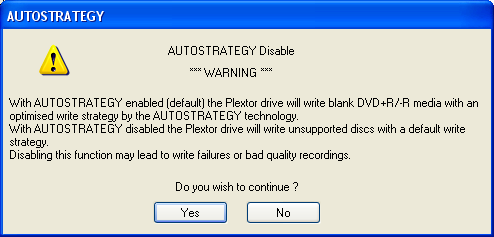
In our first attempt, we turned off the AS feature so the drive will only use the strategies from the firmware's database for recording. In that case, you'll receive the following message.
Then we opened the AS Database...
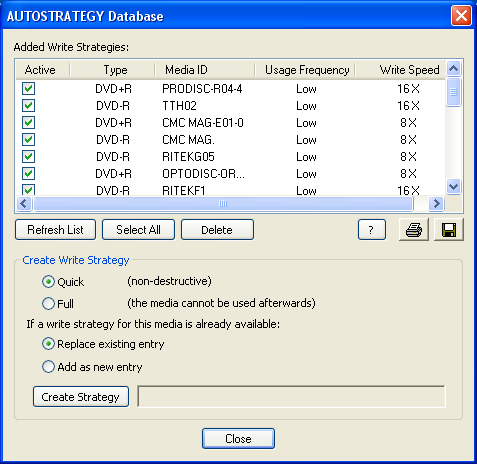
...and we deleted all entries, and created a new one using this time, the "AS On Mode (Forced)" option.
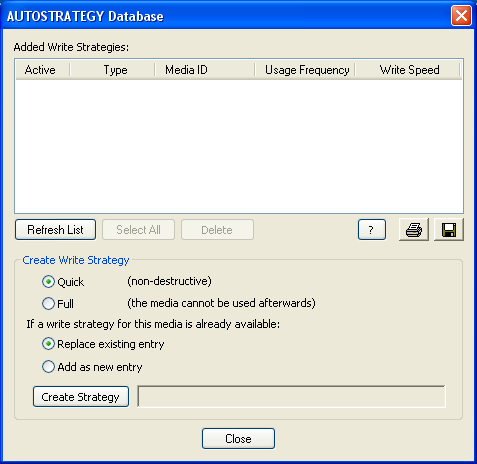
After the recording, the new writing strategy was added in AS Database.

We used Nero's CD/DVD Speed and its Create Data Disc function in order to burn our discs, while we would also be able to see the writing strategy's details.
- AS off Mode

Click to enlarge
- AS On Mode (Forced)

Click to enlarge
With the AS off, the time needed was 5:59min. The drive delayed during Leadin with AS On Mode (Forced) and the burning process finished after 7:07min. If you check the above graphs, you'll notice that there are some differences in speed drop-offs and also in writing strategy.
Now, what about the differences in writing quality, does this feature actually work?
We used two different methods to measure the writing quality on the discs we burned. First, with Plextools V2.31 and the Plextor PX-760A drive and second with Almedio's AEC-1000 "ALChecker" analyzer.
- Plextools
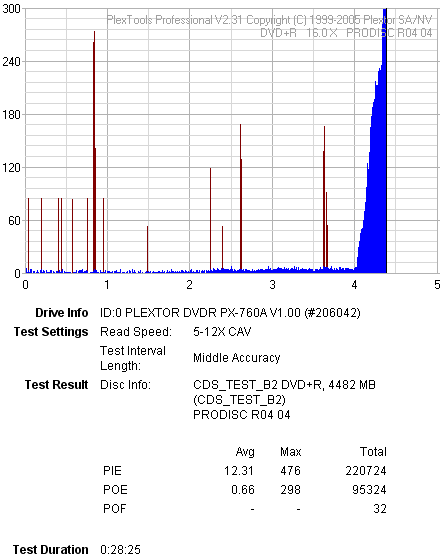
AS off Mode
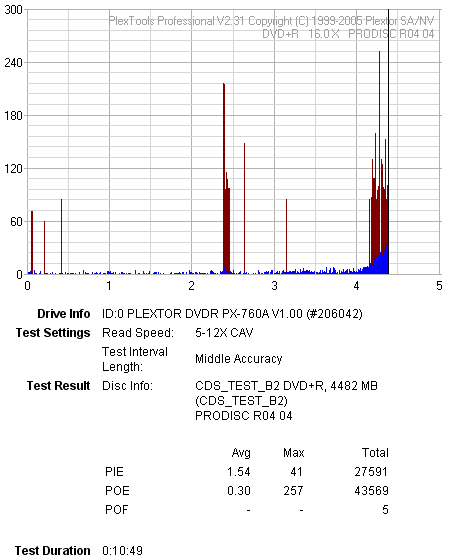
AS On Mode (Forced)
Plextools reported increased PIE error levels with AS off Mode, at the end of the disc. With AS On Mode (Forced) the PIE errors reported were 10 times lower.
- Almedio
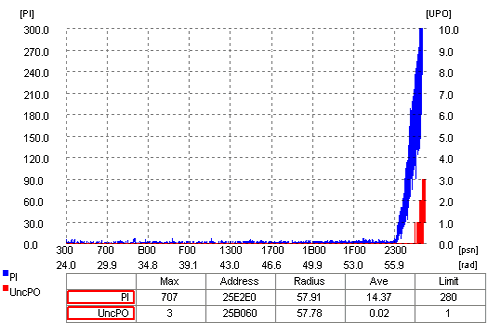
AS off Mode
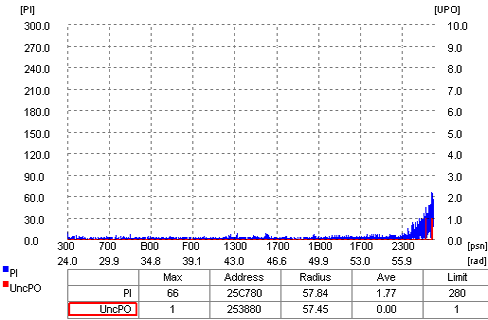
AS On Mode (Forced)
With both AS off Mode and AS On Mode (Forced), Almedio's AEC-1000 "ALChecker" analyzer reported Uncorrectable PO errors, but with AS off Mode, those were 3 while with AS On Mode (Forced) only 1. Moreover, there were many more PI errors with AS off Mode, 707 to 66, than with the AS On Mode (Forced).
Review Pages
2. Reading Tests
3. CD Error Correction
4. DVD Error Correction
5. Protected Discs
6. CD Recording Tests
7. CD Writing Quality - Plextools
8. CD Writing Quality - Clover System
9. DVD Writing Tests
10. DVD Writing Quality - Page 1
11. DVD Writing Quality - Page 2
12. DVD Writing Quality - Page 3
13. DVD Writing Quality - Page 4
14. DVD Writing Quality - Page 5
15. DVD Writing Quality - Page 6
16. DVD Writing Quality - Page 7
17. DVD Writing Quality - Almedio
18. DVDR DL - Page 1
19. DVDR DL - Page 2
20. PX-760A vs CATS - Page 1
21. PX-760A vs CATS - Page 2
22. PX-760A vs CATS - Page 3
23. PX-760A vs CATS - Page 4
24. Booktype Setting
25. Media Quality Check Utility
26. Conclusion
27. Q-Check TA Function
28. Autostrategy