Breaking News

LG Display launches 24.5-inch 720Hz Gaming OLED Panel Razer Unveils the Mako Desktop Gaming Speakers TerraMaster Launches 725 Series Xeon Rackmount NAS Viltrox Brings Its Full-Frame Air Series to L-Mount with Four Compact Prime Lenses CORSAIR Deploys the WARTHOG Airflow Mid-Tower PC Case

logo

  • Share Us
    • Facebook
    • Twitter
  • Home
  • Home
  • News
  • Reviews
  • Essays
  • About
    • Submit News

    • Contact Us
    • Privacy

    • Promotion
    • Advertise

    • RSS Feed

Search form

Plextor PX-760A

Mar 22,2006 0

26. Conclusion


Review Pages

1. Introduction
2. Reading Tests
3. CD Error Correction
4. DVD Error Correction
5. Protected Discs
6. CD Recording Tests
7. CD Writing Quality - Plextools
8. CD Writing Quality - Clover System
9. DVD Writing Tests
10. DVD Writing Quality - Page 1
11. DVD Writing Quality - Page 2
12. DVD Writing Quality - Page 3
13. DVD Writing Quality - Page 4
14. DVD Writing Quality - Page 5
15. DVD Writing Quality - Page 6
16. DVD Writing Quality - Page 7
17. DVD Writing Quality - Almedio
18. DVDR DL - Page 1
19. DVDR DL - Page 2
20. PX-760A vs CATS - Page 1
21. PX-760A vs CATS - Page 2
22. PX-760A vs CATS - Page 3
23. PX-760A vs CATS - Page 4
24. Booktype Setting
25. Media Quality Check Utility
26. Conclusion
27. Q-Check TA Function
28. Autostrategy


PX-760A, as with the PX-716A and PX-716A in the past, supports the advanced Q-Check function with the two acronyms "TA", that are the initials for Time Analyser. Plextools explains exactly what the test measures:

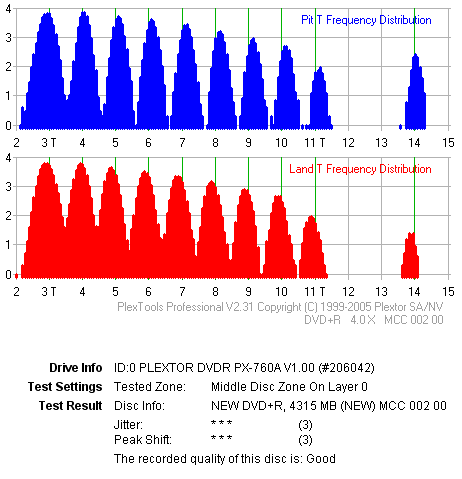
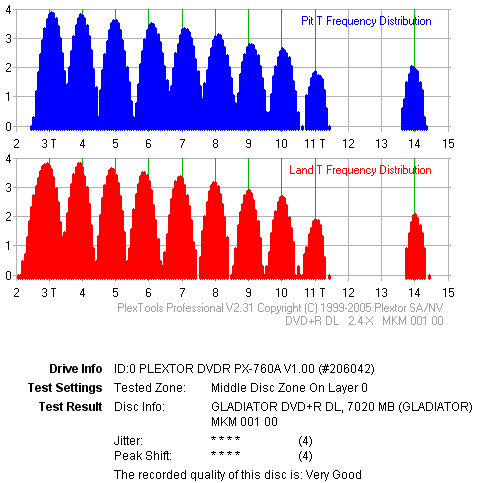
As we have mentioned in our previous reviews, this advanced Q-Check function checks the geometry of pit and lands on a recorded disc. As most of you know, the DVD specifications specify the length of both pits and lands as multiplies of the T time period of the clock. The Q-Check function checks whether there are any variations in the size of the pit/land spots on a recorded disc, compared to the theoretical values (3T-14T). In extreme cases where these variations are significant, reading could result in read errors.

So, once again we checked this function with two different discs, one single layer (MCC DVD+) and one dual layer (MCC DVD+R DL). Both discs were those we also scanned in the PI/PO Test in order to make a comparison with the SA300 CATS analyzer.

Single Layer Disc

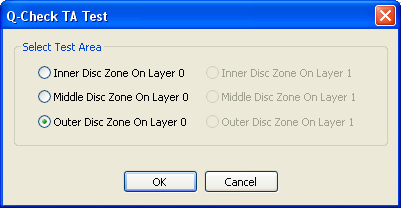
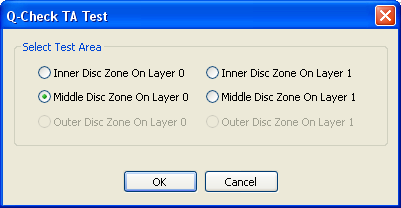
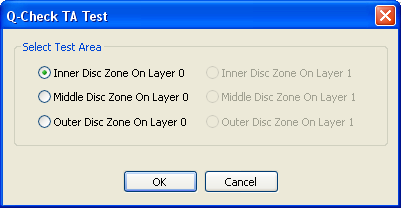
After choosing the test and pressing start, you can select from three zones to "scan", inner/middle/outer for the appropriate disc zone:
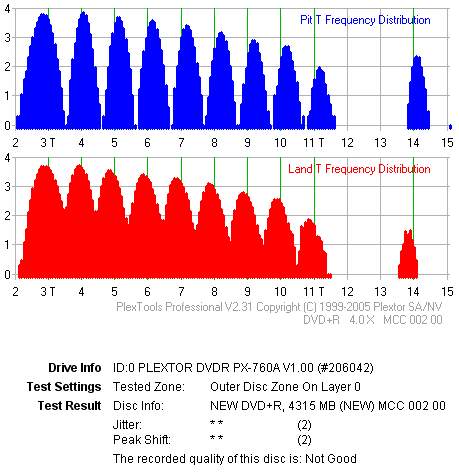
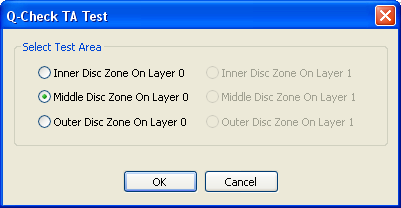
The test results will vary from disc to disc and from zone to zone, however user can easily test a full disc in less than a minute, since each zone takes approximately 10 seconds to finish:

Dual Layer Disc

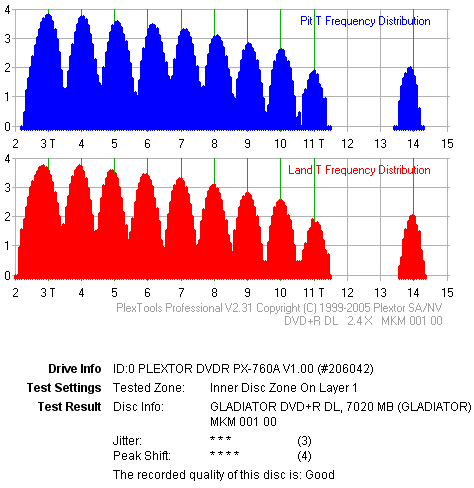
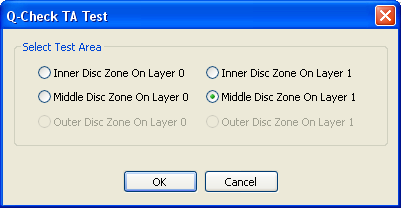
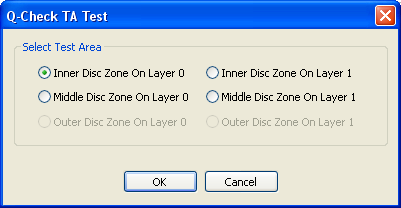
If the inserted disc is a dual layer (DL), user can select inner/middle zone at Layer 0/1, as the following picture illustrates:
 

Review Pages

1. Introduction
2. Reading Tests
3. CD Error Correction
4. DVD Error Correction
5. Protected Discs
6. CD Recording Tests
7. CD Writing Quality - Plextools
8. CD Writing Quality - Clover System
9. DVD Writing Tests
10. DVD Writing Quality - Page 1
11. DVD Writing Quality - Page 2
12. DVD Writing Quality - Page 3
13. DVD Writing Quality - Page 4
14. DVD Writing Quality - Page 5
15. DVD Writing Quality - Page 6
16. DVD Writing Quality - Page 7
17. DVD Writing Quality - Almedio
18. DVDR DL - Page 1
19. DVDR DL - Page 2
20. PX-760A vs CATS - Page 1
21. PX-760A vs CATS - Page 2
22. PX-760A vs CATS - Page 3
23. PX-760A vs CATS - Page 4
24. Booktype Setting
25. Media Quality Check Utility
26. Conclusion
27. Q-Check TA Function
28. Autostrategy


 

Pages

  • « first
  • ‹ previous
  • …
  • 20
  • 21
  • 22
  • 23
  • 24
  • 25
  • 26
  • 27
  • 28
  • next ›
  • last »

Plextor

Tags: Plextor
Previous Post
Spire Diamond Cool II
Next Post
ASUS EAX1800XT TOP

Related Posts

  • Plextor SSD RMA Services Transition to SSSTC Official Website

  • Plextor Unveils M10P Series PCIe Gen4 Solid State Drives

  • Plextor Launches the M9P Plus Series of SSDs

  • LITE-ON Technology Approves the Transfer of its Solid State Drives Business to Toshiba Memory

  • Shinano Kenshi Introduces New ASPINA Corporate Brand

  • PLEXTOR Debuts New Consumer SSDs at CES 2019

  • Plextor Unveils the M9Pe Extreme NVMe SSD at Computex Taipei 2018

  • Plextool NVMe Edition Released

Latest Reviews

Fanxiang MP83 M.2 NVMe SSD Enclosure
Enterprise & IT

Fanxiang MP83 M.2 NVMe SSD Enclosure

Ugreen CM642 USB4.0 Enclosure
PC components

Ugreen CM642 USB4.0 Enclosure

be quiet! Dark Power 14 IO
PC components

be quiet! Dark Power 14 IO

SanDisk High Endurance 512GB microSDXC
Cameras

SanDisk High Endurance 512GB microSDXC

Samsung PRO Ultimate 512GB microSDXC
Cameras

Samsung PRO Ultimate 512GB microSDXC

Popular News

CORSAIR announces Vanguard Pro 96 and Vanguard 96 Gaming Keyboards

CORSAIR announces Vanguard Pro 96 and Vanguard 96 Gaming Keyboards

MSI’s Latest AMD X870E MAX & EVO Series Motherboards

MSI’s Latest AMD X870E MAX & EVO Series Motherboards

Panasonic Introduces the First Ultra-Telephoto Zoom Lens in the LUMIX S Series

Panasonic Introduces the First Ultra-Telephoto Zoom Lens in the LUMIX S Series

COLORFUL Launches iGame B850M ULTRA Series Micro-ATX Motherboards

COLORFUL Launches iGame B850M ULTRA Series Micro-ATX Motherboards

COLORFUL Presents Limited Edition Chitu MAG-60 Magnetic Keyboard Inspired by the Year of the Horse

COLORFUL Presents Limited Edition Chitu MAG-60 Magnetic Keyboard Inspired by the Year of the Horse

COLORFUL Presents iGame Z890 ULTRA-S W and iGame Z890M ULTRA Z Motherboards

COLORFUL Presents iGame Z890 ULTRA-S W and iGame Z890M ULTRA Z Motherboards

COLORFUL Launches iGame B850I MINI OC V14 Motherboard

COLORFUL Launches iGame B850I MINI OC V14 Motherboard

COLORFUL Expands B850 Motherboard Lineup with New CVN, Battle-Ax, and MEOW Models

COLORFUL Expands B850 Motherboard Lineup with New CVN, Battle-Ax, and MEOW Models

Main menu

  • Home
  • News
  • Reviews
  • Essays
  • About
    • Submit News

    • Contact Us
    • Privacy

    • Promotion
    • Advertise

    • RSS Feed
  • About
  • Privacy
  • Contact Us
  • Promotional Opportunities @ CdrInfo.com
  • Advertise on out site
  • Submit your News to our site
  • RSS Feed