Breaking News

Sony Expands Its Turntable Lineup with New Wireless Models ENDORFY introduces Atlas Electric desks Sony Unveils LinkBuds Clip Open Earbuds be quiet! enters high-end gaming mouse market with Dark Perk Ergo and Dark Perk Sym ASUS ROG announces ROG Strix GS-BE7200 Dual-Band WiFi 7 Gaming Router

logo

  • Share Us
    • Facebook
    • Twitter
  • Home
  • Home
  • News
  • Reviews
  • Essays
  • Forum
  • Legacy
  • About
    • Submit News

    • Contact Us
    • Privacy

    • Promotion
    • Advertise

    • RSS Feed
    • Site Map

Search form

Patriot Torqx 128GB SSD

Jun 30,2009 0

3. Upgrading the firmware


Review Pages

1. Features
2. Package
3. Upgrading the firmware
4. Benchmarks
5. Performance Comparison between Ver.1370 & ver.1571 firmware versions
6. Final words


Installing the Patriot Memory Torqx 128GB SSD product is very easy. After booting into Windows VISTA, we got the first information about the drive using the CrystalDiskInfo 2.7.4 software. The product has 128GB of RAM and supports the S.M.A.R.T., NCQ and the "TRIM" technologies. While those terms might not say anything to you, especially the "TRIM" technology promises to boost the speed of the drive..
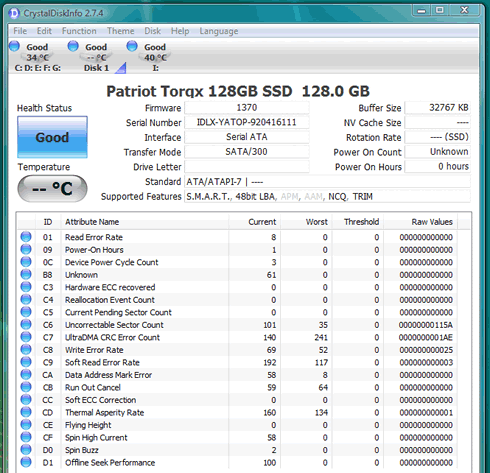
According to Wikipedia, TRIM is actually a drive controller command that can be used from the operating system to get blocks of data set to write so the drive's performance will be increased. So far no operating system supports this "command" , but rumours say that the upcoming Windows 7 would include it offering faster speeds. However manufacturers haven't finalized the TRIM feature yet, so its up to each maker to introduce its own utility for that use. So far the only utility we know is called 'wiper.exe,' which helps you clean the unused space of your drive. This utility can be used with specific or we should better say limited SSD models. The Patriot Memory Torqx 128GB is supported from the wiper.exe software, so you can use under Windows.

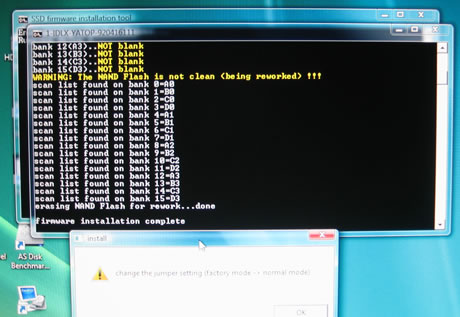
After we had completed all the tests, Patriot Memory sent us a newer firmware revision (1571) that was supposed to futher increase the drive's performance. In order to begin flashing the drive woith the new firmware, we had to use the included jumper, boot into Windows and use the firmware upgrader. The whole procedure didn't take more than 1 minute. After flashing the drive we removed the jumper and had a brand new Torqx 128GB SSD drive in our hands. The negative point here is that the process wiped out the complete data of the SSD, so be careful to read the instructions before proceeding:
After the firmware upgrade (v1571) we noticed that two additional SMART features were added (D2/D3):


Review Pages
1. Features
2. Package
3. Upgrading the firmware
4. Benchmarks
5. Performance Comparison between Ver.1370 & ver.1571 firmware versions
6. Final words


Pages

  • « first
  • ‹ previous
  • 1
  • 2
  • 3
  • 4
  • 5
  • 6
  • next ›
  • last »

Patriot Memory

SSDs

Tags: Patriot Memory SSDs
Previous Post
OCZ Vertex 60GB SSD
Next Post
Optiarc AD7240S

Related Posts

  • JEDEC Publishes Automotive Solid State Drive (SSD) Device Standard

  • Patriot Announces VIPER VENOM RGB and non-RGB DDR5 Kits

  • Patriot Announces Signature DDR5 Memory Series

  • Crucial launch 500GB & 4TB X6 Portable SSDs

  • Intel Launches SSD for Everyday Computing, Mainstream Gaming

  • PATRIOT VIPER GAMING STEEL RGB Memory Lineup

  • Seagate Releases New FireCuda 120 SATA SSD

  • Kingston Ships 7.68TB Capacity for High-Performance Data Center SSDs

Latest Reviews

The Difference Between American and European Stakes and Why It Changes How People Bet
Enterprise & IT

The Difference Between American and European Stakes and Why It Changes How People Bet

Endorfy Thock V2 Wireless Keyboard
PC components

Endorfy Thock V2 Wireless Keyboard

Noctua NH-D15 G2 Chromax.Black
Cooling Systems

Noctua NH-D15 G2 Chromax.Black

EnGenius ECW520 AP
Enterprise & IT

EnGenius ECW520 AP

Noctua NP-DM3 desk mat
Gaming

Noctua NP-DM3 desk mat

Popular News

COLORFUL Introduces CVN B850I GAMING FROZEN Motherboard

COLORFUL Introduces CVN B850I GAMING FROZEN Motherboard

COLORFUL Presents CVN X870 ARK FROZEN Motherboard for AMD Ryzen 9000 CPUs

COLORFUL Presents CVN X870 ARK FROZEN Motherboard for AMD Ryzen 9000 CPUs

TEAMGROUP Launches EXPERT P34F Find My External SSD

TEAMGROUP Launches EXPERT P34F Find My External SSD

ASRock AM5 Motherboards Now Fully Support AMD Ryzen 9 9950X3D & 9900X3D Processors

ASRock AM5 Motherboards Now Fully Support AMD Ryzen 9 9950X3D & 9900X3D Processors

Samsung announces Galaxy Tab S11 and Galaxy S25 FE series

Samsung announces Galaxy Tab S11 and Galaxy S25 FE series

Viltrox Showcases Upcoming Lens Lineup and New TTL Flash at IBC 2025

Viltrox Showcases Upcoming Lens Lineup and New TTL Flash at IBC 2025

CORSAIR announces Vanguard Pro 96 and Vanguard 96 Gaming Keyboards

CORSAIR announces Vanguard Pro 96 and Vanguard 96 Gaming Keyboards

Panasonic Introduces the First Ultra-Telephoto Zoom Lens in the LUMIX S Series

Panasonic Introduces the First Ultra-Telephoto Zoom Lens in the LUMIX S Series

Main menu

  • Home
  • News
  • Reviews
  • Essays
  • Forum
  • Legacy
  • About
    • Submit News

    • Contact Us
    • Privacy

    • Promotion
    • Advertise

    • RSS Feed
    • Site Map
  • About
  • Privacy
  • Contact Us
  • Promotional Opportunities @ CdrInfo.com
  • Advertise on out site
  • Submit your News to our site
  • RSS Feed