Breaking News

LG Electronics Unveils New LG MAGNIT Micro LED Display at ISE 2026 Giga Computing Announces New Server Built on NVIDIA GB200 NVL4 Platform Sony Expands Its Turntable Lineup with New Wireless Models ENDORFY introduces Atlas Electric desks Sony Unveils LinkBuds Clip Open Earbuds

logo

  • Share Us
    • Facebook
    • Twitter
  • Home
  • Home
  • News
  • Reviews
  • Essays
  • Forum
  • Legacy
  • About
    • Submit News

    • Contact Us
    • Privacy

    • Promotion
    • Advertise

    • RSS Feed
    • Site Map

Search form

Patriot Torqx 128GB SSD

Jun 30,2009 0

2. Package


Review Pages

1. Features
2. Package
3. Upgrading the firmware
4. Benchmarks
5. Performance Comparison between Ver.1370 & ver.1571 firmware versions
6. Final words


We have in our hands the retail packet of the Torqx 128GB SSD product (PFZ128GS25SSDR) that costs ~ $399 ($385 after $12 mail-in rebate). Compared with the Warp v2 series ($259), this product would cost you more for exactly the same capacity, so let's hope that it worths the extra cash. The product is backed by a 2-year warranty as it is usually the case with the majority of the currently available SSD drives except OCZ , which recently announced a 3-year warranty for its high-end SSD models.

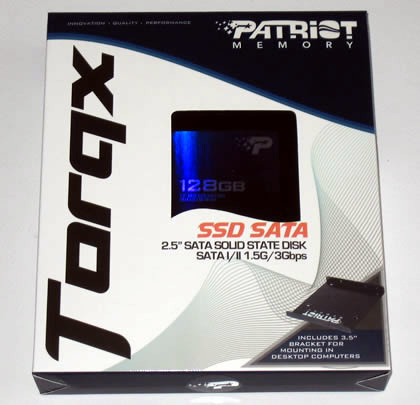
The retail package follows the design we have seen with the Warp v2 series. It is small and can be easily identidied with all these logos found on it.

A large plastic film covered window at the front side allows you to actually see the contents of the package and the drive itself. The additional 3.5" mounting bracket for desktop use found in the package is very useful for users who simply wish to install this product in their main system and not use it in any external disk case or laptop.
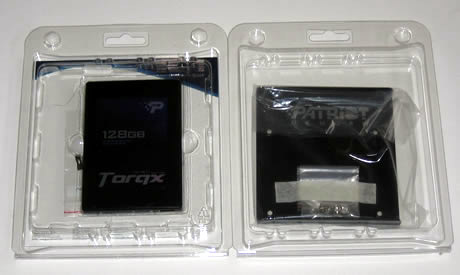
The well-packaged product is placed into two plastic shells protecting it from any damage. The 3.5" bracket is found in the second shell:
The SSD drive is black covered with a sticker with information about the available capacity and the model number. The drive's weight is just 91grams:.
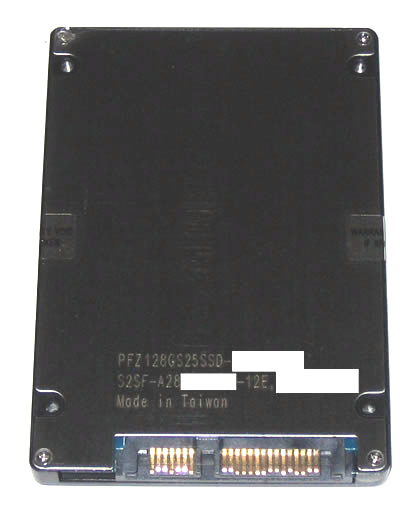
The available power and SATA connectors are typically placed in the rear side of the drive, offering easy installation for your laptop or desktop PC:
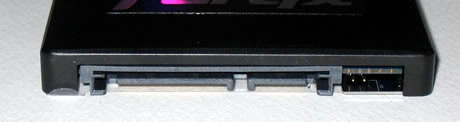
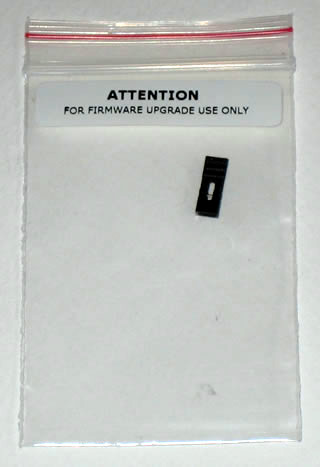
We also found interesting the we pins we saw at the right side of the interface panel. These pins should be used and connected before upgrading the firmware of the drive, using the inlcuded header:
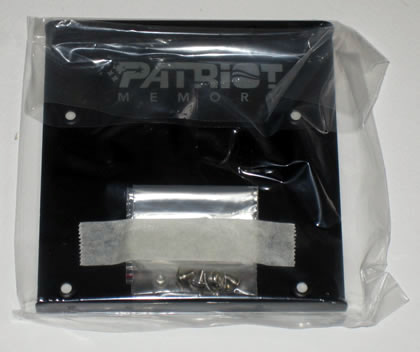
The 3.5" bracket is a simple metal plate with the right dimensions to fit at any typical 3.5" bay. Some mounting screws are also included for securing the bracket before installation.
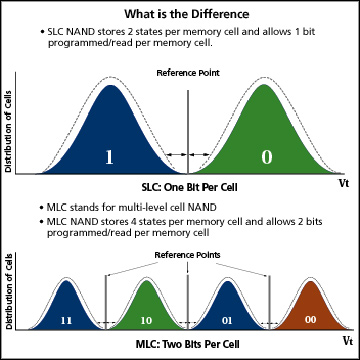
The drive's I/O controller is the Indilinx Barefoot with a 64MB cache chip by Elpida Memory. We should remind you here that this is an MLC SSD solution and as such, it is more affordable than SLC products. In theory, SLC SSDs should be faster, although these new controllers have been proved fast and and efficient compared with SLCs.

On the other hands, SLC products seem to offer a better protection for your data since they produce less read/write cycles.
 

Review Pages

1. Features
2. Package
3. Upgrading the firmware
4. Benchmarks
5. Performance Comparison between Ver.1370 & ver.1571 firmware versions
6. Final words


Pages

  • « first
  • ‹ previous
  • 1
  • 2
  • 3
  • 4
  • 5
  • 6
  • next ›
  • last »

Patriot Memory

SSDs

Tags: Patriot Memory SSDs
Previous Post
OCZ Vertex 60GB SSD
Next Post
Optiarc AD7240S

Related Posts

  • JEDEC Publishes Automotive Solid State Drive (SSD) Device Standard

  • Patriot Announces VIPER VENOM RGB and non-RGB DDR5 Kits

  • Patriot Announces Signature DDR5 Memory Series

  • Crucial launch 500GB & 4TB X6 Portable SSDs

  • Intel Launches SSD for Everyday Computing, Mainstream Gaming

  • PATRIOT VIPER GAMING STEEL RGB Memory Lineup

  • Seagate Releases New FireCuda 120 SATA SSD

  • Kingston Ships 7.68TB Capacity for High-Performance Data Center SSDs

Latest Reviews

The Difference Between American and European Stakes and Why It Changes How People Bet
Enterprise & IT

The Difference Between American and European Stakes and Why It Changes How People Bet

Endorfy Thock V2 Wireless Keyboard
PC components

Endorfy Thock V2 Wireless Keyboard

Noctua NH-D15 G2 Chromax.Black
Cooling Systems

Noctua NH-D15 G2 Chromax.Black

EnGenius ECW520 AP
Enterprise & IT

EnGenius ECW520 AP

Noctua NP-DM3 desk mat
Gaming

Noctua NP-DM3 desk mat

Popular News

COLORFUL Introduces CVN B850I GAMING FROZEN Motherboard

COLORFUL Introduces CVN B850I GAMING FROZEN Motherboard

COLORFUL Presents CVN X870 ARK FROZEN Motherboard for AMD Ryzen 9000 CPUs

COLORFUL Presents CVN X870 ARK FROZEN Motherboard for AMD Ryzen 9000 CPUs

TEAMGROUP Launches EXPERT P34F Find My External SSD

TEAMGROUP Launches EXPERT P34F Find My External SSD

ASRock AM5 Motherboards Now Fully Support AMD Ryzen 9 9950X3D & 9900X3D Processors

ASRock AM5 Motherboards Now Fully Support AMD Ryzen 9 9950X3D & 9900X3D Processors

Samsung announces Galaxy Tab S11 and Galaxy S25 FE series

Samsung announces Galaxy Tab S11 and Galaxy S25 FE series

Viltrox Showcases Upcoming Lens Lineup and New TTL Flash at IBC 2025

Viltrox Showcases Upcoming Lens Lineup and New TTL Flash at IBC 2025

CORSAIR announces Vanguard Pro 96 and Vanguard 96 Gaming Keyboards

CORSAIR announces Vanguard Pro 96 and Vanguard 96 Gaming Keyboards

Panasonic Introduces the First Ultra-Telephoto Zoom Lens in the LUMIX S Series

Panasonic Introduces the First Ultra-Telephoto Zoom Lens in the LUMIX S Series

Main menu

  • Home
  • News
  • Reviews
  • Essays
  • Forum
  • Legacy
  • About
    • Submit News

    • Contact Us
    • Privacy

    • Promotion
    • Advertise

    • RSS Feed
    • Site Map
  • About
  • Privacy
  • Contact Us
  • Promotional Opportunities @ CdrInfo.com
  • Advertise on out site
  • Submit your News to our site
  • RSS Feed