
Breaking News

God of War Greek trilogy remake in development & God of War Sons of Sparta out now Sony Launches WF-1000XM6 Truly Wireless Earbuds EnGenius ECW515 Brings Wi-Fi 7 Performance to In-Room and In-Unit Deployments MSI Strengthens Strategic Partnership with Samsung Display Razer Introduces the BlackShark V3 for Xbox – White Edition

logo

  • Share Us
    • Facebook
    • Twitter
  • Home
  • Home
  • News
  • Reviews
  • Essays
  • Forum
  • Legacy
  • About
    • Submit News

    • Contact Us
    • Privacy

    • Promotion
    • Advertise

    • RSS Feed
    • Site Map

Search form

ONES - Simple DVD-Video guide

Oct 18,2004 0

3. Erase RW Disc


Review Pages

1. The Software
2. DVD-Video Compilation
3. Erase RW Disc
4. Comments


ONES - Simple DVD-Video guide - Page 4

Erase RW Disc

There is also an option to erase RW media. Choose the image from the main screen as shown below:

As soon as you make this selection, the following screen will pop up.

If you press on the Details button, the window will expand as shown below:
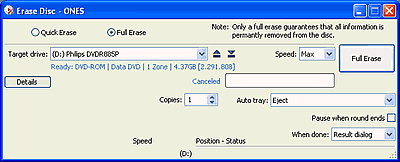
You can choose between Quick or Full erase. After pressing the Erase button (with either Quick or Full selected), the process will begin.

If instead of this you see the following message, then your RW media has DVD-ROM booktype instead of DVD+RW and cannot be erased with ONES software, which is something that we would like to see added in the next version of this software. In this case, if you want to erase the specific media, you'll have to change its booktype.

So the indication below the "Target drive" name drop down list should be something similar to that below:
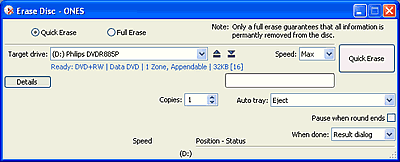
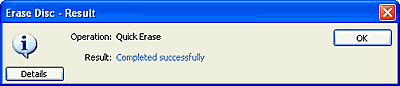
The time to erase depends on your selection (full or quick).
 

Review Pages

1. The Software
2. DVD-Video Compilation
3. Erase RW Disc
4. Comments


Pages

  • « first
  • ‹ previous
  • 1
  • 2
  • 3
  • 4
  • next ›
  • last »

Prassi

Tags: Prassi
Previous Post
Rome: Total War Review
Next Post
ONES - Simple AudioCD guide

Related Posts

  • ONES recording software review

  • ONES - Simple AudioCD guide

  • ONES Software

  • January, 2003 - Prassi is back!

  • Prassi keeps "CD Rep" after the lawsuit settlement

  • Roxio settles Prassi lawsuit

  • VERITAS Software acquires Prassi Europe!

  • Hot news: Prassi USA has been acquired by ...?

Latest Reviews

Asustor AS5404T 4-Bay NAS System
Enterprise & IT

Asustor AS5404T 4-Bay NAS System

be quiet! Pure Power 13M 1200W
PC components

be quiet! Pure Power 13M 1200W

Server-Side Gaming Why Canadian Online Casinos Are Abandoning Local Clients for HTML5 Clouds
Enterprise & IT

Server-Side Gaming Why Canadian Online Casinos Are Abandoning Local Clients for HTML5 Clouds

Airfanta 3 Pro Air
Consumer Electronics

Airfanta 3 Pro Air

Akaso Brave 8 Lite
Cameras

Akaso Brave 8 Lite

Popular News

COLORFUL Introduces CVN B850I GAMING FROZEN Motherboard

COLORFUL Introduces CVN B850I GAMING FROZEN Motherboard

COLORFUL Presents CVN X870 ARK FROZEN Motherboard for AMD Ryzen 9000 CPUs

COLORFUL Presents CVN X870 ARK FROZEN Motherboard for AMD Ryzen 9000 CPUs

TEAMGROUP Launches EXPERT P34F Find My External SSD

TEAMGROUP Launches EXPERT P34F Find My External SSD

Samsung announces Galaxy Tab S11 and Galaxy S25 FE series

Samsung announces Galaxy Tab S11 and Galaxy S25 FE series

Viltrox Showcases Upcoming Lens Lineup and New TTL Flash at IBC 2025

Viltrox Showcases Upcoming Lens Lineup and New TTL Flash at IBC 2025

CORSAIR announces Vanguard Pro 96 and Vanguard 96 Gaming Keyboards

CORSAIR announces Vanguard Pro 96 and Vanguard 96 Gaming Keyboards

Panasonic Introduces the First Ultra-Telephoto Zoom Lens in the LUMIX S Series

Panasonic Introduces the First Ultra-Telephoto Zoom Lens in the LUMIX S Series

MSI Launches DATAMAG 40Gbps Magnetic Portable SSD

MSI Launches DATAMAG 40Gbps Magnetic Portable SSD

Main menu

  • Home
  • News
  • Reviews
  • Essays
  • Forum
  • Legacy
  • About
    • Submit News

    • Contact Us
    • Privacy

    • Promotion
    • Advertise

    • RSS Feed
    • Site Map
  • About
  • Privacy
  • Contact Us
  • Promotional Opportunities @ CdrInfo.com
  • Advertise on out site
  • Submit your News to our site
  • RSS Feed


