Breaking News

Akasa Launches Newton N16, Compact Fanless Case for ASUS NUC 16 Pro TEAMGROUP Unveils the ACE 8K MicroSDXC Memory Card ASUS Announces Ascent QN10 Mini PC CORSAIR Launches Second Generation Nautilus II AIO CPU Coolers CORSAIR Launches VOXARA USB Gaming Condenser Microphone

logo

  • Share Us
    • Facebook
    • Twitter
  • Home
  • Home
  • News
  • Reviews
  • Essays
  • About
    • Submit News

    • Contact Us
    • Privacy

    • Promotion
    • Advertise

    • RSS Feed

Search form

ONES - Simple DVD-Video guide

Oct 18,2004 0

2. DVD-Video Compilation


Review Pages

1. The Software
2. DVD-Video Compilation
3. Erase RW Disc
4. Comments


ONES - Simple DVD-Video guide - Page 3

DVD-Video Compilation

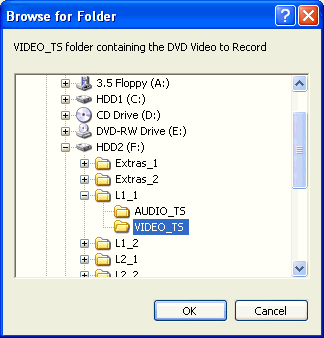
For recording a movie so that it is playable on standalone players, you need to follow the specifications of the DVD-Video format, which uses two subfolders, Audio_TS and Video_TS. Your files should be located in the Video_TS folder.

So, select the image from the list as shown below:

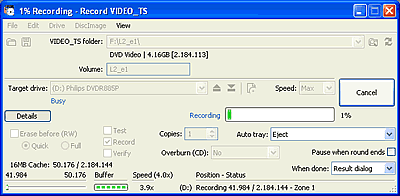
After selecting, the following dialog window will be presented:
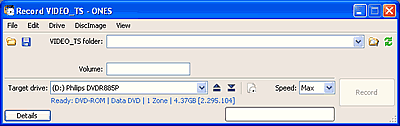
You can see further details by presseing on the "Details" button:
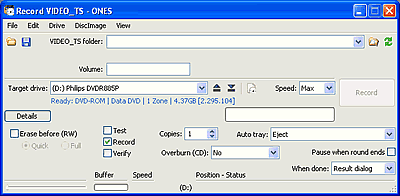
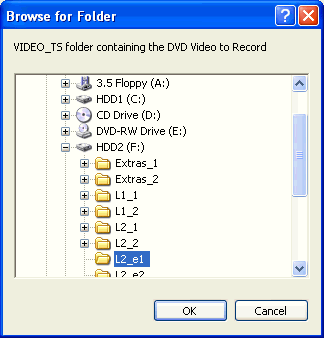
First thing you should do is browse for the video file by choosing the folder icon on the far right of the "VIDEO_TS folder:" selection and select the movie you would like to burn.
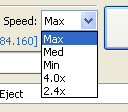
Next, determine at which speed you want to burn your media. You can select a speed of 4X, min, med or max. When there are only two speeds available for the specific disc, min and med refer to the lowest, 2.4X in our example, while max to the fasted, 4X.


You can select to burn your complilation by pressing the button. Also you can do a test before the recording and a data verification at the end. According to what you have selected by enabling the various fields, the Record button should look something like this :

As soon as you select the button, the writing process will begin. You can watch the writing speed, the buffer level and the data size writng process.
Below is what Windows Task Manager reported while our writing process was running:
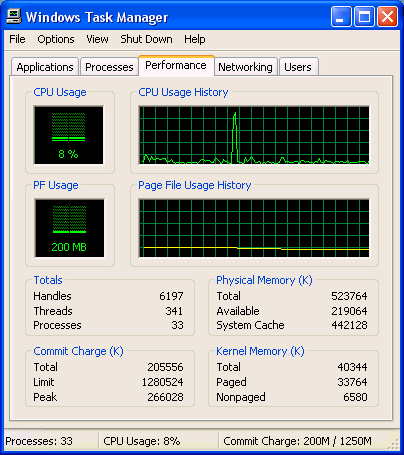
The CPU usage was beetween 2%~15% approximately. We recommend that you avoid any other activities while recording, especially on older systems.

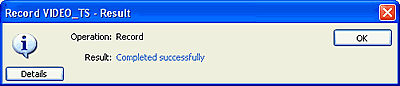
As soon as the process is finished, you'll get the following message:
 

Review Pages

1. The Software
2. DVD-Video Compilation
3. Erase RW Disc
4. Comments


Pages

  • « first
  • ‹ previous
  • 1
  • 2
  • 3
  • 4
  • next ›
  • last »

Prassi

Tags: Prassi
Previous Post
Rome: Total War Review
Next Post
ONES - Simple AudioCD guide

Related Posts

  • ONES recording software review

  • ONES - Simple AudioCD guide

  • ONES Software

  • January, 2003 - Prassi is back!

  • Prassi keeps "CD Rep" after the lawsuit settlement

  • Roxio settles Prassi lawsuit

  • VERITAS Software acquires Prassi Europe!

  • Hot news: Prassi USA has been acquired by ...?

Latest Reviews

Fanxiang MP83 M.2 NVMe SSD Enclosure
Enterprise & IT

Fanxiang MP83 M.2 NVMe SSD Enclosure

Ugreen CM642 USB4.0 Enclosure
PC components

Ugreen CM642 USB4.0 Enclosure

be quiet! Dark Power 14 IO
PC components

be quiet! Dark Power 14 IO

SanDisk High Endurance 512GB microSDXC
Cameras

SanDisk High Endurance 512GB microSDXC

Samsung PRO Ultimate 512GB microSDXC
Cameras

Samsung PRO Ultimate 512GB microSDXC

Popular News

CORSAIR announces Vanguard Pro 96 and Vanguard 96 Gaming Keyboards

CORSAIR announces Vanguard Pro 96 and Vanguard 96 Gaming Keyboards

MSI’s Latest AMD X870E MAX & EVO Series Motherboards

MSI’s Latest AMD X870E MAX & EVO Series Motherboards

Panasonic Introduces the First Ultra-Telephoto Zoom Lens in the LUMIX S Series

Panasonic Introduces the First Ultra-Telephoto Zoom Lens in the LUMIX S Series

COLORFUL Launches iGame B850M ULTRA Series Micro-ATX Motherboards

COLORFUL Launches iGame B850M ULTRA Series Micro-ATX Motherboards

COLORFUL Presents Limited Edition Chitu MAG-60 Magnetic Keyboard Inspired by the Year of the Horse

COLORFUL Presents Limited Edition Chitu MAG-60 Magnetic Keyboard Inspired by the Year of the Horse

COLORFUL Presents iGame Z890 ULTRA-S W and iGame Z890M ULTRA Z Motherboards

COLORFUL Presents iGame Z890 ULTRA-S W and iGame Z890M ULTRA Z Motherboards

COLORFUL Launches iGame B850I MINI OC V14 Motherboard

COLORFUL Launches iGame B850I MINI OC V14 Motherboard

COLORFUL Expands B850 Motherboard Lineup with New CVN, Battle-Ax, and MEOW Models

COLORFUL Expands B850 Motherboard Lineup with New CVN, Battle-Ax, and MEOW Models

Main menu

  • Home
  • News
  • Reviews
  • Essays
  • About
    • Submit News

    • Contact Us
    • Privacy

    • Promotion
    • Advertise

    • RSS Feed
  • About
  • Privacy
  • Contact Us
  • Promotional Opportunities @ CdrInfo.com
  • Advertise on out site
  • Submit your News to our site
  • RSS Feed