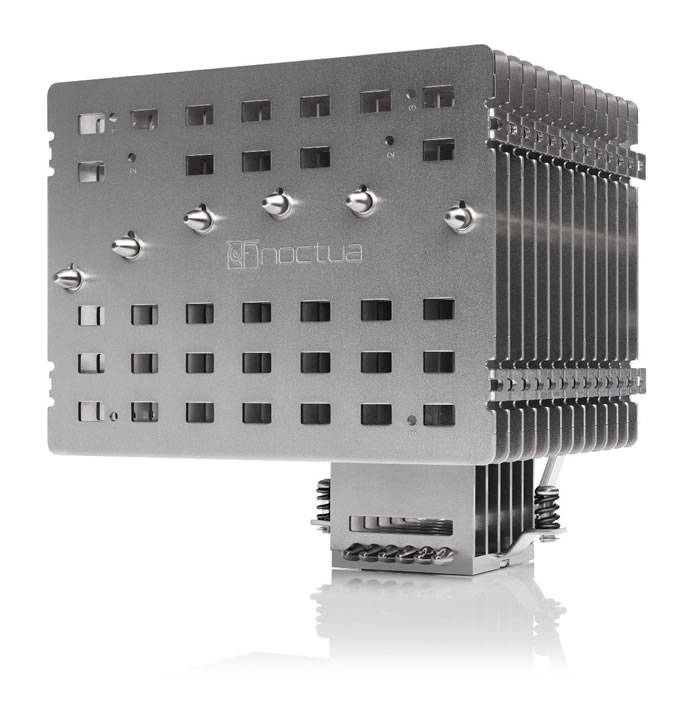
Noctua NH-P1 passive CPU cooler
7. Conclusion
The Noctua NH-P1 is the first ever passive CPU cooler that aims for a specific target group of users. The product is massive and promises very good performance even without an external fan and depending from you case you can have a totally silent system. The NH-P1 is capable of cooling high-end CPUs with low to moderate heat dissipation using natural convection only.
Noctua also updated their SecuFirm2+ mounting system with Torx screws, while they also included their own branded NT-H2 thermal compound. The retail package comes with a massive 6-year manufacturer’s warranty in case something comes up. The product supports almost (!) all Intel and AMD released sockets like Intel LGA2066, LGA2011-0 & LGA2011-3 (Square ILM), LGA1200, LGA1156, LGA1155, LGA1151, LGA1150 & AMD AM2, AM2+, AM3, AM3+, FM1, FM2, FM2+, AM4 and even with LGA1366 and LGA775 with extra the optional NM-I3 mounting kit, very impressive.
The retail package is complete as usual with Noctua products and you won't have much problems installing this CPU cooler, since the SecuFirm2+ system is easy to handle, at least with the AM4 socket. Users should , before buying, check the special Noctua has with supported CPUs/motherboard and of course cases. Since its main use is passive cooling proper "airflow" should be present and of course "proper" environment temperature. All of our tests performed at controlled environment ~25 celcious with the AMD Ryzen 5600X processor. Another important with passive cooling is to try "undervolting" your processor to the minimum that will help even further bring down those high temperatures.
Enough with all this talk, how this passive CPU cooler performed? In our opinion very good, considering that this product mainly advertised as a PASSIVE cooler. Noctua mentioned that it is best to use passive coolers with open test bed. In our case, we left the installed Noctua NH-P1 inside the CPU case with front and back panels removed and we measured some temperatures, this isn't an ideal open test bed but should give you an idea what you can expect without any fan around. For sure passive cooling requires some kind of air flow, either from extra FANS or room climate control. The extra Noctua NF-A12x25 LS-PWM fan DID help reducing even further internal temperatures and didn't added at all noise to our system since mainly was rotating at 200-300 rpm (according to the Asus Expert4 software). You can even further fine tune the fan from software if you like, we just took the Auto values from the motherboard manufacturer.
After each test we opened the case and we cooled down the CPU by simply placing a high rotating 120mm fan. The fin design is really clever and you can immediately notice the CPU temp drop. So if you have a good air flow, or you simply are in a controller environment, this CPU cooler can be used without any issue or problem, even with harder to run tasks (like Photo/Video Editing). The currently sold processors have high temperature margins and even reaching 90 celcious isn't a real problem.
We believe the NH-P1 is a very good product from Noctua and it’s designed for user who wish to have the absolute lowest noise from their PC case, provided that they can supply this passive cooler with satisfactory surround air flow and good air temperatures. The retail price is not cheap (~110 Euro) and you need additional +30 Euro for the Noctua NF-A12x25 LS-PWM but you get a very interesting combo that will accompany you for many many years to come, since for sure Noctua will manufacture new motherboard plates for future Intel/AMD sockets.

The Good:
+ Great & complete retail package. includes thermal paste and long screwdriver to get started
+ Great external design and aesthetics for a passive cooler
+ Fin design allows for quick heat removal when paired with air cooler
+ Fin design supports three different mounting options for 120mm fans
+ Supports almost all Intel / AMD sold sockets!
+ Great performance with open air testbed for "normal" use (Office/Internet/etc.)
+ Very good passive performance, provided that you have enough surround air flow
+ The Noctua NF-A12x25 LS-PWM fan gets the job done introducing minimal noise and rotates from 200~300 rpm removing heat
+ Noctua has detailed compatibility information at their website
+ Installation procedure is not hard at all (at least for the AMD platform)
+ 6 Years Warranty
Neutral:
- Price is not cheap but this is premium passive CPU cooler
- Buying the suggested Noctua NF-A12x25 LS-PWM fan costs additional (+30 Euro), but you can use any 120mm fan you may have around
The bad
- ?