Noctua NH-C12P SE14 review
2. Package, installation
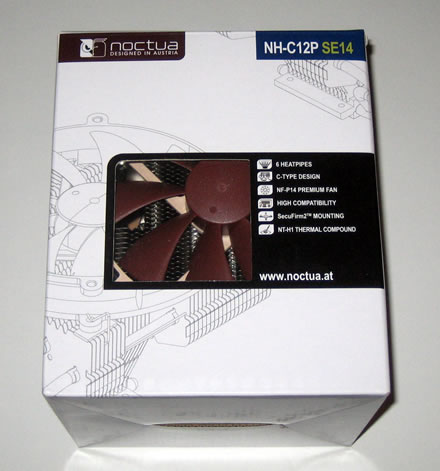
Noctua used its typical packaging for the NH-C12P SE14 as you can see in the picture below. A transparent window in the front side of the box allows you to see the cooler inside. The basic features of the product are listed on the front side of the box. Reading the specifications on the rear side of it should make you smile, with the heatsink to be universally compatible with Intel's LGA1366, LGA1156, LGA775 & AMD's AM2, AM2+, AM3 sockets. You can make this package yours after spending ~ $70. This is a high price for a heatsink but it follows Noctua's pricing tradition for premium heatsinks. Let's hope that this baby will worth the extra spending.

The contents of the retail package include the main heatsink, the NF-P14 fan (140mm) , installation manuals, Noctua's SecuFirm2 multi-socket mounting system for Intel and AMD CPUs, and Noctua's NT-H1 thermal compound:


The Noctua NH-C12P SE14 is a compact-sized cpu cooler and uses a fan installed on the top side of the heatsink. Measuring just 90x126x152 (height x width x depth) and with a weight of 550grams, the NH-C12P SE14 will fit inside your PC case even if it is not a large one. So before running any tests, we can safely say that if you need something to make things cooler inside your PC case, the NH-C12P SE14 should be a good option for you.
The heatsink's small footprint is also contributed to the down-facing c-type design of it. This allows for low height as well as motherboard and case compatibility, making the NH-C12P SE14 suitable for many smaller or desktop style cases.
Let's have a closer look. The Noctua NH-C12P SE14 follows the proven 6 heatpipe design, with six full copper nickel-plated heatpipes connecting the heatsink's base with the aluminium fins:


Besides offering a small height, the down-facing design also provides cooling and lots of airflow for near-socket mainboard components.
The heatsink's base looks perfect made of nickel-plated copper. The bottom-surface of the cooler is optimized for the use with high-viscosity thermal compounds. As a result, we have to don't have to do with a mirror like surface. Micro-grooves on the surface of the coolers' base ensure that high-viscosity thermal compounds are dispersed to a uniform thin layer across the whole contact area and that no air pockets remain between the cooler and the CPU. Noctua claims that with a polished, mirror like surface, the risk of uneven dispersion is much higher. As too thick layers of thermal paste and air pockets drastically deteriorate heat transmission, the micro-grooves are is of vital importance to the overall cooling performance of the cooler when used with today's high-viscosity thermal pastes.
Close to the base you can see four pre-assempled screws used to mount the heatsink on the motherboard:

The included NF-P14 140mm fan is very efficient, as the results showed us when we tested the NH-D14 heatsink. The fan features psychoacoustic optimizations like the Vortex-Control Notches for quietness and aerodynamic efficiency. Noctua has also included Low (L.N.A) and Ultra-Low Noise adaptors (U. L.N.A.).

The fan should be installed on the top side of the cooler as you can see in the picture below. Installation is very easy using the corresponding clips:

Unless you have already owned a Noctua cooler, you should read the included manual before installation, in order to familiarize yourself with Noctua's SecureFirm 2 mounting method. While there are many nuts and bolts to use, things are rather straight forward.

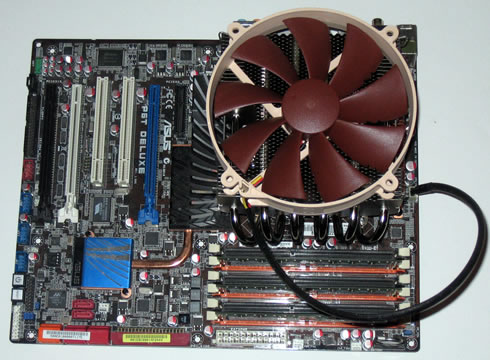
Let's apply thermal compound on the CPU and place the cpu cooler on it. As you can see in the picture below, the cooler offers sufficient clearance for nearby memory modules of up to 40mm in height (standard height). RAM modules with higher heatspreaders can cause compatibility issues on mainboard's where the heatsink extends over the RAM slots. Also make sure to take off the removable top heatsink of your DDR3 Corsair Dominator RAM before installing the NH-C12P SE14 (in case your system uses this type of memory).
When using the NH-C12P in a tower-style case, Noctua recommends installing the NH-C12P with the heatpipes in horizontal position or with the bends of the heatpipes pointing downwards. Installing the NH-C12P with the bends pointing upwards as this may result in reduced cooling performance. In desktop cases, the NH-C12P can be used in any orientation: