Breaking News

Samsung Launches One UI 8.5 Beta for Next-Level Ease of Use LIAN LI Launches RS Series PSU with World’s First Rotatable AC Inlet Gigabyte X870E AERO X3D WOOD Redefines the Motherboard Toshiba Storage Trends 2026 AWS introduces Graviton5 CPU

logo

  • Share Us
    • Facebook
    • Twitter
  • Home
  • Home
  • News
  • Reviews
  • Essays
  • Forum
  • Legacy
  • About
    • Submit News

    • Contact Us
    • Privacy

    • Promotion
    • Advertise

    • RSS Feed
    • Site Map

Search form

Microsoft Announces Defender ATP for Mac

Microsoft Announces Defender ATP for Mac

Enterprise & IT Mar 21,2019 0

Microsoft is rebranding Windows Defender Advanced Threat Protection (ATP) to Microsoft Defender ATP as it’s bringing the service to Macs.

Core components of the company's unified endpoint security platform, including the new Threat & Vulnerability Management, will now be available for Mac devices.

There are two key parts for cross-platform support for Microsoft Defender ATP on Mac. Firstly, a new user interface on Mac clients called Microsoft Defender ATP. The user interface brings a similar experience to what you may have seen today on Windows 10 devices.

Microsoft Defender ATP can be installed on devices running macOS Mojave, macOS High Sierra, or macOS Sierra.

Microsoft is offering a "limited preview" of the app, which provides antimalware protection and allows end users to review and perform configuration of their protection, including:

  • Running scans, including full, quick, and custom path scans
  • Reviewing detected threats
  • Taking actions on threats, including quarantine, remove, or allow

Users will also be able to configure advanced settings, for example:

  • Disable or enable real-time protection, cloud-delivered protection, and automatic sample submission
  • Add exclusions for files and paths
  • Manage notifications when threats are found
  • Manually chec for security intelligence updates

Some of these options can be disabled by an administrator using Microsoft Intune or other Mac management consoles to prevent end users from making changes.

The Microsoft AutoUpdate service is also installed, which ensures that the app is kept up-to-date and is connected to the cloud.
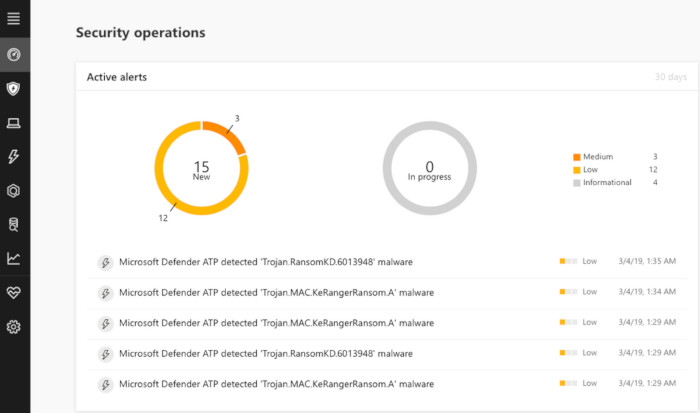
Machines with alerts and detections will be surfaced in the Microsoft Defender ATP portal, including rich context and alert process trees. Drilling deeper into individual alerts shows detailed information, including the process tree related to the alert, and further machine context.

Microsoft Defender ATP users can now apply for preview, and Microsoft will contact customers via email to confirm their participation.

Tags: AntivirusMicrosoftMACWindows Defender ATP
Previous Post
Microsoft Previews Windows Virtual Desktop
Next Post
Razer Collaborates With Tencent on Mobile Gaming

Related Posts

  • Snapdragon X Series is the Exclusive Platform to Power the Next Generation of Windows PCs with Copilot+ Today

  • Activision Blizzard King to Team Xbox

  • NVIDIA Studio Lineup Adds RTX-Powered Microsoft Surface Laptop Studio 2

  • 7 Best Printers for Mac

  • Samsung and Microsoft Unveil First On-Device Attestation Solution for Enterprise

  • Introducing Xbox Game Pass Core, Coming This September

  • Announcing the next wave of AI innovation with Microsoft Bing and Edge

  • Microsoft Announces Security Copilot AI

Latest News

Samsung Launches One UI 8.5 Beta for Next-Level Ease of Use
Smartphones

Samsung Launches One UI 8.5 Beta for Next-Level Ease of Use

LIAN LI Launches RS Series PSU with World’s First Rotatable AC Inlet
PC components

LIAN LI Launches RS Series PSU with World’s First Rotatable AC Inlet

Gigabyte X870E AERO X3D WOOD Redefines the Motherboard
PC components

Gigabyte X870E AERO X3D WOOD Redefines the Motherboard

Toshiba Storage Trends 2026
Enterprise & IT

Toshiba Storage Trends 2026

AWS introduces Graviton5 CPU
Enterprise & IT

AWS introduces Graviton5 CPU

Popular Reviews

be quiet! Dark Mount Keyboard

be quiet! Dark Mount Keyboard

Terramaster F8-SSD

Terramaster F8-SSD

be quiet! Light Mount Keyboard

be quiet! Light Mount Keyboard

Soundpeats Pop Clip

Soundpeats Pop Clip

Akaso 360 Action camera

Akaso 360 Action camera

Dragon Touch Digital Calendar

Dragon Touch Digital Calendar

Noctua NF-A12x25 G2 fans

Noctua NF-A12x25 G2 fans

be quiet! Pure Loop 3 280mm

be quiet! Pure Loop 3 280mm

Main menu

  • Home
  • News
  • Reviews
  • Essays
  • Forum
  • Legacy
  • About
    • Submit News

    • Contact Us
    • Privacy

    • Promotion
    • Advertise

    • RSS Feed
    • Site Map
  • About
  • Privacy
  • Contact Us
  • Promotional Opportunities @ CdrInfo.com
  • Advertise on out site
  • Submit your News to our site
  • RSS Feed