Breaking News

LG Electronics Introduces World’s First Native 1000Hz Full HD Gaming Monitor Transcend to Showcase Next-Gen Storage Solutions at COMPUTEX 2026 Giga Computing Enhances Cloud Storage Solutions with AMD EPYC 8005 Server CPU SAMA S50 Rethinks Compact ATX Cases addlink’s 2026 Virtual Showcase

logo

  • Share Us
    • Facebook
    • Twitter
  • Home
  • Home
  • News
  • Reviews
  • Essays
  • Forum
  • Legacy
  • About
    • Submit News

    • Contact Us
    • Privacy

    • Promotion
    • Advertise

    • RSS Feed
    • Site Map

Search form

MAYA44 USB External Sound Card

Apr 15,2007 0

4. Drivers/Installation - Page 2


Review Pages

1. Introduction
2. The package
3. Drivers/Installation - Page 1
4. Drivers/Installation - Page 2
5. Performance/Conclusion


For our tests, we used VirtualDJ version v4.2R1. The software has detected the Maya44 USB card and after selecting it, all properties are set automatically.
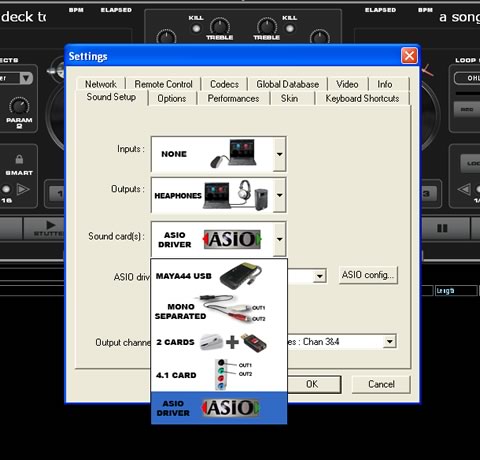
However, for better handling, you can select ASIO driver mode and after pressing the "ASIO config..." button, you access the card's ASIO panel. There are two major tabs, where you can select the sample rate 44/48KHz and resolution (16bit always):

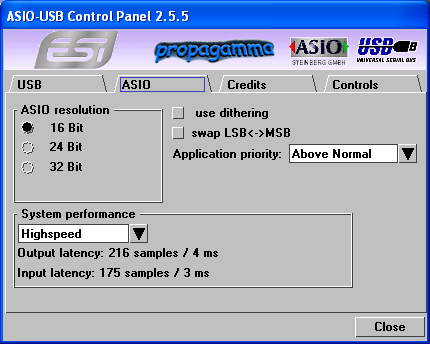
In the ASIO tab, again you can select the ASIO resolution and system performance. With a fast computer, and after selecting "Highspeed" mode, the output latency reaches 4ms. Of course, we could like to have zero latency but 4ms is still very low:
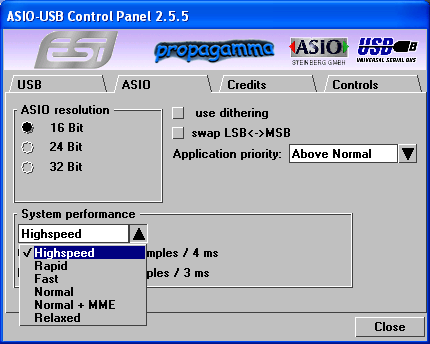
In case your PC is not very fast, you can select other modes:
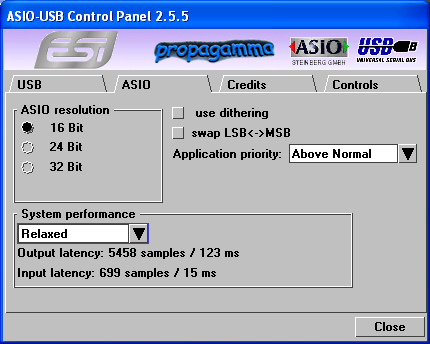
With the "relaxed" (worst) option selected, output latency reaches 123ms, not useful to any kind of user:
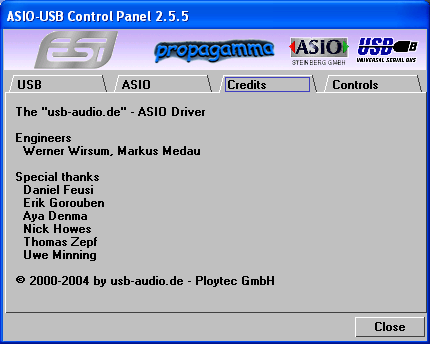
The Credits tab.
Lastly, the Control tab, controls the output/input levels.

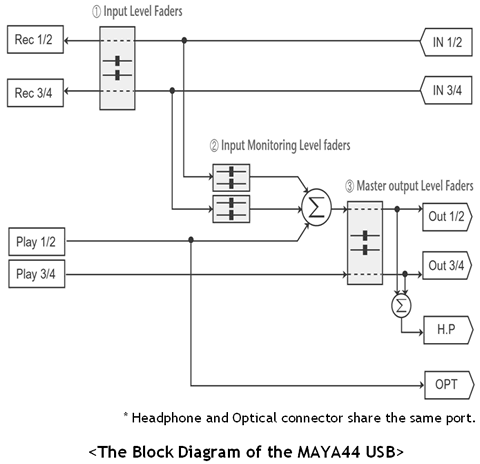
1. Monitor Level Control Section
This section can be used to control the input level. You can monitor the signals through the input channel 1,2 and input channel 3,4 individually and/or simultaneously. It will not affect the actual input level from the source. Even if these faders are muted, you can still record the signals from the source, but you are not able to listen to (= monitor) the input source through the analog output.

2. Input Level Control Section
This section controls the real input level through the input ports. You can control all 4 inputs using the one set of stereo faders.

3. Output Level Control Section
These are the master output level faders. You can control all the outputs using the single set of the stereo master faders, except the digital optical output. You can control the monitoring level of the input source through the input ports and/or the playing out level of the wave file through the analog output ports.

The headphone output signal is the mixed signal from analog out 1, 2 and analog out 3, 4. Also note that the analog headphone output and the digital optical output share the same connector, i.e. they cannot be used simultaneously. The Gang mode links the left and right faders of each channel together for easier stereo operation. Deselect Gang if you need to control the left and right levels independently.


Review Pages

1. Introduction
2. The package
3. Drivers/Installation - Page 1
4. Drivers/Installation - Page 2
5. Performance/Conclusion


 

Pages

  • « first
  • ‹ previous
  • 1
  • 2
  • 3
  • 4
  • 5
  • next ›
  • last »

ESI

External Sound Card

USB

Tags: ESI External Sound Card USB
Previous Post
Blackberry 8800
Next Post
Biostar T-Force P965

Related Posts

  • Pre-IFA 2019: Sound Blaster X3 and Super X-Fi

  • USB-IF Completes Media Agnostic Wireless USB Specification

  • Next Generation USB Connector Underway

  • SuperSpeed USB 10 Gbps Ready for Development

  • USB-IF Certified Intel 7 Series Chipset and Intel C216 Chipset Family

  • Roboform2Go

  • Behringer BCD3000

  • Supertalent DH 2GB USB

Latest Reviews

The Technology Stack Behind Modern Digital Gaming Platforms
Consumer Electronics

The Technology Stack Behind Modern Digital Gaming Platforms

be quiet! Dark Rock Pro 6
Cooling Systems

be quiet! Dark Rock Pro 6

How Online Casinos Use Encryption, Verification, and Risk Controls to Build User Trust
Enterprise & IT

How Online Casinos Use Encryption, Verification, and Risk Controls to Build User Trust

Why Low-Latency Infrastructure Matters More Than Raw Specs
Enterprise & IT

Why Low-Latency Infrastructure Matters More Than Raw Specs

In the Age of AI Phishing, the Best User Experience Might Be the One That Feels Safest
Enterprise & IT

In the Age of AI Phishing, the Best User Experience Might Be the One That Feels Safest

Popular News

TEAMGROUP Launches EXPERT P34F Find My External SSD

TEAMGROUP Launches EXPERT P34F Find My External SSD

CORSAIR announces Vanguard Pro 96 and Vanguard 96 Gaming Keyboards

CORSAIR announces Vanguard Pro 96 and Vanguard 96 Gaming Keyboards

Samsung announces Galaxy Tab S11 and Galaxy S25 FE series

Samsung announces Galaxy Tab S11 and Galaxy S25 FE series

Viltrox Showcases Upcoming Lens Lineup and New TTL Flash at IBC 2025

Viltrox Showcases Upcoming Lens Lineup and New TTL Flash at IBC 2025

MSI Launches FORGE GK600 TKL WIRELESS Special Edition Compact Mechanical Keyboard

MSI Launches FORGE GK600 TKL WIRELESS Special Edition Compact Mechanical Keyboard

Panasonic Introduces the First Ultra-Telephoto Zoom Lens in the LUMIX S Series

Panasonic Introduces the First Ultra-Telephoto Zoom Lens in the LUMIX S Series

MSI Launches DATAMAG 40Gbps Magnetic Portable SSD

MSI Launches DATAMAG 40Gbps Magnetic Portable SSD

Viltrox Joins the L-Mount Alliance, Expanding Creative Possibilities

Viltrox Joins the L-Mount Alliance, Expanding Creative Possibilities

Main menu

  • Home
  • News
  • Reviews
  • Essays
  • Forum
  • Legacy
  • About
    • Submit News

    • Contact Us
    • Privacy

    • Promotion
    • Advertise

    • RSS Feed
    • Site Map
  • About
  • Privacy
  • Contact Us
  • Promotional Opportunities @ CdrInfo.com
  • Advertise on out site
  • Submit your News to our site
  • RSS Feed