Breaking News

iiyama G-Master heads to gamescom 2026 with new 49’’ monitor, sim racing and esports tournaments GIGABYTE Brings AORUS INFINITY to Gamescom 2026 with an Immersive Gaming Playground LG UltraGear Brings World’s First Native 1000Hz FHD Gaming Monitor to ChinaJoy 2026 Hollyland to Showcase Next-Generation Audio and Imaging Solutions at IFA 2026 XbotGo Expands European Footprint and Showcases Multi-Sport AI Tracking Capabilities at IFA Berlin 2026

logo

  • Share Us
    • Facebook
    • Twitter
  • Home
  • Home
  • News
  • Reviews
  • Essays
  • About
    • Submit News

    • Contact Us
    • Privacy

    • Promotion
    • Advertise

    • RSS Feed

Search form

Maxtor OneTouch II

May 5,2005 0

4. Tests


Review Pages

1. Introduction
2. STEP BY STEP Installation
3. The program
4. Tests
5. Intel's IPEAK Read Tests
6. Conclusion
7. Detailed Specifications


- Tests

Our tests begin with the reading and writing benchmarks. The hard disk installed in the One Touch unit we received was the Maxtor DiamondMax 10, with 300GB capacity, Parallel ATA 133, 7200 rpm and an average seek time up to 9 msec.

In the Disk Speed Reading and Writing test graphs below, the vertical axis (Y axis) displays megabytes transferred while the horizontal axis (X axis) shows the time period in milliseconds. Hence, the graphs indicate the transfer rate in MB/s.

  • Disk Speed Reading Test

A large test file is created on the disk under test. The size of this test file is proportional to the amount of RAM available, which stops the entire file from being cached in RAM. The file is read sequentially from start to end. The amount of data read in each individual read operation is always 16KB.

  • Disk Speed Writing Test

This graph shows the MB/Sec disk write rate over the period of time required to write over 200MB to a hard drive. Cacheing allows the rate to start very high then drop off as the cache fills and the drive can't keep up. In fact, for writing large files cacheing can even cause a decrease in performance (compared to the uncached performance). The cache becomes an overhead in this case.


  • HD Tach

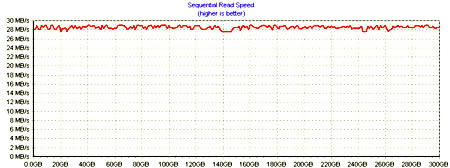
HD Tach tests the sequential read, random access and interface burst speeds of your attached storage device (hard drive, flash drive, removable drive, etc). All drive technologies such as SCSI, IDE/ATA, 1394, USB, SATA and RAID are supported. Test results from HD Tach can be used to confirm manufacturer specs, analyze your system for proper performance, and compare your performance with others.

This benchmark is intended to determine the maximum read or write speed on the device at various locations. Hard drives, for example, have faster read/write speeds at the inside edge (mapped to block 0) of the device, so it is useful to see the difference in speed. The maximum sustained speed (lowest speed on the device) is an important metric for real time sequential access applications. The maximum speed may be important to a power user that would like to partition the drive into a high speed partition and low speed partition.

The Maxtor gives a very stable performance graph that remains over 29 MB/s throughout its entire capacity.
  • WinBench 99 Test Results

The High-End and Business WinMark99 tests gave us very good results. This shows the good job that Maxtor has done with the One Touch II unit.


Review Pages

1. Introduction
2. STEP BY STEP Installation
3. The program
4. Tests
5. Intel's IPEAK Read Tests
6. Conclusion
7. Detailed Specifications


Pages

  • « first
  • ‹ previous
  • 1
  • 2
  • 3
  • 4
  • 5
  • 6
  • 7
  • next ›
  • last »

Maxtor

Tags: Maxtor
Previous Post
Star Wars Knights of the Old Republic II
Next Post
LiteON SOHW-1673S

Related Posts

  • Maxtor Announces 1.5TB Storage Solution

  • Seagate Introduces New Maxtor Desktop and Notebook Hard Drives

  • Seagate Seen Buying Maxtor

  • New Maxtor OneTouch Solution Hits a Terabyte

  • Maxtor Intros 3Gb/S SATA II Hard Drives

  • Maxtor Bypasses PC with Home Network Drive

  • Maxtor Unveils 500GB Hard Disk

  • Maxtor won't think small after all

Latest Reviews

be quiet! Light Loop IO LCD
Cooling Systems

be quiet! Light Loop IO LCD

KIOXIA Exceria Pro G2 NVME 2TB
PC components

KIOXIA Exceria Pro G2 NVME 2TB

Online Casino Games That Offer Something Different
Consumer Electronics

Online Casino Games That Offer Something Different

SOUNDPEATS Air6 HS
Consumer Electronics

SOUNDPEATS Air6 HS

Arctic MX-7
Cooling Systems

Arctic MX-7

Popular News

CORSAIR announces Vanguard Pro 96 and Vanguard 96 Gaming Keyboards

CORSAIR announces Vanguard Pro 96 and Vanguard 96 Gaming Keyboards

MSI Launches FORGE GK600 TKL WIRELESS Special Edition Compact Mechanical Keyboard

MSI Launches FORGE GK600 TKL WIRELESS Special Edition Compact Mechanical Keyboard

TEAMGROUP Launches EXPERT P34F Find My External SSD

TEAMGROUP Launches EXPERT P34F Find My External SSD

Samsung announces Galaxy Tab S11 and Galaxy S25 FE series

Samsung announces Galaxy Tab S11 and Galaxy S25 FE series

Viltrox Showcases Upcoming Lens Lineup and New TTL Flash at IBC 2025

Viltrox Showcases Upcoming Lens Lineup and New TTL Flash at IBC 2025

Panasonic Introduces the First Ultra-Telephoto Zoom Lens in the LUMIX S Series

Panasonic Introduces the First Ultra-Telephoto Zoom Lens in the LUMIX S Series

MSI Launches DATAMAG 40Gbps Magnetic Portable SSD

MSI Launches DATAMAG 40Gbps Magnetic Portable SSD

Viltrox Joins the L-Mount Alliance, Expanding Creative Possibilities

Viltrox Joins the L-Mount Alliance, Expanding Creative Possibilities

Main menu

  • Home
  • News
  • Reviews
  • Essays
  • About
    • Submit News

    • Contact Us
    • Privacy

    • Promotion
    • Advertise

    • RSS Feed
  • About
  • Privacy
  • Contact Us
  • Promotional Opportunities @ CdrInfo.com
  • Advertise on out site
  • Submit your News to our site
  • RSS Feed