
Breaking News

Akasa Launches Newton N16, Compact Fanless Case for ASUS NUC 16 Pro TEAMGROUP Unveils the ACE 8K MicroSDXC Memory Card ASUS Announces Ascent QN10 Mini PC CORSAIR Launches Second Generation Nautilus II AIO CPU Coolers CORSAIR Launches VOXARA USB Gaming Condenser Microphone

logo

  • Share Us
    • Facebook
    • Twitter
  • Home
  • Home
  • News
  • Reviews
  • Essays
  • About
    • Submit News

    • Contact Us
    • Privacy

    • Promotion
    • Advertise

    • RSS Feed

Search form

Logitech G1 Optical Mouse

May 30,2006 0

3. Installation


Review Pages

1. Introduction
2. A Closer Look
3. Installation
4. Conclusion


Installation is easy enough. Simply unplug your "old" mouse, and plug in the new one! I used the PS2 interface, since I didn't want to waste a USB port.
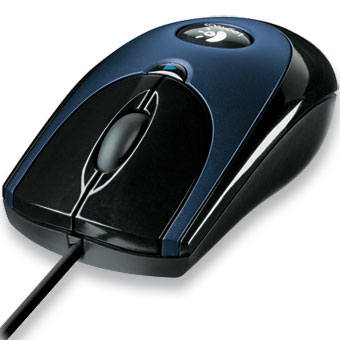
In any case, the G1 will work perfectly with either the USB or PS2 connection interface. Logitech, unfortunately, doesn't offer in the package (probably to keep retail package costs down?) any drivers. While the drivers are not mandatory in order for the G1 mouse to work, they do offer some additional capabilities, and you can set a special function for each button. After visiting the Logitech website, I noticed that the latest Logitech Setpoint driver package was available, v2.60.590, a massive 47MB download.

After installing and rebooting, the logitech Setpoint software is available so that you can configure all functions of your mouse.

Below, is a screenshot of the button setup.

Next, are the settings for the mouse pointer, including speed, acceleration and trails.
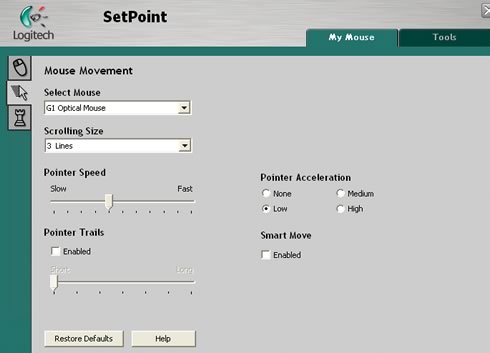
You can even set it for in-game performance.

- Performance

Finally, I came to the most interesting part. How does the G1 mouse feel? What was its performance like? While this is a matter of personal taste, and there's no "scientific" methodology to be followed when trying out the feel of the device in the palm of your hand, I was very satisfied with it although I would have liked it a little fuller in the hand. Then again, this could be a matter of getting used to it with time.

The response was far better than I had been used to, much better than my previous Microsoft Basic Optical mouse. There are also many settings within Setpoint, that allow you to adjust the device according to your needs.

An obvious use of the fourth button is with Internet Explorer, where it can set to navigate either back or forward. Of course, you can set it up for any other function you want, using Setpoint. In games, it could be useful, for throwing grenades, for example.

We tried a few FPS (first person shooter) games and we found the response very good. Logitech has other mice of course, especially designed for gamers, with greater resolution, more buttons, but at double the price :-)


Review Pages

1. Introduction
2. A Closer Look
3. Installation
4. Conclusion


Pages

  • « first
  • ‹ previous
  • 1
  • 2
  • 3
  • 4
  • next ›
  • last »

Logitech

Tags: Logitech
Previous Post
Grundig GDP-3550
Next Post
Thermaltake Power Express 250W

Related Posts

  • Logitech announces G512 X Gaming Keyboard

  • Logitech introduces G RS H-Shifter

  • Logitech G325 LIGHTSPEED Delivers Comfort, Style, and Game-Ready Audio

  • Logitech Muse, the Digital Pencil for Apple Vision Pro, Launches October 22nd

  • Logitech announces MX Master 4

  • Logitech announces Signature Slim Solar+ K980 Keyboard

  • Logitech G Drops a Wide Array of New Products and Innovations at Logitech G PLAY 2025

  • Introducing Logitech Muse for Apple Vision Pro

Latest Reviews

Fanxiang MP83 M.2 NVMe SSD Enclosure
Enterprise & IT

Fanxiang MP83 M.2 NVMe SSD Enclosure

Ugreen CM642 USB4.0 Enclosure
PC components

Ugreen CM642 USB4.0 Enclosure

be quiet! Dark Power 14 IO
PC components

be quiet! Dark Power 14 IO

SanDisk High Endurance 512GB microSDXC
Cameras

SanDisk High Endurance 512GB microSDXC

Samsung PRO Ultimate 512GB microSDXC
Cameras

Samsung PRO Ultimate 512GB microSDXC

Popular News

CORSAIR announces Vanguard Pro 96 and Vanguard 96 Gaming Keyboards

CORSAIR announces Vanguard Pro 96 and Vanguard 96 Gaming Keyboards

MSI Launches FORGE GK600 TKL WIRELESS Special Edition Compact Mechanical Keyboard

MSI Launches FORGE GK600 TKL WIRELESS Special Edition Compact Mechanical Keyboard

MSI’s Latest AMD X870E MAX & EVO Series Motherboards

MSI’s Latest AMD X870E MAX & EVO Series Motherboards

Panasonic Introduces the First Ultra-Telephoto Zoom Lens in the LUMIX S Series

Panasonic Introduces the First Ultra-Telephoto Zoom Lens in the LUMIX S Series

COLORFUL Launches iGame B850M ULTRA Series Micro-ATX Motherboards

COLORFUL Launches iGame B850M ULTRA Series Micro-ATX Motherboards

COLORFUL Presents Limited Edition Chitu MAG-60 Magnetic Keyboard Inspired by the Year of the Horse

COLORFUL Presents Limited Edition Chitu MAG-60 Magnetic Keyboard Inspired by the Year of the Horse

COLORFUL Presents iGame Z890 ULTRA-S W and iGame Z890M ULTRA Z Motherboards

COLORFUL Presents iGame Z890 ULTRA-S W and iGame Z890M ULTRA Z Motherboards

LIAN LI Launches 8.8” Universal Screen with Flexible Mounting Solution

LIAN LI Launches 8.8” Universal Screen with Flexible Mounting Solution

Main menu

  • Home
  • News
  • Reviews
  • Essays
  • About
    • Submit News

    • Contact Us
    • Privacy

    • Promotion
    • Advertise

    • RSS Feed
  • About
  • Privacy
  • Contact Us
  • Promotional Opportunities @ CdrInfo.com
  • Advertise on out site
  • Submit your News to our site
  • RSS Feed

