Breaking News

WD Unifies its Professional Content Creator Storage Portfolio Under the G-DRIVE Brand Samsung Introduces the New Bixby in One UI 8.5 Razer Unveils the Huntsman Signature Edition CORSAIR Introduces Limited-Edition FRAME 4000D Nova and Galaxy cases with Color-Shift Finishes Sharkoon announces SKILLER SGM25W

logo

  • Share Us
    • Facebook
    • Twitter
  • Home
  • Home
  • News
  • Reviews
  • Essays
  • Forum
  • Legacy
  • About
    • Submit News

    • Contact Us
    • Privacy

    • Promotion
    • Advertise

    • RSS Feed
    • Site Map

Search form

Hercules DJ Console

Oct 20,2004 0

6. DJ Tests


Review Pages

1. Introduction - Retail Package
2. The Hardware
3. Installation
4. The Software
5. USB Audio Card abilities
6. DJ Tests
7. Hardware Tests - Page 1
8. Hardware Tests - Page 2
9. Conclusion


Hercules DJ Console - Page 6

- DJ Tests

As we mentioned before, the bulked version of Virtual DJ is 1.08 (and with update 1.09). You can also use the newly released v2.01 Demo version, but important features will not work (like previewing next songs).

For our tests we mainly used Virtual DJ v2.00 from Atomix Productions. The full version compared with the demo, further supports:

  • Jogwheel scratch
  • Sound output from EACH of the decks in VDJ, giving you the ability to connect to external mixer
  • You can choose in VDJ setup or in VDJ skin (some support) if jogwheels are to be in nudge (speed up/down) or scratch mode

In VDJ 2.xx, to make Hercules work in one-output and headphone prelisten mode, go to the soundcard setup in VDJ, and browse all the way to the bottom of the setup images until you see the Hercules image, then choose it. Also, to get DUAL sound output, you need to select the 4.1 soundcard + external mixer image in the soundcard setup in VDJ (only available in full version, not demo).
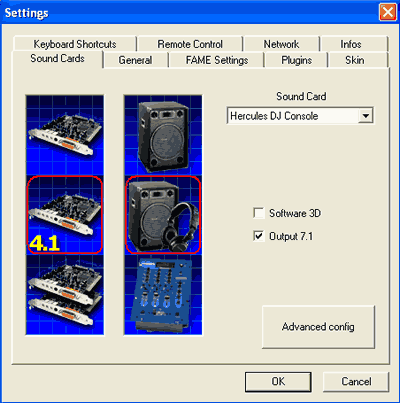
After loading the Virtual DJ software, you'll see what should be a very familiar interface which resembles your DJ console:

We will assume you are already familiar with the basic elements of DJing, so we will simply present our thoughts after our extensive use of the VirtualDJ + Hercules DJ consoles, remebering however that we are not Pro DJs:-)

Positive

  • The VirtualDJ software corresponds very closely to the hardware. The crossfader not only moves on the hardware console, but also in the software, while the wheels are very good for scratching.
  • The Hercules DJ Console can handle almost all Virtual DJ functions, except for beatlock.
  • The cue/stop buttons on the console work much like on real CD players, which most Pro DJs will like.
  • The build quality of the console is good, although Pro users may wish for a metal instead of plastic case.
  • The sound production from the DJ Console is very good.

Negative

  • The joystick is slow and while it can even be used to browse folders, we would reccomend using a normal mouse instead.
  • The two jogwheels are too close to the play/cue buttons and the crossfader. This might cause problems with accidental scratching of tracks while crossfading. For continued use, we advise turning the jogs off.
  • The headphone output volume is weak, especially when music is very loud.

 

Review Pages

1. Introduction - Retail Package
2. The Hardware
3. Installation
4. The Software
5. USB Audio Card abilities
6. DJ Tests
7. Hardware Tests - Page 1
8. Hardware Tests - Page 2
9. Conclusion


Pages

  • « first
  • ‹ previous
  • 1
  • 2
  • 3
  • 4
  • 5
  • 6
  • 7
  • 8
  • 9
  • next ›
  • last »

Hercules

Tags: Hercules
Previous Post
NeuNeo HVD108 DVD Player
Next Post
Rome: Total War Review

Related Posts

  • Hercules DJ Console Mk4 for Mac and PC is Available

  • Hercules DJ Control MP3 e2

  • Hercules Puts Wireless Networking Within Reach Of The GeneralL Public

Latest Reviews

Kioxia Exceria Plus G3 512GB microSD
Cameras

Kioxia Exceria Plus G3 512GB microSD

SoundPeats Cove Pro
Consumer Electronics

SoundPeats Cove Pro

Asustor AS5404T 4-Bay NAS System
Enterprise & IT

Asustor AS5404T 4-Bay NAS System

be quiet! Pure Power 13M 1200W
PC components

be quiet! Pure Power 13M 1200W

Server-Side Gaming Why Canadian Online Casinos Are Abandoning Local Clients for HTML5 Clouds
Enterprise & IT

Server-Side Gaming Why Canadian Online Casinos Are Abandoning Local Clients for HTML5 Clouds

Popular News

COLORFUL Introduces CVN B850I GAMING FROZEN Motherboard

COLORFUL Introduces CVN B850I GAMING FROZEN Motherboard

COLORFUL Presents CVN X870 ARK FROZEN Motherboard for AMD Ryzen 9000 CPUs

COLORFUL Presents CVN X870 ARK FROZEN Motherboard for AMD Ryzen 9000 CPUs

TEAMGROUP Launches EXPERT P34F Find My External SSD

TEAMGROUP Launches EXPERT P34F Find My External SSD

Samsung announces Galaxy Tab S11 and Galaxy S25 FE series

Samsung announces Galaxy Tab S11 and Galaxy S25 FE series

Viltrox Showcases Upcoming Lens Lineup and New TTL Flash at IBC 2025

Viltrox Showcases Upcoming Lens Lineup and New TTL Flash at IBC 2025

CORSAIR announces Vanguard Pro 96 and Vanguard 96 Gaming Keyboards

CORSAIR announces Vanguard Pro 96 and Vanguard 96 Gaming Keyboards

Panasonic Introduces the First Ultra-Telephoto Zoom Lens in the LUMIX S Series

Panasonic Introduces the First Ultra-Telephoto Zoom Lens in the LUMIX S Series

MSI Launches DATAMAG 40Gbps Magnetic Portable SSD

MSI Launches DATAMAG 40Gbps Magnetic Portable SSD

Main menu

  • Home
  • News
  • Reviews
  • Essays
  • Forum
  • Legacy
  • About
    • Submit News

    • Contact Us
    • Privacy

    • Promotion
    • Advertise

    • RSS Feed
    • Site Map
  • About
  • Privacy
  • Contact Us
  • Promotional Opportunities @ CdrInfo.com
  • Advertise on out site
  • Submit your News to our site
  • RSS Feed