Breaking News

Akasa Launches Newton N16, Compact Fanless Case for ASUS NUC 16 Pro TEAMGROUP Unveils the ACE 8K MicroSDXC Memory Card ASUS Announces Ascent QN10 Mini PC CORSAIR Launches Second Generation Nautilus II AIO CPU Coolers CORSAIR Launches VOXARA USB Gaming Condenser Microphone

logo

  • Share Us
    • Facebook
    • Twitter
  • Home
  • Home
  • News
  • Reviews
  • Essays
  • About
    • Submit News

    • Contact Us
    • Privacy

    • Promotion
    • Advertise

    • RSS Feed

Search form

Foxconn Bloodrage GTI

May 22,2009 0

10. Overclocking


Review Pages

1. About the Foxconn Bloodrage GTI
2. A closer look
3. BIOS settings
4. TestBed
5. Benchmarks - Everest Ultimate Edition, SiSoftware Sandra
6. Benchmarks - PCMark Vantage, SYSmark 2007 Preview
7. Benchmarks - MAXON CINEBENCH, x264 HD Benchmark, TMPGEnc 4 Xpress
8. Benchmarks - SuperPI, wPrime
9. Benchmarks - 3DMark 06, Crysis v1.2
10. Overclocking
11. Conclusion


Before we start the overclocking procedure, let's take some notes. In order to achieve the best possible results, it is advised to disable the 'Turbo mode' and the 'EIST technologies' under the BIOS. Disabling the 'C-STATE Tech' will also eliminate any reason that could negatively influence your results.

The Bloodrage GTI motherboard offers all those controls needed for overclocking under the Quantum BIOS area. First you need to enable the 'System Turbo' setting to unlock all the voltage/Bclock(FSB) sub settings. The easiest way to start is by rising up the Bclock (FSB) from 133 to let's say..180Hz. That should give you a 3.60GHz speed, as the motherboard will inform you. The memory speed also changes according to the selected multiplier (Auto/manual). So far so good.

We left all the voltage settings to default and the 3.60GHz mark came very easily! The system is stable without performing any further adjustments:
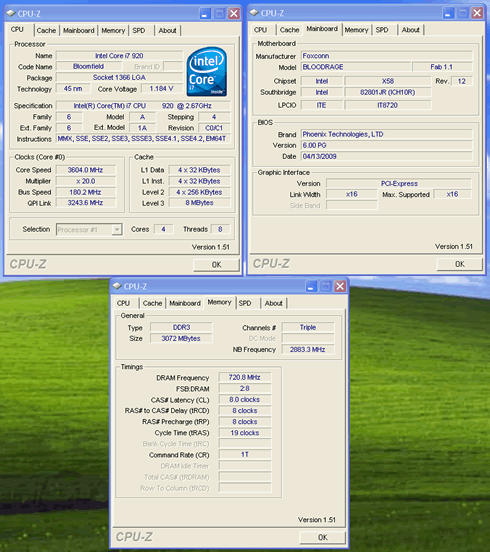
In order to get higher you will need to start experimenting and make manual adjustments. We got a 3.80GHz (aka Bclock=190):

For Bclock=200 and 4.0GHz you could try the following BIOS settings:

Foxconn also offers the AEGIS Panel utility that controls most of the BIOS functions under Windows. However, despite our efforts, Windows was 'freezing' as soon as we were making any change in the settings and pushed the "Apply" button:

Like any other X58-based motherboard, the Foxconn Bloodrage GTI also allows you overclock it using the 'Turbo Function'. In our case we got some additional 135MHz without messing up with voltages etc...

When we tested the Foxconn Ressainance motherboard some time ago we had seen that under heavy overclocking, the 'Turbo' function was automatically disabled. it seems that this is also happening with the Bloodrage GTI model.

We left the Bclock at 190 and we enabled 'Turbo,' which should result to a CPU clock of 4.0GHz:

We start stressing the system, and everything looked good:

After sometime, the motherboard dropped the multiplier back to x20 meaning that the 'Turbo' had been disabled. Previously we had set the the 'Turbo' function always-on under the BIOS, so we are not very sure why this is happening.

Finally, we noticed that the memory dividers do not work, at least for the Core i7-920 processor. Although we set the memory at 1333MHz under BIOS, it was still running at 1067MHz under Windows. The same behavior was also noticed with the Foxconn Renaissance motherboard.


Review Pages

1. About the Foxconn Bloodrage GTI
2. A closer look
3. BIOS settings
4. TestBed
5. Benchmarks - Everest Ultimate Edition, SiSoftware Sandra
6. Benchmarks - PCMark Vantage, SYSmark 2007 Preview
7. Benchmarks - MAXON CINEBENCH, x264 HD Benchmark, TMPGEnc 4 Xpress
8. Benchmarks - SuperPI, wPrime
9. Benchmarks - 3DMark 06, Crysis v1.2
10. Overclocking
11. Conclusion

 

Pages

  • « first
  • ‹ previous
  • …
  • 3
  • 4
  • 5
  • 6
  • 7
  • 8
  • 9
  • 10
  • 11
  • next ›
  • last »

Hon Hai/Foxconn Technology Group

Tags: Hon Hai/Foxconn Technology Group
Previous Post
Thermaltake SpinQ CPU Cooler
Next Post
OCZ Apex 120GB SSD

Related Posts

  • Foxconn’s Q1 Profit Influenced by Slow Smartphone Sales

  • Foxconn to Assemble Procedural Masks in Wisconsin for Pandemic Relief

  • Foxconn Says 5G IPhone Fall Launch is Feasible

  • Foxconn to Resume Production in China by End of The Month

  • Foxconn Slowly Resumes Production, Says Coronavirus Will Have am Impact to Revenue

  • Apple Stores Beijing to Reopen on February 14, Coronavirus Could Impact iPhone Production

  • China Blocks Operations of Foxconn Plants due to Coronavirus: report

  • Coronavirus Measures to Hold Back Foxconn's Production

Latest Reviews

Fanxiang MP83 M.2 NVMe SSD Enclosure
Enterprise & IT

Fanxiang MP83 M.2 NVMe SSD Enclosure

Ugreen CM642 USB4.0 Enclosure
PC components

Ugreen CM642 USB4.0 Enclosure

be quiet! Dark Power 14 IO
PC components

be quiet! Dark Power 14 IO

SanDisk High Endurance 512GB microSDXC
Cameras

SanDisk High Endurance 512GB microSDXC

Samsung PRO Ultimate 512GB microSDXC
Cameras

Samsung PRO Ultimate 512GB microSDXC

Popular News

CORSAIR announces Vanguard Pro 96 and Vanguard 96 Gaming Keyboards

CORSAIR announces Vanguard Pro 96 and Vanguard 96 Gaming Keyboards

MSI’s Latest AMD X870E MAX & EVO Series Motherboards

MSI’s Latest AMD X870E MAX & EVO Series Motherboards

Panasonic Introduces the First Ultra-Telephoto Zoom Lens in the LUMIX S Series

Panasonic Introduces the First Ultra-Telephoto Zoom Lens in the LUMIX S Series

COLORFUL Launches iGame B850M ULTRA Series Micro-ATX Motherboards

COLORFUL Launches iGame B850M ULTRA Series Micro-ATX Motherboards

COLORFUL Presents Limited Edition Chitu MAG-60 Magnetic Keyboard Inspired by the Year of the Horse

COLORFUL Presents Limited Edition Chitu MAG-60 Magnetic Keyboard Inspired by the Year of the Horse

COLORFUL Presents iGame Z890 ULTRA-S W and iGame Z890M ULTRA Z Motherboards

COLORFUL Presents iGame Z890 ULTRA-S W and iGame Z890M ULTRA Z Motherboards

COLORFUL Launches iGame B850I MINI OC V14 Motherboard

COLORFUL Launches iGame B850I MINI OC V14 Motherboard

COLORFUL Expands B850 Motherboard Lineup with New CVN, Battle-Ax, and MEOW Models

COLORFUL Expands B850 Motherboard Lineup with New CVN, Battle-Ax, and MEOW Models

Main menu

  • Home
  • News
  • Reviews
  • Essays
  • About
    • Submit News

    • Contact Us
    • Privacy

    • Promotion
    • Advertise

    • RSS Feed
  • About
  • Privacy
  • Contact Us
  • Promotional Opportunities @ CdrInfo.com
  • Advertise on out site
  • Submit your News to our site
  • RSS Feed