Breaking News

Endorfy announces Aquarius 8000 PC cases and Corona 120 fans Toshiba Canvio Flex Portable Hard Drive, Now in Metallic Blue PIODATA Unveils SecureX Flash Drive: Enterprise-Grade Security Meets Always-Accessible, Cross-Platform Storage DZOFILM Arcana Delivers 2X Anamorphic Character From a 1.5X Squeeze at Under 700g Viltrox to Showcase Expanding Imaging System at NAB Show 2026

logo

  • Share Us
    • Facebook
    • Twitter
  • Home
  • Home
  • News
  • Reviews
  • Essays
  • Forum
  • Legacy
  • About
    • Submit News

    • Contact Us
    • Privacy

    • Promotion
    • Advertise

    • RSS Feed
    • Site Map

Search form

EVGA 680i LT Motherboard

Apr 30,2007 0

12. Overclocking


Review Pages

1. Introduction
2. Comparison between 680i and 680i LT
3. The Package
4. BIOS
5. Installation
6. Everest Ultimate Edition 2006 - SiSoft Sandra
7. PCMARK - 3DMARK
8. Science Mark - PovRay - Nero Digital
9. CINEBENCH -SuperPI
10. F.E.A.R - Prey
11. Splinter Cell Chaos Theory - Half Life
12. Overclocking
13. Conclusion


EVGA advertises the 680i LT as an overclocking champion, and to be honest we couldn't disagree with that statement. The BIOS includes all the needed settings to boost the CPU's overall speed, either by increasing the FSB or RAM frequency, synced or not. Without making any special preparations and leaving all voltages at auto, we got a nice overclock increase of 1GHz from our Intel E6600 CPU:
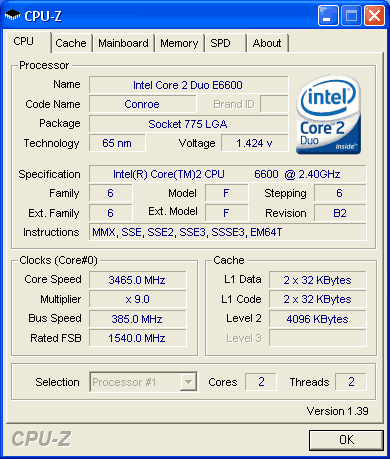
Yes that is correct! The motherboard made the correct option changes and we had a stable system at 3.465GHz. However, note that you need a better cooling system than Intel's default in order to keep CPU temperatures low. We could boot the PC at 3.8GHz with the Auto settings, but couldn't boot Windows. Perhaps with a different cooling system, we could go even higher.

Passing on to the highest FSB we could get, we had some issues. The system wasn't very stable above 415MHz (FSB), with memory un-synced. That troubled us since we had seen reports of other reviewers getting up to 500MHz FSB, perhaps it was our system setup (CPU+memory).
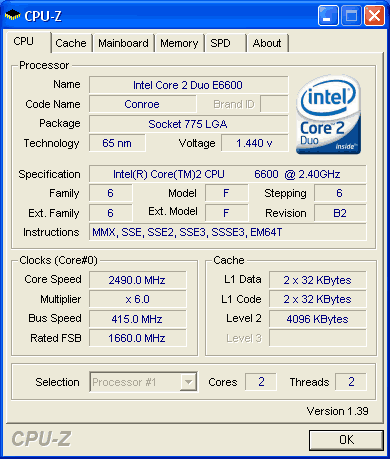
The good news is that most of the EVGA 680i LT motherboard settings can be set from Windows with the Nvidia nTune application:

Click To Enlarge!

Users can set on-the-fly the system FSB and memory timings, and test the stability of the system. Intel doesn't offer such an application for their chipsets, so we can say its an advantage for Nvidia users.


Review Pages

1. Introduction
2. Comparison between 680i and 680i LT
3. The Package
4. BIOS
5. Installation
6. Everest Ultimate Edition 2006 - SiSoft Sandra
7. PCMARK - 3DMARK
8. Science Mark - PovRay - Nero Digital
9. CINEBENCH -SuperPI
10. F.E.A.R - Prey
11. Splinter Cell Chaos Theory - Half Life
12. Overclocking
13. Conclusion
 

Pages

  • « first
  • ‹ previous
  • …
  • 5
  • 6
  • 7
  • 8
  • 9
  • 10
  • 11
  • 12
  • 13
  • next ›
  • last »

evga

MotherBoards

Socket 775

Tags: evga MotherBoards Socket 775
Previous Post
Golf Launchpad
Next Post
AKG K81DJ Headphones

Related Posts

  • EVGA releases CLX Series - The Next Generation in Cooling

  • eVGA, MSI and Gigabyte announce Z790 motherboards

  • Colorful Technology, Gigabyte and EVGA also announces GeForce GTX 1630

  • Introducing the EVGA Z690 DARK K|NGP|N

  • Introducing the EVGA X570 FTW WIFI

  • Introducing the EVGA Z690 Motherboards – The Ultimate Choice for PC Gaming

  • Introducing the EVGA SuperNOVA P5 Power Supplies

  • Introducing the EVGA X570 DARK

Latest Reviews

In the Age of AI Phishing, the Best User Experience Might Be the One That Feels Safest
Enterprise & IT

In the Age of AI Phishing, the Best User Experience Might Be the One That Feels Safest

SoundPeats C30
Consumer Electronics

SoundPeats C30

Why Streaming Live Casino Games Demands Smarter Tech
Enterprise & IT

Why Streaming Live Casino Games Demands Smarter Tech

Kioxia Exceria Plus G3 512GB microSD
Cameras

Kioxia Exceria Plus G3 512GB microSD

SoundPeats Cove Pro
Consumer Electronics

SoundPeats Cove Pro

Popular News

TEAMGROUP Launches EXPERT P34F Find My External SSD

TEAMGROUP Launches EXPERT P34F Find My External SSD

Samsung announces Galaxy Tab S11 and Galaxy S25 FE series

Samsung announces Galaxy Tab S11 and Galaxy S25 FE series

Viltrox Showcases Upcoming Lens Lineup and New TTL Flash at IBC 2025

Viltrox Showcases Upcoming Lens Lineup and New TTL Flash at IBC 2025

CORSAIR announces Vanguard Pro 96 and Vanguard 96 Gaming Keyboards

CORSAIR announces Vanguard Pro 96 and Vanguard 96 Gaming Keyboards

Panasonic Introduces the First Ultra-Telephoto Zoom Lens in the LUMIX S Series

Panasonic Introduces the First Ultra-Telephoto Zoom Lens in the LUMIX S Series

MSI Launches DATAMAG 40Gbps Magnetic Portable SSD

MSI Launches DATAMAG 40Gbps Magnetic Portable SSD

MSI Launches FORGE GK600 TKL WIRELESS Special Edition Compact Mechanical Keyboard

MSI Launches FORGE GK600 TKL WIRELESS Special Edition Compact Mechanical Keyboard

Viltrox Joins the L-Mount Alliance, Expanding Creative Possibilities

Viltrox Joins the L-Mount Alliance, Expanding Creative Possibilities

Main menu

  • Home
  • News
  • Reviews
  • Essays
  • Forum
  • Legacy
  • About
    • Submit News

    • Contact Us
    • Privacy

    • Promotion
    • Advertise

    • RSS Feed
    • Site Map
  • About
  • Privacy
  • Contact Us
  • Promotional Opportunities @ CdrInfo.com
  • Advertise on out site
  • Submit your News to our site
  • RSS Feed