Breaking News

Akasa Launches Newton N16, Compact Fanless Case for ASUS NUC 16 Pro TEAMGROUP Unveils the ACE 8K MicroSDXC Memory Card ASUS Announces Ascent QN10 Mini PC CORSAIR Launches Second Generation Nautilus II AIO CPU Coolers CORSAIR Launches VOXARA USB Gaming Condenser Microphone

logo

  • Share Us
    • Facebook
    • Twitter
  • Home
  • Home
  • News
  • Reviews
  • Essays
  • About
    • Submit News

    • Contact Us
    • Privacy

    • Promotion
    • Advertise

    • RSS Feed

Search form

Epomaker Click

Mar 19,2025 0

3. Software


Review Pages

1. Introduction
2. Retail Package
3. Software
4. Conclusion


When the battery is charging there are three Lights, Fully charged: Green, Low battery: Red flashing and Charging: Purple. Users need to download the EPOMAKER Driver to fully utilize the Click mouse product. The EPOMAKER drive is a well-organized software that can set various options and aspects of the mouse. On the main screen, users can view the basic key functions of the mouse and change them if needed according to their liking.
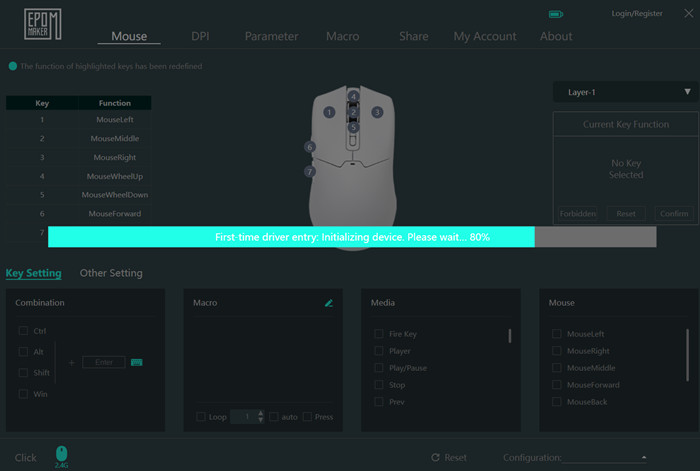

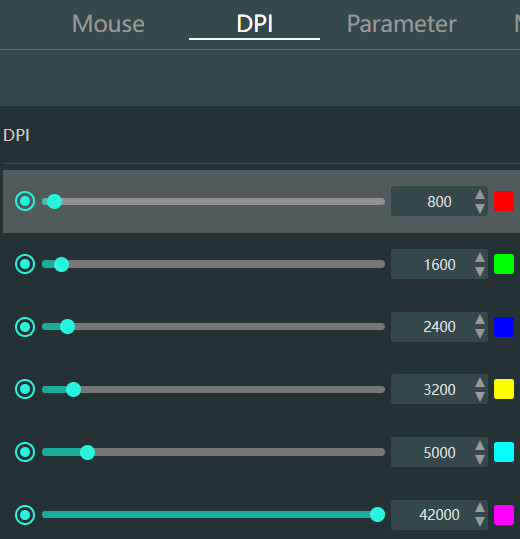
At the DPI tab, users can see the default DPI settings and LED color.
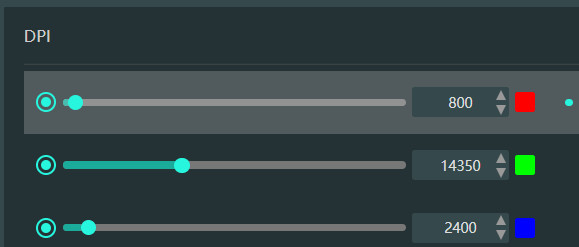
And even change the DPI settings with their likings
The firmware update function is only supported via USB-wired connection mode.

Our sample had the latest available firmware version (v301)


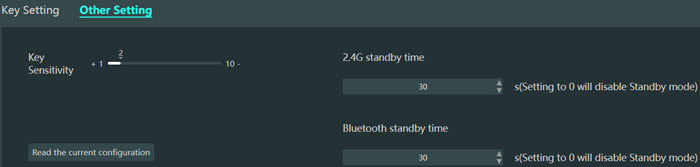
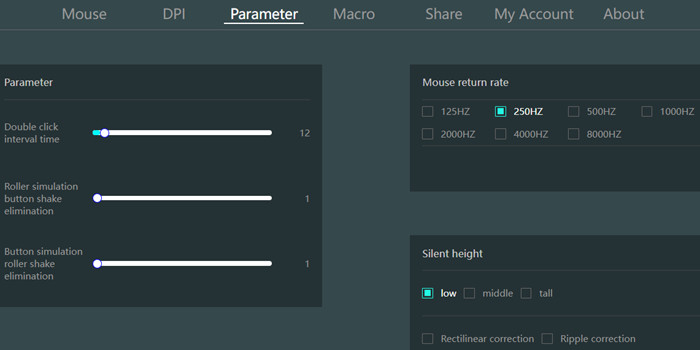
At the parameter, users can set other options like double click interval time and refresh rate from 125hz up to 8K.
Macros are also possible and you can share or download other users' macros/functions as well, interesting. For all online features, a free account is needed.


Review Pages

1. Introduction
2. Retail Package
3. Software
4. Conclusion


Pages

  • « first
  • ‹ previous
  • 1
  • 2
  • 3
  • 4
  • next ›
  • last »

EPOMAKER

Tags: EPOMAKER
Previous Post
Epomaker HE 68
Next Post
be quiet! Pure Base 501 DX LX

Related Posts

  • Epomaker Magcore 87

  • Epomaker Carbon 60

  • Epomaker HE 68

  • Epomaker Alice 66

  • Epomaker Split 65

  • EPOMAKER RT100

  • Epomaker HE 75 Mag

  • Epomaker P75

Latest Reviews

Fanxiang MP83 M.2 NVMe SSD Enclosure
Enterprise & IT

Fanxiang MP83 M.2 NVMe SSD Enclosure

Ugreen CM642 USB4.0 Enclosure
PC components

Ugreen CM642 USB4.0 Enclosure

be quiet! Dark Power 14 IO
PC components

be quiet! Dark Power 14 IO

SanDisk High Endurance 512GB microSDXC
Cameras

SanDisk High Endurance 512GB microSDXC

Samsung PRO Ultimate 512GB microSDXC
Cameras

Samsung PRO Ultimate 512GB microSDXC

Popular News

CORSAIR announces Vanguard Pro 96 and Vanguard 96 Gaming Keyboards

CORSAIR announces Vanguard Pro 96 and Vanguard 96 Gaming Keyboards

MSI Launches FORGE GK600 TKL WIRELESS Special Edition Compact Mechanical Keyboard

MSI Launches FORGE GK600 TKL WIRELESS Special Edition Compact Mechanical Keyboard

MSI’s Latest AMD X870E MAX & EVO Series Motherboards

MSI’s Latest AMD X870E MAX & EVO Series Motherboards

Panasonic Introduces the First Ultra-Telephoto Zoom Lens in the LUMIX S Series

Panasonic Introduces the First Ultra-Telephoto Zoom Lens in the LUMIX S Series

COLORFUL Launches iGame B850M ULTRA Series Micro-ATX Motherboards

COLORFUL Launches iGame B850M ULTRA Series Micro-ATX Motherboards

COLORFUL Presents Limited Edition Chitu MAG-60 Magnetic Keyboard Inspired by the Year of the Horse

COLORFUL Presents Limited Edition Chitu MAG-60 Magnetic Keyboard Inspired by the Year of the Horse

COLORFUL Presents iGame Z890 ULTRA-S W and iGame Z890M ULTRA Z Motherboards

COLORFUL Presents iGame Z890 ULTRA-S W and iGame Z890M ULTRA Z Motherboards

LIAN LI Launches 8.8” Universal Screen with Flexible Mounting Solution

LIAN LI Launches 8.8” Universal Screen with Flexible Mounting Solution

Main menu

  • Home
  • News
  • Reviews
  • Essays
  • About
    • Submit News

    • Contact Us
    • Privacy

    • Promotion
    • Advertise

    • RSS Feed
  • About
  • Privacy
  • Contact Us
  • Promotional Opportunities @ CdrInfo.com
  • Advertise on out site
  • Submit your News to our site
  • RSS Feed