Breaking News

ENDORFY introduces Atlas Electric desks Sony Unveils LinkBuds Clip Open Earbuds be quiet! enters high-end gaming mouse market with Dark Perk Ergo and Dark Perk Sym ASUS ROG announces ROG Strix GS-BE7200 Dual-Band WiFi 7 Gaming Router Transcend Launches RDE3 microSD Express Card Reader for Next-Generation High-Speed Performance

logo

  • Share Us
    • Facebook
    • Twitter
  • Home
  • Home
  • News
  • Reviews
  • Essays
  • Forum
  • Legacy
  • About
    • Submit News

    • Contact Us
    • Privacy

    • Promotion
    • Advertise

    • RSS Feed
    • Site Map

Search form

Epomaker Click

Mar 19,2025 0

4. Conclusion


Review Pages

1. Introduction
2. Retail Package
3. Software
4. Conclusion


Getting using this mouse is a very nice experience. The standard dimensions feel ok at the hand of a male person and if you have medium-sized palms/hands it will fit like a glove. The rounded design reminded us of old M$ mice but with current features and technologies. Speaking of technologies, the EPOMAKER Click houses the PixArt PAW3950 optical sensor with 800 to 42,000 DPI sensitivity, an 8K polling rate, and of course three working modes (wire, 2.4G, BT). There is also an included 500mAh rechargeable battery that promises days of continuous running hours for you to be invincible in the gaming field. The EPOMAKER software is OK meaning it doesn't have the best GUI but all functions are properly placed in different tabs and work. The mouse has a very short period to wake up from deep sleep (almost instant).
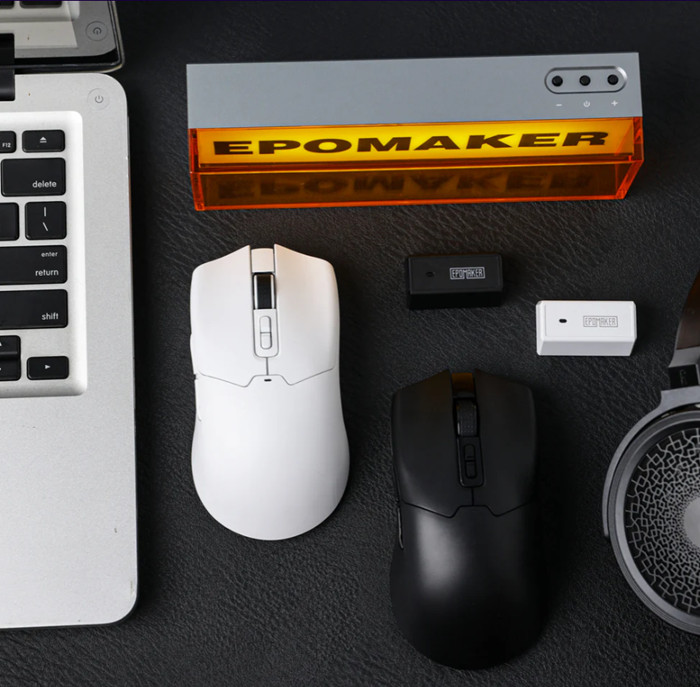
Users can set the sensitivity either under the EPOMAKER driver software or via the hardware button at the top of the mouse (up/down) that also changes the color of the included LED to understand which mode you are working with. The LED color can change as well under the EPOMAKER driver software. We found the default setting (1600 DPI) best for office use, while for competitive gaming, users can boost via the software or hardware switch at the top up to 42.000, which is crazy fast and for our taste un-usable. You can slide up/down settings under the software to your liking. Another setting users can set is the polling rate, usually 2x of your screen refresh rate should be OK as a starting guideline, setting it to low will reduce accuracy and the 8K setting also seems rather a maxed-out technical achievement. The battery life seems OK, the 500mAh for a normal 8-hour use per day should last around 2.5-3 weeks and users can charge the mouse via the included USB cable.

The mouse doesn't include any way to change the overall weight and the way to slides, but it's very light. The used buttons are OK, a bit loud, and hopefully will withstand heavy use and continue clicking. On the other side, the side buttons are very nice to work with. The middle scroll wheel is also Ok to work, nothing special. The DPI adjustment of the top is not easy to accidentally press and the color LED gives you an idea of which DPI are you working with. The USB receiver is big enough and doesn't include the mouse body meaning...it can be lost so be careful. The overall build quality is a big +, nothing creaks and sounds weird and the external texture coating feels great at your hand.

Overall we feel that the EPOMAKER Click is a nice proposal for gaming mice and at the retail price of $59.49 should be on your shopping list if you are in search of a great gaming mouse packed with a very capable PixArt PAW3950 sensor.


Review Pages

1. Introduction
2. Retail Package
3. Software
4. Conclusion


Pages

  • « first
  • ‹ previous
  • 1
  • 2
  • 3
  • 4

EPOMAKER

Tags: EPOMAKER
Previous Post
Epomaker HE 68
Next Post
be quiet! Pure Base 501 DX LX

Related Posts

  • Epomaker Magcore 87

  • Epomaker Carbon 60

  • Epomaker HE 68

  • Epomaker Alice 66

  • Epomaker Split 65

  • EPOMAKER RT100

  • Epomaker HE 75 Mag

  • Epomaker P75

Latest Reviews

The Difference Between American and European Stakes and Why It Changes How People Bet
Enterprise & IT

The Difference Between American and European Stakes and Why It Changes How People Bet

Endorfy Thock V2 Wireless Keyboard
PC components

Endorfy Thock V2 Wireless Keyboard

Noctua NH-D15 G2 Chromax.Black
Cooling Systems

Noctua NH-D15 G2 Chromax.Black

EnGenius ECW520 AP
Enterprise & IT

EnGenius ECW520 AP

Noctua NP-DM3 desk mat
Gaming

Noctua NP-DM3 desk mat

Popular News

COLORFUL Introduces CVN B850I GAMING FROZEN Motherboard

COLORFUL Introduces CVN B850I GAMING FROZEN Motherboard

COLORFUL Presents CVN X870 ARK FROZEN Motherboard for AMD Ryzen 9000 CPUs

COLORFUL Presents CVN X870 ARK FROZEN Motherboard for AMD Ryzen 9000 CPUs

TEAMGROUP Launches EXPERT P34F Find My External SSD

TEAMGROUP Launches EXPERT P34F Find My External SSD

ASRock AM5 Motherboards Now Fully Support AMD Ryzen 9 9950X3D & 9900X3D Processors

ASRock AM5 Motherboards Now Fully Support AMD Ryzen 9 9950X3D & 9900X3D Processors

Samsung announces Galaxy Tab S11 and Galaxy S25 FE series

Samsung announces Galaxy Tab S11 and Galaxy S25 FE series

Viltrox Showcases Upcoming Lens Lineup and New TTL Flash at IBC 2025

Viltrox Showcases Upcoming Lens Lineup and New TTL Flash at IBC 2025

CORSAIR announces Vanguard Pro 96 and Vanguard 96 Gaming Keyboards

CORSAIR announces Vanguard Pro 96 and Vanguard 96 Gaming Keyboards

Panasonic Introduces the First Ultra-Telephoto Zoom Lens in the LUMIX S Series

Panasonic Introduces the First Ultra-Telephoto Zoom Lens in the LUMIX S Series

Main menu

  • Home
  • News
  • Reviews
  • Essays
  • Forum
  • Legacy
  • About
    • Submit News

    • Contact Us
    • Privacy

    • Promotion
    • Advertise

    • RSS Feed
    • Site Map
  • About
  • Privacy
  • Contact Us
  • Promotional Opportunities @ CdrInfo.com
  • Advertise on out site
  • Submit your News to our site
  • RSS Feed