Breaking News

Toshiba to Showcase High-Performance AI and Petabyte-Scale Storage Solutions at Cloudfest 2026 The SAMA V62 brings panoramic design to modern PC builds ASUS Republic of Gamers Announces New Strix OLED monitors PlayStation Plus Game Catalog for March 2026 Intel Announces New Intel Core Ultra 200S Plus Series Desktop Processors

logo

  • Share Us
    • Facebook
    • Twitter
  • Home
  • Home
  • News
  • Reviews
  • Essays
  • Forum
  • Legacy
  • About
    • Submit News

    • Contact Us
    • Privacy

    • Promotion
    • Advertise

    • RSS Feed
    • Site Map

Search form

Asus Xonar DX

Jun 23,2008 0

3. Installation


Review Pages

1. Introducing the Asus Xonar DX audio card
2. Inside the box
3. Installation
4. ASIO mode
5. Test Configuration
6. Test Results 16bit
7. Test Results 24bit
8. Comparison tests 16bit
9. Comparison tests 24bit
10. Conclusion


Asus Xonar DX needs to be powered by a 4pin power supply directly from the PSU and is attached on a PCI-e v1.0 slot. After booting up at Windows, you will be prompted to install drivers. Press cancel and use the Asus installer:

The latest driver pack is included in the supplied disc:
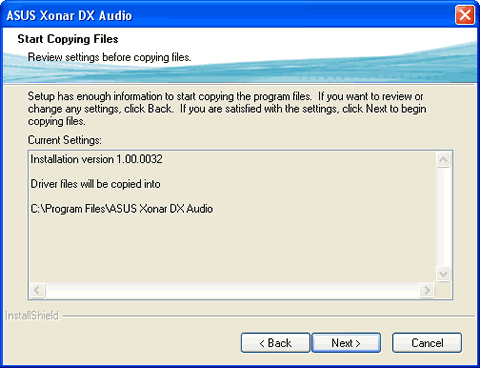
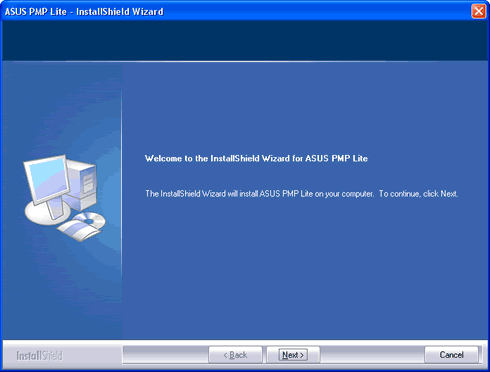
Several other applications are available in the CD-ROM, such as the Asus PMP Lite (Portable Music Processor utility). The software converts digital music content or audio CD audio into MP3/WMA files using Dolby Headphone, Dolby Virtual Speaker (w/ Pro-Logic II), and Smart Volume Normalization processing (Windows Media Player 10 or above is required). The software requires an external MP3 encoder, which can be downloaded for free.
Looking at the Asus Xonar DX mixer we don't see any differences compared to the driver pack of the Asus Xonar D2 series.

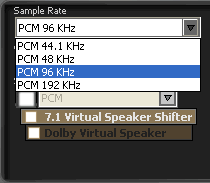
By pressing the "Menu" button you can set the sample rate, configure channels.

The available sampling rates (PCM) are the 44.1KHz and up to 192KHz.
The analogue out can be configured for simple headphones or for multi-channel speakers:

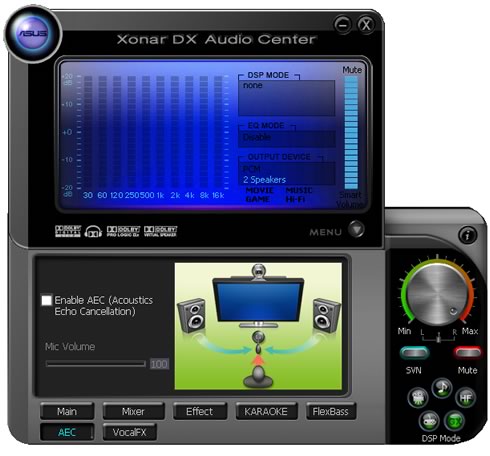
A new feature found here is the Acoustic Echo Cancellation (AEC) mode that eliminates up-to-40dB speaker echo return and the noise suppression technologies that enhance the voice communication in VOIP applications or online gaming.
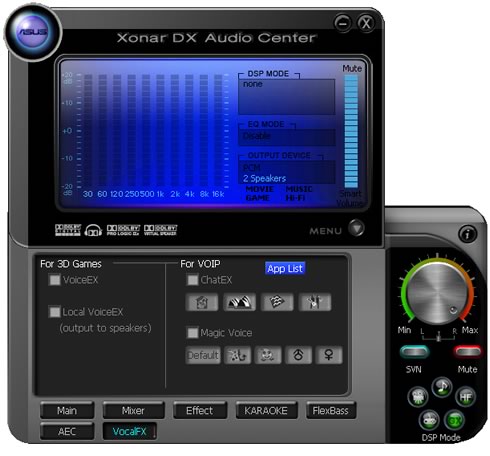
Another interesting feature is the VocalFX, the latest vocal effect technologies for gaming and VoIP. The available modes include:

-VoiceEX: produces vivid environmental reverberation for your voice in EAX games

-ChatEX: emulates different background environment effects when you chat online

-Magic Voice: changes your voice pitch to different types (Monster/Cartoon…) for disguising your real voice or just for fun in online chatting

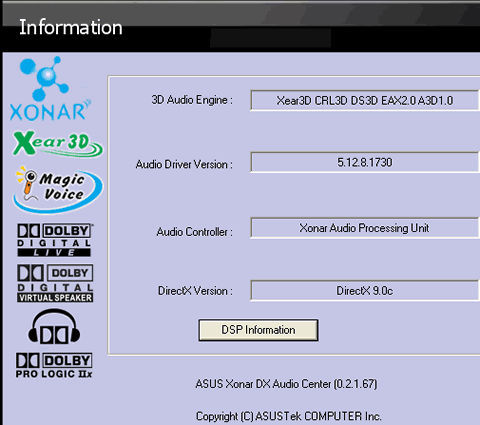
The About Tab gives typical information about driver's version
 

Review Pages

1. Introducing the Asus Xonar DX audio card
2. Inside the box
3. Installation
4. ASIO mode
5. Test Configuration
6. Test Results 16bit
7. Test Results 24bit
8. Comparison tests 16bit
9. Comparison tests 24bit
10. Conclusion


Pages

  • « first
  • ‹ previous
  • 1
  • 2
  • 3
  • 4
  • 5
  • 6
  • 7
  • 8
  • 9
  • next ›
  • last »

Asus Xonar DX

Tags: Asus Xonar DX
Previous Post
CPU Coolers Roundup June 2008
Next Post
LG L246WH-BN

Related Posts

  • ASUS EXPEDITION GTX1050TI-4G review

  • ASUS STRIX R9 380X OC review

  • Asus Maximus IV Gene-Z review

  • Asus SaberTooth P67 B3 review

  • Asus P6T Deluxe Vs Foxconn Renaissance

  • Asus Rampage Extreme

  • Asus P5Q Deluxe

  • Asus EN9600GT Top

Latest Reviews

Why Streaming Live Casino Games Demands Smarter Tech
Enterprise & IT

Why Streaming Live Casino Games Demands Smarter Tech

Kioxia Exceria Plus G3 512GB microSD
Cameras

Kioxia Exceria Plus G3 512GB microSD

SoundPeats Cove Pro
Consumer Electronics

SoundPeats Cove Pro

Asustor AS5404T 4-Bay NAS System
Enterprise & IT

Asustor AS5404T 4-Bay NAS System

be quiet! Pure Power 13M 1200W
PC components

be quiet! Pure Power 13M 1200W

Popular News

COLORFUL Presents CVN X870 ARK FROZEN Motherboard for AMD Ryzen 9000 CPUs

COLORFUL Presents CVN X870 ARK FROZEN Motherboard for AMD Ryzen 9000 CPUs

TEAMGROUP Launches EXPERT P34F Find My External SSD

TEAMGROUP Launches EXPERT P34F Find My External SSD

Samsung announces Galaxy Tab S11 and Galaxy S25 FE series

Samsung announces Galaxy Tab S11 and Galaxy S25 FE series

Viltrox Showcases Upcoming Lens Lineup and New TTL Flash at IBC 2025

Viltrox Showcases Upcoming Lens Lineup and New TTL Flash at IBC 2025

CORSAIR announces Vanguard Pro 96 and Vanguard 96 Gaming Keyboards

CORSAIR announces Vanguard Pro 96 and Vanguard 96 Gaming Keyboards

Panasonic Introduces the First Ultra-Telephoto Zoom Lens in the LUMIX S Series

Panasonic Introduces the First Ultra-Telephoto Zoom Lens in the LUMIX S Series

MSI Launches DATAMAG 40Gbps Magnetic Portable SSD

MSI Launches DATAMAG 40Gbps Magnetic Portable SSD

MSI Launches FORGE GK600 TKL WIRELESS Special Edition Compact Mechanical Keyboard

MSI Launches FORGE GK600 TKL WIRELESS Special Edition Compact Mechanical Keyboard

Main menu

  • Home
  • News
  • Reviews
  • Essays
  • Forum
  • Legacy
  • About
    • Submit News

    • Contact Us
    • Privacy

    • Promotion
    • Advertise

    • RSS Feed
    • Site Map
  • About
  • Privacy
  • Contact Us
  • Promotional Opportunities @ CdrInfo.com
  • Advertise on out site
  • Submit your News to our site
  • RSS Feed