Breaking News

ADATA Launches URBAN TAPSAFE External SSD Sony Expands Gaming Gear Range with INZONE H6 Air and INZONE M10S II Transcend Launches RDE3 microSD Express Card Reader for Next-Generation High-Speed Performance PlayStation Plus Game Catalog for April 2026 Samsung Sets a New Standard of Color with Micro RGB TV Lineup

logo

  • Share Us
    • Facebook
    • Twitter
  • Home
  • Home
  • News
  • Reviews
  • Essays
  • Forum
  • Legacy
  • About
    • Submit News

    • Contact Us
    • Privacy

    • Promotion
    • Advertise

    • RSS Feed
    • Site Map

Search form

Asus SaberTooth P67 B3 review

Sep 5,2011 0

6. Final words


Review Pages

1. Features
2. A closer look
3. The uEFI BIOS
4. Tests
5. Overclocking
6. Final words


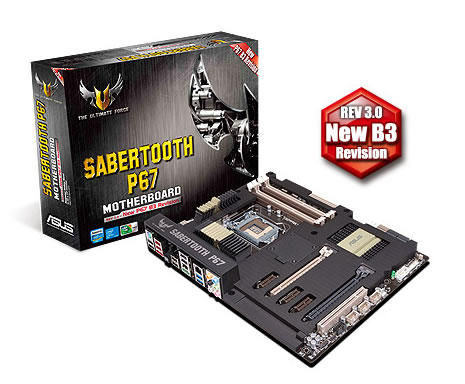
The Asus Sabertooth P67 B3 is a great example of what engineers can do when pairing a very good chipset, high-quality components and the new uEFI bios.

First of all, its appearance is quite unique. The idea behind the completely shrouded motherboard is that it will keep heat coming off the components from heating up the rest of the motherboard. Although it seems like it might have some actual value, in reality, it's more about and for looks. In addition, you may find it hard to fit a large heatsink on your CPU since the uncovered nearby area may be limiting.

But besides looks the Sabertooth P67 is also using military-grade components such as alloy chokes, solid capacitors, and MOSFETs, ensuring smooth operation and longevity.

The UEFI. interpretation of on the BIOS is so much easier to use than a BIOS that it's. It's so easy to tune your hardware and profile settings and even to overclock.

The ASUS MemOK! button is another functional feature ASUS adds to the Sabertooth P67, helping to minimize the memory incompatibility boot problems. The DIGI+ VRM made overvolting a charm by eliminating the +/- error factor and thereby increasing component lifespan. Also, the control given to the user within Windows through the AI Suite II software is great.

Overclocking on the Sabertooth was easy . Clicking OC Tuner in the BIOS gave a great overclock and even allowed for a significant memory speed increase as well. For manual overclocking, achieving stability at 4.8GHz was painless and the system was rock solid over many hours of testing.

During our tests, the Asus Sabertooth P67 performed very well the overall feeling was great. When paired with a fast memory and an SSD and you got yourself a great PC platform.

Listing some welcome additions for the Sabertooth P67, we could say that there is not a Bluetooth 2.1 receiver, we would like to see some additional PCI-Express lanes for CrossfireX or SLI modes, since some lanes available on the P67Express chipset are taken up by the USB 3.0 ports and the third-party controllers. In addition, we would like to see Power and reset buttons on the board as well as a 50mm fan for even better cooling as well as a USB 3.0 bracket bundled with the board.

The Sabertooth is priced around €170~190 which makes it a few dollars more than several P67 boards. Considering the many extras, the Sabertooth may have the advantage in power delivery due to the TUF VRM components so it worth's the extra cash.
 

Positive

  • Very good build quality
  • Great looking motherboard
  • Components stay really cool if you add the fan (not included)
  • uEFI bios is great
  • Easy overclocking with Intel i5-2500K series
  • Tons of options to fine-tune overclocking
  • No problems during operation
  • Many SATA2/SATA3 ports
  • Many USB3.0 ports
  • 5 year warranty
  • DIGI+ VRM 8+2 Enable digital precision voltage control
  • MemOK! Increases memory compatibility for bootup
  • Supports ATI CrossFireX dual and triple video card sets
  • TUF Thermal Armor, Radar, and Military Grade Components
  • CrossfireX OR SLI Configurations supported
  • Good retail price

Negative

  • Doesn't come with an 50mm fan and USB 3.0 bracket
  • No power/reset buttons
  • Only 1 PCI slot
  • Due to the TUF Thermal Design some very good CPU coolers may not fit
  • SATA6G/USB3 borrow from PCI-E link lanes
  • No Bluetooth onboard


Review Pages

1. Features
2. A closer look
3. The uEFI BIOS
4. Tests
5. Overclocking
6. Final words


Pages

  • « first
  • ‹ previous
  • 1
  • 2
  • 3
  • 4
  • 5
  • 6

ASUS

Tags: ASUS
Previous Post
Foxconn Rattler P67 review (Quantum Force)
Next Post
Numark DJ2Go Controller review

Related Posts

  • ASUS Announces ProArt Router PRT-BE5000 and ProArt Switch PQG-U1080

  • ASUS Announces Intel Core Ultra 200S Plus Series Support on W880, Z890, Q870, B860 and H810 Motherboards

  • ASUS Unveils Complete Portfolio Support for Intel Core 200S Series

  • ASUS Announces 2026 TUF Gaming Laptop Lineup

  • ASUS Announces New-Gen NUC 16 Pro Mini PC

  • ASUS Unveils ExpertBook B3 G2

  • Announcing ASUS ExpertBook B5 G2

  • ASUS Unveils Mac-Friendly Features on ProArt Displays to Enhance Workflows

Latest Reviews

In the Age of AI Phishing, the Best User Experience Might Be the One That Feels Safest
Enterprise & IT

In the Age of AI Phishing, the Best User Experience Might Be the One That Feels Safest

SoundPeats C30
Consumer Electronics

SoundPeats C30

Why Streaming Live Casino Games Demands Smarter Tech
Enterprise & IT

Why Streaming Live Casino Games Demands Smarter Tech

Kioxia Exceria Plus G3 512GB microSD
Cameras

Kioxia Exceria Plus G3 512GB microSD

SoundPeats Cove Pro
Consumer Electronics

SoundPeats Cove Pro

Popular News

TEAMGROUP Launches EXPERT P34F Find My External SSD

TEAMGROUP Launches EXPERT P34F Find My External SSD

Samsung announces Galaxy Tab S11 and Galaxy S25 FE series

Samsung announces Galaxy Tab S11 and Galaxy S25 FE series

Viltrox Showcases Upcoming Lens Lineup and New TTL Flash at IBC 2025

Viltrox Showcases Upcoming Lens Lineup and New TTL Flash at IBC 2025

CORSAIR announces Vanguard Pro 96 and Vanguard 96 Gaming Keyboards

CORSAIR announces Vanguard Pro 96 and Vanguard 96 Gaming Keyboards

Panasonic Introduces the First Ultra-Telephoto Zoom Lens in the LUMIX S Series

Panasonic Introduces the First Ultra-Telephoto Zoom Lens in the LUMIX S Series

MSI Launches DATAMAG 40Gbps Magnetic Portable SSD

MSI Launches DATAMAG 40Gbps Magnetic Portable SSD

MSI Launches FORGE GK600 TKL WIRELESS Special Edition Compact Mechanical Keyboard

MSI Launches FORGE GK600 TKL WIRELESS Special Edition Compact Mechanical Keyboard

Viltrox Joins the L-Mount Alliance, Expanding Creative Possibilities

Viltrox Joins the L-Mount Alliance, Expanding Creative Possibilities

Main menu

  • Home
  • News
  • Reviews
  • Essays
  • Forum
  • Legacy
  • About
    • Submit News

    • Contact Us
    • Privacy

    • Promotion
    • Advertise

    • RSS Feed
    • Site Map
  • About
  • Privacy
  • Contact Us
  • Promotional Opportunities @ CdrInfo.com
  • Advertise on out site
  • Submit your News to our site
  • RSS Feed