
Breaking News

ZOTAC GAMING Launches GeForce RTX 5080 SOLID CORE OC 20th Anniversary Edition Google Unveils Pixel 11 Series, Pixel 11 Pro Fold, Pixel Watch 5, and Pixel Tag Insta360 Expands Its Content Creation Ecosystem with Flagship X6 8K 360 Camera and Next-Generation Audio Solutions Razer Unveils the Artisan Keycap – Triple-Headed Snake Edition Razer Unveils the Naga V3 Pro

logo

  • Share Us
    • Facebook
    • Twitter
  • Home
  • Home
  • News
  • Reviews
  • Essays
  • About
    • Submit News

    • Contact Us
    • Privacy

    • Promotion
    • Advertise

    • RSS Feed

Search form

Asus P5E3 Deluxe WiFi

Nov 22,2007 0

3. BIOS settings


Review Pages

1. Introduction, features
2. A closer look
3. BIOS settings
4. Test configuration
5. Everest Ultimate Edition 2007
6. SiSoftware Sandra
7. PCMark05, 3DMark06
8. Science Mark 2.0, Pov-Ray, x264 Benchmark
9. Maxon CineBench
10. SuperPI
11. SYSmark 2007, WorldBench 6
12. Lost Planet: Extreme Condition
13. Overclocking
14. Asus ExpressGate 1
15. Asus ExpressGate 2
16. Final words


The BIOS follows what Asus has been using for sometime now. In order to get the best results, we used the BIOS update software to upgrade from the 141 version to the newest one, the 0504. The update is pretty straight and works just fine. Probably the best we've seen, compared to the one of other manufacturers.

The BIOS is separated in several tabs, each one holding several sub-menus with different options. The first tab shows the date, SATA drives and system information.

On the second tab named "AI Tweaker", users will find tons of features. The motherboard includes an auto overclocking system, called Ai Overclock Tuner with three different settings:

  • Manual
  • Auto
  • X.M.P

These options are easy to understand, even though only the last one applies for DDR3 memory. If you have a pair of X.M.P enabled DDR3 memory, then you can use this option. It works like Nvidia's SLI profiles...

Let's set now the Ai Overclock Tuner at Manual mode to be able to make some fine tunning:

The FSB can be set to up to 400MHz with the upcoming Intel processors. Most users will leave this option to Auto.
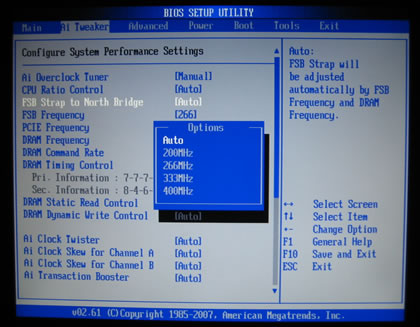
There are many memory dividers to play with, from 1:1 to 1:2. The memory dividers are affected from the selected FSB, so in order to have the highest possible options, leave the FSB to auto. We can see that the BIOS reads the memory timings and displays them.

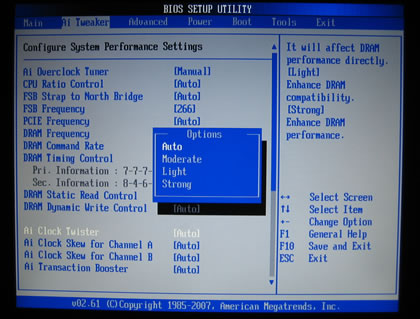
There are several modes for memory regulation either to enhance the performance or the stability
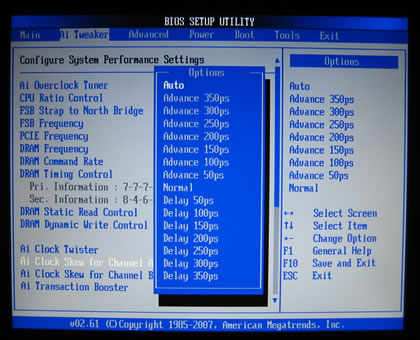
Many options also under the Ai Clock Skew:
While the voltage control has changed compared to previous models, now the user can type the exact memory value and the BIOS will set it to the closest one available. Asus P5E3 Deluxe WiFi can set it with 0.02V interval that not many other manufacturers can:
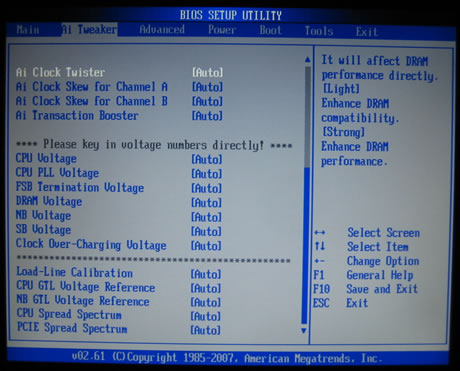
For most of our tests we set DRAM at 1.90V. Notice that according to the used voltage the colour changes from blue to yellow, purple and eventually to red (max values):
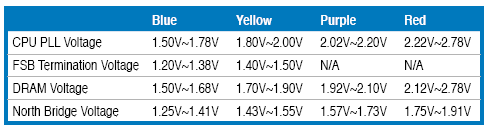
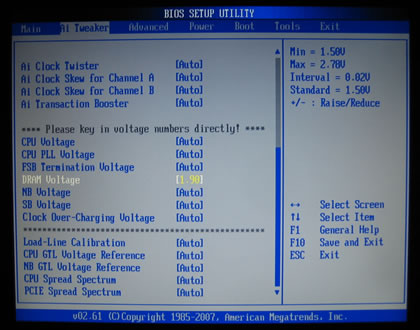
Here is a list with all the available voltages and frequencies:

  • FSB from 200~800MHz with 1MHz step
  • Frequency bus PCI-E from 100~150MHz with 1MHz step
  • CPU Voltage: 1.10000V~1.70000V with 0.00625V interval
  • CPU PLL Voltage: 1.50V~2.78V with 0.02V interval
  • FSB Termination: 1.20V~2.48V with 0.02V interval
  • DRAM Voltage: 1.50V~2.78V with 0.02V interval
  • NB Voltage: 1.25V~2.53V with 0.02V interval
  • SB Voltage: 1.05V~1.23V with 0.15V interval

Under the Power tab, there are the usual temperature readings.
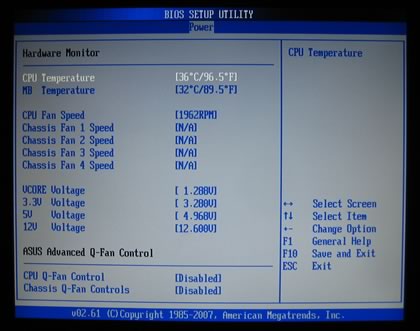
While at the Tools tab, we can find the Asus Express Gate feature that you can either enable or disable it:


Review Pages

1. Introduction, features
2. A closer look
3. BIOS settings
4. Test configuration
5. Everest Ultimate Edition 2007
6. SiSoftware Sandra
7. PCMark05, 3DMark06
8. Science Mark 2.0, Pov-Ray, x264 Benchmark
9. Maxon CineBench
10. SuperPI
11. SYSmark 2007, WorldBench 6
12. Lost Planet: Extreme Condition
13. Overclocking
14. Asus ExpressGate 1
15. Asus ExpressGate 2
16. Final words


Pages

  • « first
  • ‹ previous
  • 1
  • 2
  • 3
  • 4
  • 5
  • 6
  • 7
  • 8
  • 9
  • …
  • next ›
  • last »

ASUS

Tags: ASUS
Previous Post
ASUS BC1205PT
Next Post
Corsair Dominator TWIN3X2048-1800C7DFG

Related Posts

  • ASUS Announces Prime AP304 PC Case

  • ASUS Announces ProArt Display OLED PA279CDV and PA329CDV

  • ASUS Announces T1 GeForce RTX 5070 and RTX 5060 Ti Graphics Cards

  • ASUS Announces ProArt GeForce RTX 5090 Graphics Card

  • ASUS Announces ProArt Display OLED PA27USD and PA32USD

  • ASUS Announces TUF Gaming Platinum Power Supply Series

  • ASUS Announces ProArt PA40SU USB4 SSD Enclosure

  • ASUS Showcases Comprehensive AI-Powered Creator Workflows at NAB Show 2026

Latest Reviews

be quiet! Light Loop IO LCD
Cooling Systems

be quiet! Light Loop IO LCD

KIOXIA Exceria Pro G2 NVME 2TB
PC components

KIOXIA Exceria Pro G2 NVME 2TB

Online Casino Games That Offer Something Different
Consumer Electronics

Online Casino Games That Offer Something Different

SOUNDPEATS Air6 HS
Consumer Electronics

SOUNDPEATS Air6 HS

Arctic MX-7
Cooling Systems

Arctic MX-7

Popular News

CORSAIR announces Vanguard Pro 96 and Vanguard 96 Gaming Keyboards

CORSAIR announces Vanguard Pro 96 and Vanguard 96 Gaming Keyboards

MSI Launches FORGE GK600 TKL WIRELESS Special Edition Compact Mechanical Keyboard

MSI Launches FORGE GK600 TKL WIRELESS Special Edition Compact Mechanical Keyboard

TEAMGROUP Launches EXPERT P34F Find My External SSD

TEAMGROUP Launches EXPERT P34F Find My External SSD

Samsung announces Galaxy Tab S11 and Galaxy S25 FE series

Samsung announces Galaxy Tab S11 and Galaxy S25 FE series

Viltrox Showcases Upcoming Lens Lineup and New TTL Flash at IBC 2025

Viltrox Showcases Upcoming Lens Lineup and New TTL Flash at IBC 2025

Panasonic Introduces the First Ultra-Telephoto Zoom Lens in the LUMIX S Series

Panasonic Introduces the First Ultra-Telephoto Zoom Lens in the LUMIX S Series

MSI Launches DATAMAG 40Gbps Magnetic Portable SSD

MSI Launches DATAMAG 40Gbps Magnetic Portable SSD

Viltrox Joins the L-Mount Alliance, Expanding Creative Possibilities

Viltrox Joins the L-Mount Alliance, Expanding Creative Possibilities

Main menu

  • Home
  • News
  • Reviews
  • Essays
  • About
    • Submit News

    • Contact Us
    • Privacy

    • Promotion
    • Advertise

    • RSS Feed
  • About
  • Privacy
  • Contact Us
  • Promotional Opportunities @ CdrInfo.com
  • Advertise on out site
  • Submit your News to our site
  • RSS Feed