
Breaking News

Powerful Cooling with the Freezer 4U-OneX Samsung Launches Galaxy A07 5G Mobile phone Samsung Ships Industry-First Commercial HBM4 With Ultimate Performance for AI Computing BIOSTAR INTRODUCES DDR5 16GB UDIMM 4800MHz/5600MHz MEMORY GAMEMAX Launches NEX C51 and NEX C31 Panoramic PC Cases

logo

  • Share Us
    • Facebook
    • Twitter
  • Home
  • Home
  • News
  • Reviews
  • Essays
  • Forum
  • Legacy
  • About
    • Submit News

    • Contact Us
    • Privacy

    • Promotion
    • Advertise

    • RSS Feed
    • Site Map

Search form

Asus P5E3 Deluxe WiFi

Nov 22,2007 0

14. Asus ExpressGate 1


Review Pages

1. Introduction, features
2. A closer look
3. BIOS settings
4. Test configuration
5. Everest Ultimate Edition 2007
6. SiSoftware Sandra
7. PCMark05, 3DMark06
8. Science Mark 2.0, Pov-Ray, x264 Benchmark
9. Maxon CineBench
10. SuperPI
11. SYSmark 2007, WorldBench 6
12. Lost Planet: Extreme Condition
13. Overclocking
14. Asus ExpressGate 1
15. Asus ExpressGate 2
16. Final words


- ExpressGate - Page 1

As we mentioned during our introduction, one major new feature of the Asus P5E3 Deluxe WiFi is the so called "ExpressGate". So what is this exactly? Asus has included an optional Linux based OS bootup that allows you after almost 10 seconds to enjoy instant access to commonly used tasks like Internet, VoIP, and Web emailing without entering the main OS (e.g. Windows).

The idea behind all this was to include a lightweight on-board OS in order for the user to have quick access to it's main applications without the need of booting to the OS installed in the HDD. Of course the user can't see or use this partition under Windows since the BIOS forbids it. That means that the user can't modify or add more applications to the Express Gate OS, something that Asus should consider changing. For more information, please visit Splashtop website.

Someone may wonder for the importance of this feature. First of all it's interesting to be able to access the Internet without the need of an optical disc drive or a  USB thumb drive. The current implementation from Asus was very good as you will notice in the following pictures

After powering up the motherboard the user will come up with the following screen. You can select exactly what you want to do, enter the Express Gate, enter BIOS, shut down motherboard or simply proceed with the normal boot process. The whole process is controlled by a timer that can be adjusted in the BIOS. If you don't do nothing, then the system by default will proceed with the normal booting (hard drive).
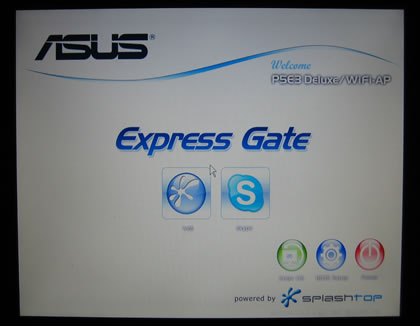
Let's select the left icon, that allow us to enter the Web. The system automatically sets everything up, like keyboard/mouse support and of course assigns an  IP address. The desktop is as follows:
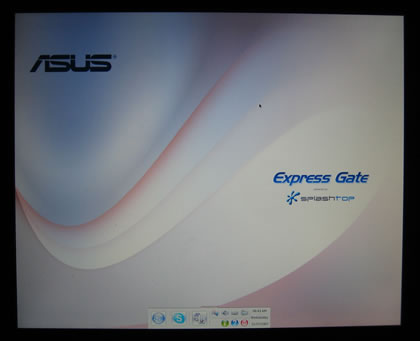
There are six languages currently supported (English, German, French, Japanese, Simplified Chinese, & Traditional Chinese), we would like to see more languages supported in the future. At the bottom is a simple task bar with several icons:
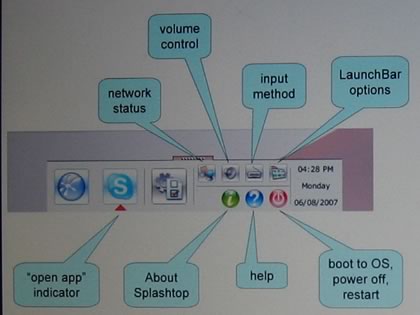
Selecting the configuration panel we can see various submenus:

The Network is auto configured and of course you can also create a dial up connection if that's how you access the Internet. WiFi can also be enabled but by default it's disabled.
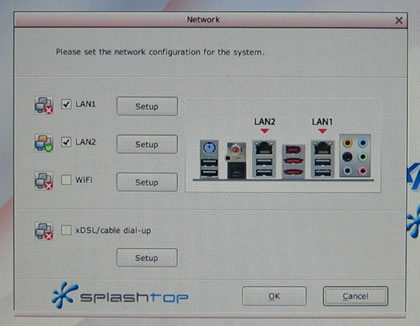
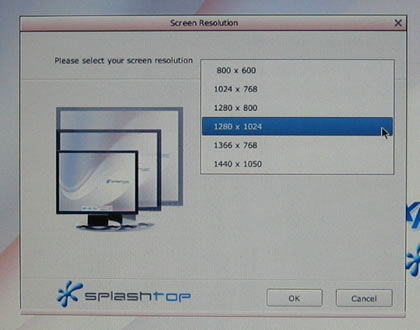
Several screen resolutions are available, we had to manually change ours from 800x600 to 1280x1024
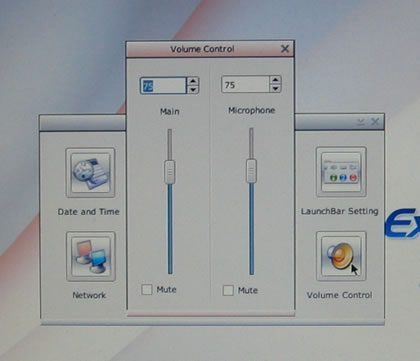
Volume Control is present for both the speakers and the mic
And finally the shutdown/restart/bios buttons

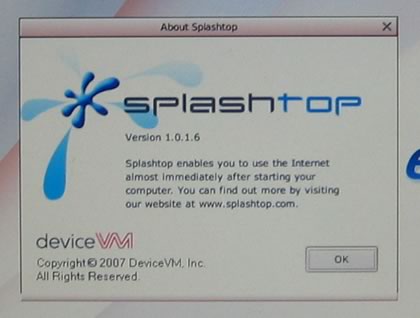
The "About" screen shows us more information about Splashtop
 

Review Pages

1. Introduction, features
2. A closer look
3. BIOS settings
4. Test configuration
5. Everest Ultimate Edition 2007
6. SiSoftware Sandra
7. PCMark05, 3DMark06
8. Science Mark 2.0, Pov-Ray, x264 Benchmark
9. Maxon CineBench
10. SuperPI
11. SYSmark 2007, WorldBench 6
12. Lost Planet: Extreme Condition
13. Overclocking
14. Asus ExpressGate 1
15. Asus ExpressGate 2
16. Final words


Pages

  • « first
  • ‹ previous
  • …
  • 8
  • 9
  • 10
  • 11
  • 12
  • 13
  • 14
  • 15
  • 16
  • next ›
  • last »

ASUS

Tags: ASUS
Previous Post
ASUS BC1205PT
Next Post
Corsair Dominator TWIN3X2048-1800C7DFG

Related Posts

  • ASUS Unveils Mac-Friendly Features on ProArt Displays to Enhance Workflows

  • Asus at CES 2026

  • ASUS Announces ProArt PF120 Case Fan

  • ASUS Announces Prime AP303 Compact Mid-Tower ATX Case

  • ASUS TUF Gaming Unveils Call of Duty Black Ops 7 Edition AMD Radeon RX 9070 XT

  • ASUS Announces October Availability of ProArt Display 8K PA32KCX

  • ASUS Unveils ProArt PA401, PA602 Wood Edition PC Cases with Retro Colors

  • ASUS Announces ExpertCenter PN54-S1 Mini PC

Latest Reviews

Asustor AS5404T 4-Bay NAS System
Enterprise & IT

Asustor AS5404T 4-Bay NAS System

be quiet! Pure Power 13M 1200W
PC components

be quiet! Pure Power 13M 1200W

Server-Side Gaming Why Canadian Online Casinos Are Abandoning Local Clients for HTML5 Clouds
Enterprise & IT

Server-Side Gaming Why Canadian Online Casinos Are Abandoning Local Clients for HTML5 Clouds

Airfanta 3 Pro Air
Consumer Electronics

Airfanta 3 Pro Air

Akaso Brave 8 Lite
Cameras

Akaso Brave 8 Lite

Popular News

COLORFUL Introduces CVN B850I GAMING FROZEN Motherboard

COLORFUL Introduces CVN B850I GAMING FROZEN Motherboard

COLORFUL Presents CVN X870 ARK FROZEN Motherboard for AMD Ryzen 9000 CPUs

COLORFUL Presents CVN X870 ARK FROZEN Motherboard for AMD Ryzen 9000 CPUs

TEAMGROUP Launches EXPERT P34F Find My External SSD

TEAMGROUP Launches EXPERT P34F Find My External SSD

Samsung announces Galaxy Tab S11 and Galaxy S25 FE series

Samsung announces Galaxy Tab S11 and Galaxy S25 FE series

Viltrox Showcases Upcoming Lens Lineup and New TTL Flash at IBC 2025

Viltrox Showcases Upcoming Lens Lineup and New TTL Flash at IBC 2025

CORSAIR announces Vanguard Pro 96 and Vanguard 96 Gaming Keyboards

CORSAIR announces Vanguard Pro 96 and Vanguard 96 Gaming Keyboards

Panasonic Introduces the First Ultra-Telephoto Zoom Lens in the LUMIX S Series

Panasonic Introduces the First Ultra-Telephoto Zoom Lens in the LUMIX S Series

MSI Launches DATAMAG 40Gbps Magnetic Portable SSD

MSI Launches DATAMAG 40Gbps Magnetic Portable SSD

Main menu

  • Home
  • News
  • Reviews
  • Essays
  • Forum
  • Legacy
  • About
    • Submit News

    • Contact Us
    • Privacy

    • Promotion
    • Advertise

    • RSS Feed
    • Site Map
  • About
  • Privacy
  • Contact Us
  • Promotional Opportunities @ CdrInfo.com
  • Advertise on out site
  • Submit your News to our site
  • RSS Feed